Can't push Images to hub with manual Dataset #4591


Description

Describe the bug
If I create a dataset including an 'Image' feature manually, when pushing to hub decoded images are not pushed,
instead it looks for image where image local path is/used to be.
This doesn't (at least didn't used to) happen with imagefolder. I want to build dataset manually because it is complicated.
This happens even though the dataset is looking like decoded images:
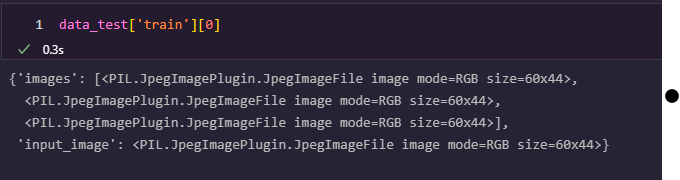
and I use embed_external_files=True while push_to_hub (same with false)
Steps to reproduce the bug
from PIL import Image
from datasets import Image as ImageFeature
from datasets import Features,Dataset
#manually create dataset
feats=Features(
    {
        "images": [ImageFeature()], #same even if explicitly ImageFeature(decode=True)
        "input_image": ImageFeature(),
    }
)

test_data={"images":[[Image.open("test.jpg"),Image.open("test.jpg"),Image.open("test.jpg")]], "input_image":[Image.open("test.jpg")]}
test_dataset=Dataset.from_dict(test_data,features=feats)
print(test_dataset)

test_dataset.push_to_hub("ceyda/image_test_public",private=False,token="",embed_external_files=True)

# clear cache rm -r ~/.cache/huggingface
# remove "test.jpg" # remove to see that it is looking for image on the local path

test_dataset=load_dataset("ceyda/image_test_public",use_auth_token="")
print(test_dataset)
print(test_dataset['train'][0])
Expected results
should be able to push image bytes if dataset has Image(decode=True)
Actual results
errors because it is trying to decode file from the non existing local path.
---->  print(test_dataset['train'][0])

File ~/.local/lib/python3.8/site-packages/datasets/arrow_dataset.py:2154, in Dataset.__getitem__(self, key)
   2152 def __getitem__(self, key):  # noqa: F811
   2153     """Can be used to index columns (by string names) or rows (by integer index or iterable of indices or bools)."""
-> 2154     return self._getitem(
   2155         key,
   2156     )

File ~/.local/lib/python3.8/site-packages/datasets/arrow_dataset.py:2139, in Dataset._getitem(self, key, decoded, **kwargs)
   2137 formatter = get_formatter(format_type, features=self.features, decoded=decoded, **format_kwargs)
   2138 pa_subtable = query_table(self._data, key, indices=self._indices if self._indices is not None else None)
-> 2139 formatted_output = format_table(
   2140     pa_subtable, key, formatter=formatter, format_columns=format_columns, output_all_columns=output_all_columns
   2141 )
   2142 return formatted_output

File ~/.local/lib/python3.8/site-packages/datasets/formatting/formatting.py:532, in format_table(table, key, formatter, format_columns, output_all_columns)
    530 python_formatter = PythonFormatter(features=None)
    531 if format_columns is None:
...
-> 3068     fp = builtins.open(filename, "rb")
   3069     exclusive_fp = True
   3071 try:

FileNotFoundError: [Errno 2] No such file or directory: 'test.jpg'
Environment info
datasetsversion: 2.3.2- Platform: Linux-5.4.0-1074-azure-x86_64-with-glibc2.29
- Python version: 3.8.10
- PyArrow version: 8.0.0
- Pandas version: 1.4.2