[2단계 - 자판기] 유세지(김용래) 미션 제출합니다. #59
Conversation


- 자판기에 투입하려는 금액이 0원을 넘지 못하면, 오류를 발생시킨다.
- 자판기에 투입하려는 금액이 10원으로 나누어 떨어지지 않으면, 오류를
  발생시킨다.


 Vallista
left a comment
Vallista
left a comment
Vallista
left a comment
There was a problem hiding this comment.
안녕하세요 세지님~
코드가 많아서 보는데 꽤 시간이 걸렸네요.. 휴
그만큼 열심히 해주고 계신걸로 보이고 대단하신 것 같아요.
이번 미션도 수고많으셨습니다 :)
레이아웃 피드백
- 스넥바를 연속해서 출력시켰더니 (form에 오류를 연속해서 30번정도 출력했습니다.) 스넥바가 사라지지 않더라구요! ㅠㅠ setTimeout으로 구현하면서 버그가 있는 것 같아요. 관련해서 수정하셔야 할 것 같습니다~
피드백
- 에러 처리 부분을 일관적으로 사용하실 수 있게 제공한 부분 좋은 것 같습니다! 다만, API 영역에서 해결을 어떻게 할 수 있을지 고민해보면 좋을 것 같아요. API에서 성공시 메시지를 내려주고 있는데, 과연 이게 맞는가? 에 대한 의문이 있네요. API에서 에러 처리를 일관적으로 할 수 있도록 제공해야할 것 같아요. 관련해서 피드백을 남겨두었습니다!
- 나머지는 잘 만든 것 같아요! 구조가 괜찮으니 수평적으로 컴포넌트가 늘어나도 커버가 쉽게 될 수 있다는걸 경험하셨을 것 같습니다~ 관련해서 공통적으로 보이는 구조를 뽑아서 만들 생각을 하셨다고 했는데, 고 부분은 인지하고만 계셔도 반쯤은 성공으로 생각합니다 :)
- 쿠키에 넣는 이유는 http-only 등의 설정으로 은닉과 도메인 단위의 보안설정이 가능하기 때문입니다 :) 그렇기에 jwt 같은 경우엔 클라이언트에서 관리하지 않고 쿠키에서 관리를 진행하게 돼죠.
| visibility: hidden; | ||
| min-width: 250px; | ||
| max-width: 300px; | ||
| background-color: #333; |
There was a problem hiding this comment.
css variable로 수정해야겠네요!
색상은 한군데에서 관리합시다~
There was a problem hiding this comment.
급하게 하다보니 스낵바쪽 css를 생각 못하고 있었네요!
global.css 에서 관리하도록 분리해주었습니다!
| @@ -0,0 +1,29 @@ | |||
| import { ALERT_MESSAGE, ERROR_MESSAGE, SERVER_URL } from '../constants'; | |||
|
|
|||
| const requestLogin = async (accountData: Object) => { | |||
There was a problem hiding this comment.
API 들이 대다수가 중복되는 로직을 개선할 수 있을 것 같네요~
중복되는 로직을 API Wrapper 클래스를 만들어 수정해볼까요?
axios 처럼 get, post, put, delete 등을 지원하고. 결과값을 빼주는?
There was a problem hiding this comment.
중복되는 부분을 ApiWrapper를 만들어 util로 분리해주었어요!
const response = await apiWrapper.post('/login', accountData);|
|
||
| if (!response.ok) { | ||
| switch (dataResult) { | ||
| case 'Cannot find user': |
There was a problem hiding this comment.
text 로 case를 분간하는 것보다, 403 등의 http response code로 에러 메시지를 만드는게 낫지 않을까요?
There was a problem hiding this comment.
dataResult가 항상 100% 동일하다면, type union으로 관리하는게 더 나을수도 있겠네요!
There was a problem hiding this comment.
text 로 case를 분간하는 것보다, 403 등의 http response code로 에러 메시지를 만드는게 낫지 않을까요?
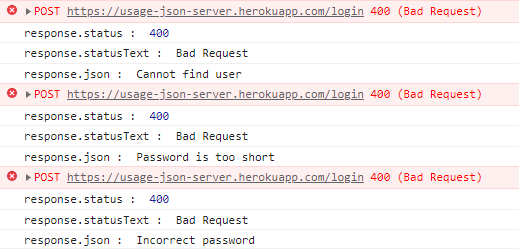
(순서대로 잘못된 ID, 너무 짧은 PW, 잘못된 PW 인 경우)
각 오류의 상태코드를 확인해보니 400 bad request로 같아 이것만으로는 어떤 오류가 발생했는지 구분할 수 없더라구요.
불가피하게 오류 메시지를 직접적으로 case를 나눠줄 수 밖에 없었습니다 😥
dataResult가 항상 100% 동일하다면, type union으로 관리하는게 더 나을수도 있겠네요!
지금은 dataResult가 response.json() 을 값으로 갖고 있는 상태인데,
요청에 성공하면 결과 데이터(accessToken, User 객체) 를 갖지만
요청에 실패했을 경우 에러 메시지(string) 하나만을 갖게 되더라구요.
type union을 적용하기 위해 새로운 wrapper를 만들어 타입 추론을 해가며 흐름을 제어할 수도 있겠지만
이를 위해서 추가해야하는 코드가 너무 많아 비효율적이라는 생각이 문득 들었습니다.
혹시 이런 과정을 감수하고 유니온을 사용할만한 이점이 있을까요?
타입가드를 잘 활용하니까 코드의 양이 확 줄었네요 😅
if (typeof dataResult === 'string') {| throw new Error(errorMessage); | ||
| } | ||
|
|
||
| return ALERT_MESSAGE.REGISTER_SUCCESS; |
There was a problem hiding this comment.
requestRegister는 성공이후 성공 메시지를 넘겨주는게 아닌, "성공 여부와 정보"를 넘겨주고, 그것을 조합하여 사용하는 것은 사용처에서 해야하지 않을까요?
이렇게 하게되면, 유연한 처리가 어려울 것 같아요~
차라리, parameter에서 successFunction, failureFunctions등을 넣고 상황마다 콜백을 실행하는게 낫겠네요
There was a problem hiding this comment.
확실히 메시지를 반환하는건 api가 가져야 할 책임은 아닌 것 같아요!
응답에 따른 정보나 성공 여부정도만 반환하도록 api 메서드들을 수정해주었습니다 👍
/* requestRegister.js */ return true;
/* requestLogin.js */ return dataResult;|
|
||
| private template = () => ` | ||
| <div id="change-add-container"> | ||
| <div id="change-add-container" class="single-input-container"> |
There was a problem hiding this comment.
굳이 ID와 class를 다르게 줄 필요가 있었을까요? BEM 같은 방법론을 쓰면 유니크함이 보장될 것 같아요.
There was a problem hiding this comment.
그리고 레이아웃마다 클래스가 파편화 되어있어서, 어디서 하나로 관리하는게 지금 사이즈에선 더 편하지 않을까요?
There was a problem hiding this comment.
굳이 ID와 class를 다르게 줄 필요가 있었을까요? BEM 같은 방법론을 쓰면 유니크함이 보장될 것 같아요.
single-input-container 클래스는 두 개 이상의 컴포넌트에서 재사용 될 수 있어서 적용해주었었어요.
id 선택자로 css를 적용하는걸 되도록이면 피하려는 의도도 있었고, 중복을 줄이기 위해 클래스를 추가로 주었습니다.
그런데 마크업 수정 중 기존 css를 변경하는 과정에서 single-input-container 가 필요해지지 않게 되었고,
지금은 흔적만 남아 의미없는 클래스가 되어버렸네요...
더 이상 사용되지 않는 선택자와 스타일들은 제거하였습니다!
그리고 레이아웃마다 클래스가 파편화 되어있어서, 어디서 하나로 관리하는게 지금 사이즈에선 더 편하지 않을까요?
클래스와 css 요소들을 컴포넌트 단위로 쪼개진 현재 구조에서는
하나의 파일에서 관리하기 쉽지 않다고 느꼈습니다.
어떻게 개선하는게 좋을지 고민하던 중이었는데 컴포넌트 별로 css 파일을 만드는게 적절한다는 말씀이실까요?
There was a problem hiding this comment.
클래스, 아이디를 constant에서 관리하자! 라는 의미였씁니다!
| import { PATH_NAME } from '../constants'; | ||
| import requestLogin from '../api/requestLogin'; | ||
|
|
||
| class LoginFormComponent { |
There was a problem hiding this comment.
일관적인 레이아웃을 제공할 수 있는 방법은 뭐가 있을까요?
지금은 변수들로 모든 아이들을 바인딩하고 있는데,
조금 수정하면 리액트처럼 만들수도 있을 것 같아요~
사실 그 정도까지 짜려면 시간이 없어서 어렵겠지만.
조금 변수를 정리할 수 있는 방법이 없을까요?
배열을 쓴다던지.
There was a problem hiding this comment.
리액트처럼 만든다면 훅과 같은 모양을 기대하신걸까요?
이렇게 한다면 말씀하신 것처럼 리액트스러운 코드를 만들 수 있을 것 같은데,
리액트의 구조에 대한 이해가 부족해서 시간이 꽤 많이 걸릴 것 같네요 ㅠㅠ
대신 배열을 이용해 변수를 정리해보았는데, 이러한 방법은 어떨까요?
// utils.ts
// DOM 변수를 관리할 Store 클래스 작성
type DOMVariable = {
  name: string;
  selector: string;
};

export default class Store {
  private variable: DOMVariable[];

  constructor() {
    this.variable = [];
  }

  setVariable(array: Array<DOMVariable>): void {
    array.forEach(item => {
      this.variable.push({ name: item.name, selector: item.selector });
    });
  }

  get(name: string): HTMLElement {
    const targetItem = this.variable.find(item => item.name === name);
    return document.querySelector(targetItem.selector);
  }
}
// LoginFormComponent.ts
protected bindEventAndElement = () => {
// Store을 이용한 변수 등록 및 관리 방법
this.store.setVariable([
{ name: '$loginInputSection', selector: '#login-input-container' },
{ name: '$loginForm', selector: '#login-form' },
{ name: '$registerLink', selector: '#register-link' },
{ name: '$mainContents', selector: '.main-contents' },
]);
this.store.get('$loginForm').addEventListener('submit', this.onSubmitLogin);
this.store.get('$registerLink').addEventListener('click', this.onClickRegister);
// 기존 변수 선언 및 관리 방법
this.$loginInputSection = this.parentElement.querySelector('#login-input-container');
this.$loginForm = document.querySelector('#login-form');
this.$registerLink = document.querySelector('#register-link');
this.$mainContents = document.querySelector('.main-contents');
this.$loginForm.addEventListener('submit', this.onSubmitLogin);
this.$registerLink.addEventListener('click', this.onClickRegister);
};| router.go(PATH_NAME.REGISTER); | ||
| }; | ||
|
|
||
| refreshComponent = () => {}; |
There was a problem hiding this comment.
다른 컴포넌트의 구조를 옮겨오는 과정에서 방치된 메서드네요 😅
필요하지 않은 메서드라 삭제하였습니다!
| import { Product } from '../interfaces/VendingMachine.interface'; | ||
|
|
||
| const ProductItemComponent = (product: Product) => { | ||
| const controlButton = () => { |
There was a problem hiding this comment.
모두 일관적으로 class를 사용했으면 좋겠어요. 어떤건 뭐고 어떤건 아니고.. 하니까 햇갈리네요!
There was a problem hiding this comment.
스스로 동작하지 못하고 다른 컴포넌트에 붙어야 제 기능을 할 수 있는
addon 성격의 컴포넌트는 의도적으로 class를 사용하지 않았는데,
보시는 입장에서 헷갈릴 수 있겠네요 😥
모두 class로 통일하였습니다!
| this.products = []; | ||
| this.availableCoinTypeList = [500, 100, 50, 10]; | ||
| this.availableCoinTypeList = [500, 100, 50, 10, 0]; | ||
| this.changes = { coin10: 0, coin50: 0, coin100: 0, coin500: 0 }; |
There was a problem hiding this comment.
VendingMachine에서 coin을 별도로 들고있기 보단, coin 객체를 배열로 들고 있고, Coin class에서 로직을 관리하는게 낫지 않을까요?
There was a problem hiding this comment.
로직에 관련한 부분은 Coin class를 생성하여 분리해주었습니다.
이전보다 나아진 것처럼 보이긴 하는데 아직도 뭔가 아리송하네요...
더 좋은 로직이 있을 것 같은데 고민해봐야겠어요!
| } | ||
| } | ||
|
|
||
| initialize() { |
There was a problem hiding this comment.
이런 경우엔 VendingMachine_Test 라는 클래스를 만들어서, 이 로직만 넣은 형태로 class VendingMachine_Test extends VendingMachine 을 만들어서 관리하는게 나을듯요~
There was a problem hiding this comment.
상속으로 테스트용 클래스를 구현해주면 원래 클래스에 필요없는 메서드를 추가해줄 필요가 없겠네요!
좋은 방법 감사합니다 😊

|
발리스타님, 안녕하세요! 피드백 주신 내용 바탕으로 몇 가지 수정을 해보았습니다. 😊 레이아웃 피드백
그렇네요 ㅠㅠ.. 실행시 기존의 timer를 초기화시켜주지 않아서 오류가 난 것 같아요. 피드백각 코멘트에 구현 상황과 질문 몇 가지를 추가로 남겨두었습니다! 확인 부탁드려요 😊😊 바쁘신데도 이것저것 생각할 거리를 많이 던져주셔서 적당히 괴롭고(?) 즐거운 시간이었습니다! |
| this.noticeStateChanged = noticeStateChanged; | ||
| } | ||
|
|
||
| private bindElementAndEvent = () => { |
There was a problem hiding this comment.
어디는 bindEventAndElement 이고 어디는 bindElementAndEvent
Vallista
left a comment
Vallista
left a comment
There was a problem hiding this comment.
세지님 코드 작성해주신 것 잘 보았습니다!
개선 된 사항 많이 봤습니다!
추가적으로 몇 가지 적어두었는데, 요건 고민해보시면 좋을 것 같아요~~
어프로브 후 머지 하도록 하겠습니당!
| import throwableFunctionHandler from '../utils/throwableFunctionHandler'; | ||
| import { getUserInitial, logout } from '../utils/userAction'; | ||
|
|
||
| export default class MainContentsComponent { |
| import { PATH_NAME } from '../constants'; | ||
| import routes from '../routes'; | ||
|
|
||
| export default class Login { |
There was a problem hiding this comment.
extends Page 와 같이 Page class를 만들어서 상속하는건 어떨까요?
extends Page 는 Page extends Component 요런 형태로..

This reverts commit 59bf011.
2 participants


안녕하세요, Vallista님!
이전보다 길었던 step2여서 그런지 오랜만에 인사드리는 느낌이네요 😊
미션의 동작은 데모 페이지를 확인해주세요!
아래에는 이번 구현에서 신경썼던 점을 적어보았습니다.
에러 처리
지난번 step1에서 에러 관련해서 남겨주셨던 피드백을 보고 에러 처리에 대해서 여러가지 생각을 해보았어요.
처음에는 최상단에
try catch를 노출하는것 자체가 좋은 형태로 보이지 않아서 최대한 숨기려고 했습니다.협업자 입장에서는 이 메서드를 사용할 때 오류를 발생시킬 수 있는 메서드인지 알고 있어야 사전에 이런식으로
try catch로 감싸주는 에러 처리가 가능하니까요. 그런데 가만 생각해보니 메서드가 오류를 발생시키는지 아닌지는 구현이 아닌 인터페이스의 영역이라는 결론에 도달했어요. (docs에서도throwable키워드가 있으니까요!)그건 당연히 알고 있어야 한다는 전제를 두고, 스낵바로 사용자에게 정보를 제공해야 할 때 사용할 수 있는 메서드인
throwableFunctionHandler를 만들었습니다. 특별한 알림이 필요할때마다 꺼내서 쓰고, 오류가 발생하더라도 이 메서드 안에서 자동으로 핸들링을 해주니 일일히 지정할 필요가 없어 개발하기 편해진 느낌이었습니다.개인적으로는 꽤 만족스러운 부분인데, 리뷰어님이 보시기에는 어떠신가요? 다른 분들이 쓰시기엔 불편할 수도 있다는 생각이 들어서 의견이 궁금해요!
라우터 <-> 페이지 <-> 컴포넌트 구조
이 부분은 지난번 미션의 구조를 그대로 이어받아 구현하였습니다. 각 계층끼리만 연결되어있어 유지보수하기에 충분히 괜찮다고 생각해서 딱히 달라진 점은 없네요. 여기서 조금 더 발전을 시키자면 공통적으로 보이는 구조들을 뽑아 클래스로 만들고, 이를 상속받아서 사용하는 것도 괜찮아 보인다고 생각하지만 도저히 더 발전시킬 시간적 여유가 없네요.. 😭😭
AccessToken 사용
서버로부터 받은 AccessToken은 로컬 스토리지에 넣어 사용하였습니다.
jwt-decode라이브러리를 통해 만료시간을 뽑아내어지났다면 기존의 토큰을 삭제하여 자동 로그아웃 처리가 되도록 구현해주었습니다. 다른 크루분들은 여기에서 스토리지를 쓸건지, 쿠키를 사용할것인지 많은 고민을 하셨던것 같은데, 제가 보기엔 두 방식은 구현 방법만 다를 뿐 사실상 크게 다른 효과는 없는 것 같아 보이네요 😅구조도
step1에서의 꼼꼼한 리뷰 다시 한 번 감사드립니다!! 😊