Environment
Vuetify Version: 4.1.1
Vue Version: 3.5.35
OS: Linux undefined (current)
Steps to reproduce
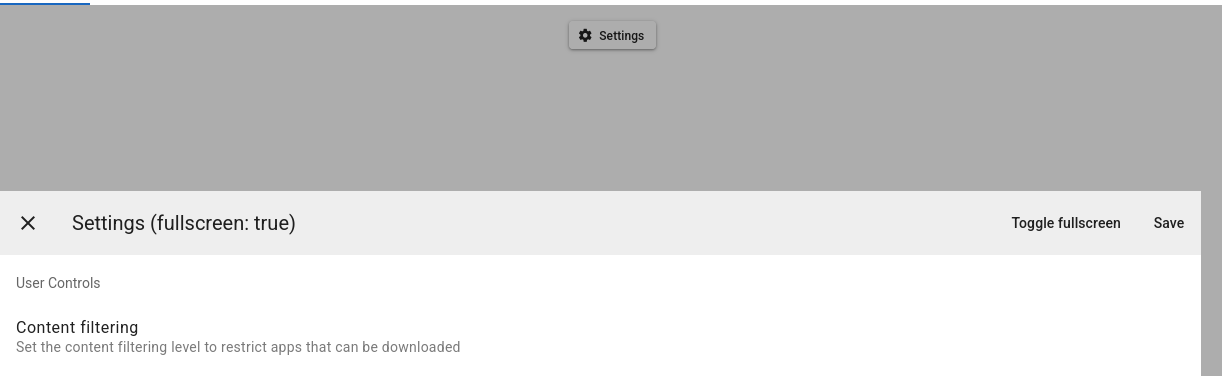
- Open the reproduction link and Press Settings button . The dialog will appear on entire screen.
- Press the button Toggle fullscreen. The dialog will restore it's size to a part of the screen
- Press Toggle fullscreen again. The dialog will extend on just part of the screen
Expected Behavior
If a dialog is opened with fullscreen=false and then set it to true it should cover the entire screen. No mater how many times you toggle it.
Actual Behavior
When setting fullscreen property of already opened dialog to true it doesn't work as expected, covers just a part of the screen. If is set on initial open - it works, but if you toggle it - first to false then to true - it doesn't
Reproduction Link
https://play.vuetifyjs.com/#...
Images

Environment
Vuetify Version: 4.1.1
Vue Version: 3.5.35
OS: Linux undefined (current)
Steps to reproduce
Expected Behavior
If a dialog is opened with fullscreen=false and then set it to true it should cover the entire screen. No mater how many times you toggle it.
Actual Behavior
When setting fullscreen property of already opened dialog to
trueit doesn't work as expected, covers just a part of the screen. If is set on initial open - it works, but if you toggle it - first to false then to true - it doesn'tReproduction Link
https://play.vuetifyjs.com/#...
Images