









Persistent memory for AI agents. Single binary. Local-first. Runs offline.
For AI Agents — Claude, Cursor, GPT, LangChain, AutoGPT, robotic systems, or your custom agents. Give them memory that persists across sessions, learns from experience, and runs entirely on your hardware.
We built this because AI agents forget everything between sessions. They make the same mistakes, ask the same questions, lose context constantly.
Shodh-Memory fixes that. It's a cognitive memory system—Hebbian learning, activation decay, semantic consolidation—packed into a single ~17MB binary that runs offline. Deploy on cloud, edge devices, or air-gapped systems.
Choose your platform:
| Platform | Install | Documentation |
|---|---|---|
| Docker | docker run -d -p 3030:3030 -v shodh-data:/data varunshodh/shodh-memory |
Docker Hub |
| Claude / Cursor | claude mcp add shodh-memory -- npx -y @shodh/memory-mcp |
MCP Setup |
| Python | pip install shodh-memory |
Python Docs |
| Rust | cargo add shodh-memory |
Rust Docs |
| npm (MCP) | npx -y @shodh/memory-mcp |
npm Docs |
shodh-tui
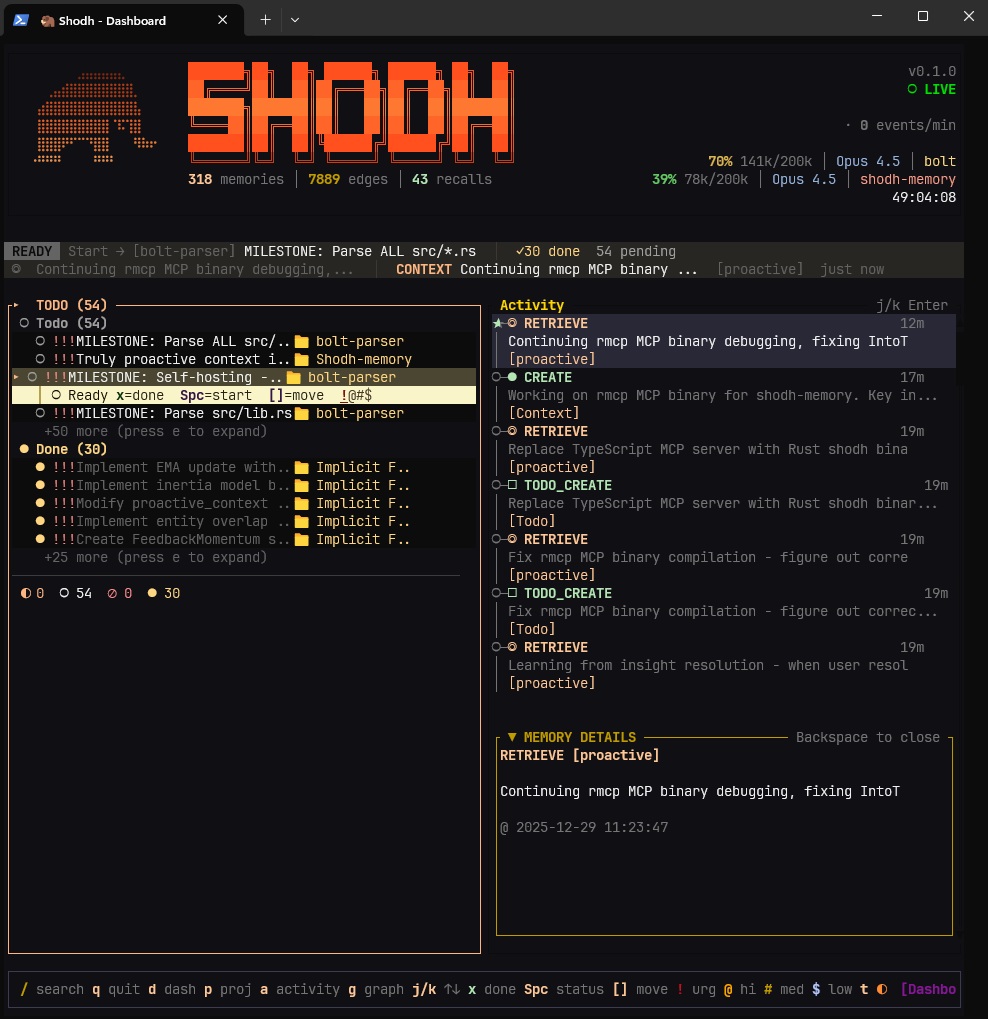
Real-time activity feed, memory tiers, and detailed inspection

Knowledge graph visualization — entity connections across memories
Keyboard shortcuts: Tab switch panels · j/k navigate · Enter select · / search · q quit

Projects and todos with GTD workflow — contexts, priorities, due dates
Built-in task management following GTD (Getting Things Done) methodology:
# Add todos with context, projects, and priorities
memory.add_todo("Fix authentication bug", project="Backend", priority="high", contexts=["@computer"])

# List by project or context
todos = memory.list_todos(project="Backend", status=["todo", "in_progress"])

# Complete tasks (auto-creates next occurrence for recurring)
memory.complete_todo("SHO-abc123")
MCP Tools for Claude/Cursor:
add_todo— Create tasks with projects, contexts, priorities, due dateslist_todos— Filter by status, project, context, due datecomplete_todo— Mark done, auto-advances recurring tasksadd_project/list_projects— Organize work into projects
Experiences flow through three tiers based on Cowan's working memory model:
Working Memory ──overflow──▶ Session Memory ──importance──▶ Long-Term Memory
   (100 items)                  (500 MB)                      (RocksDB)
Cognitive Processing:
- Hebbian learning — Co-retrieved memories form stronger connections
- Activation decay — Unused memories fade: A(t) = A₀ · e^(-λt)
- Long-term potentiation — Frequently-used connections become permanent
- Entity extraction — TinyBERT NER identifies people, orgs, locations
- Spreading activation — Queries activate related memories through the graph
- Memory replay — Important memories replay during maintenance (like sleep)
The MCP client connects to a shodh-memory server. Follow these steps:
Step 1: Start the server
Download from GitHub Releases or use Docker:
# Option A: Direct download (Linux/macOS)
curl -L https://github.com/varun29ankuS/shodh-memory/releases/latest/download/shodh-memory-linux-x64.tar.gz | tar -xz
./shodh-memory

# Option B: Docker
docker run -d -p 3030:3030 -e SHODH_HOST=0.0.0.0 -v shodh-data:/data varunshodh/shodh-memory
Wait for "Server ready!" message before proceeding.
Step 2: Generate an API key
The API key is locally generated — you create your own. This is for local client-server authentication, not a cloud service credential:
# Generate a random key
openssl rand -hex 32
# Example output: a1b2c3d4e5f6...
Set this key on your server via SHODH_DEV_API_KEY environment variable.
Step 3: Configure the MCP client
Claude Code (CLI):
claude mcp add shodh-memory -- npx -y @shodh/memory-mcpClaude Desktop / Cursor config:
{
  "mcpServers": {
    "shodh-memory": {
      "command": "npx",
      "args": ["-y", "@shodh/memory-mcp"],
      "env": {
        "SHODH_API_KEY": "your-generated-key-from-step-2"
      }
    }
  }
}
Step 4: Verify connection
curl http://localhost:3030/health
# Should return: {"status":"ok"}
Key MCP Tools:
remember— Store memories with types (Observation, Decision, Learning, etc.)recall— Semantic/associative/hybrid search across memoriesproactive_context— Auto-surface relevant memories for current contextadd_todo/list_todos— GTD task managementcontext_summary— Quick overview of recent learnings and decisions
Config file locations:
| Editor | Path |
|---|---|
| Claude Desktop (macOS) | ~/Library/Application Support/Claude/claude_desktop_config.json |
| Claude Desktop (Windows) | %APPDATA%\Claude\claude_desktop_config.json |
| Cursor | ~/.cursor/mcp.json |
pip install shodh-memoryfrom shodh_memory import Memory
memory = Memory(storage_path="./my_data")
memory.remember("User prefers dark mode", memory_type="Decision")
results = memory.recall("user preferences", limit=5)[dependencies]
shodh-memory = "0.1"use shodh_memory::{MemorySystem, MemoryConfig};
let memory = MemorySystem::new(MemoryConfig::default())?;
memory.remember("user-1", "User prefers dark mode", MemoryType::Decision, vec![])?;
let results = memory.recall("user-1", "user preferences", 5)?;The server exposes a REST API on http://localhost:3030. All /api/* endpoints require the X-API-Key header.
| Method | Endpoint | Description |
|---|---|---|
| POST | /api/remember |
Store a memory |
| POST | /api/remember/batch |
Store multiple memories |
| POST | /api/recall |
Semantic search |
| POST | /api/recall/tags |
Search by tags |
| POST | /api/proactive_context |
Context-aware retrieval |
| POST | /api/context_summary |
Get condensed summary |
| GET | /api/memory/{id} |
Get memory by ID |
| DELETE | /api/memory/{id} |
Delete memory |
| POST | /api/memories |
List with filters |
| POST | /api/reinforce |
Hebbian feedback |
| Method | Endpoint | Description |
|---|---|---|
| POST | /api/todos |
List todos |
| POST | /api/todos/add |
Create todo |
| POST | /api/todos/update |
Update todo |
| POST | /api/todos/complete |
Mark complete |
| POST | /api/todos/delete |
Delete todo |
| GET | /api/todos/{id} |
Get todo by ID |
| GET | /api/todos/{id}/subtasks |
List subtasks |
| POST | /api/todos/stats |
Get statistics |
| Method | Endpoint | Description |
|---|---|---|
| GET | /api/projects |
List projects |
| POST | /api/projects/add |
Create project |
| GET | /api/projects/{id} |
Get project by ID |
| POST | /api/projects/delete |
Delete project |
| Method | Endpoint | Description |
|---|---|---|
| GET | /health |
Health check |
| GET | /metrics |
Prometheus metrics |
| GET | /api/context/status |
Context window status |
Example: Store a memory
curl -X POST http://localhost:3030/api/remember \
  -H "Content-Type: application/json" \
  -H "X-API-Key: your-api-key" \
  -d '{
    "user_id": "user-1",
    "content": "User prefers dark mode",
    "memory_type": "Decision",
    "tags": ["preferences", "ui"]
  }'
Example: Semantic search
curl -X POST http://localhost:3030/api/recall \
  -H "Content-Type: application/json" \
  -H "X-API-Key: your-api-key" \
  -d '{
    "user_id": "user-1",
    "query": "user preferences",
    "limit": 5
  }'
Example: Create todo
curl -X POST http://localhost:3030/api/todos/add \
  -H "Content-Type: application/json" \
  -H "X-API-Key: your-api-key" \
  -d '{
    "user_id": "user-1",
    "content": "Fix authentication bug",
    "project": "Backend",
    "priority": "high",
    "contexts": ["@computer"]
}'| Operation | Latency |
|---|---|
| Store memory | 55-60ms |
| Semantic search | 34-58ms |
| Tag search | ~1ms |
| Entity lookup | 763ns |
| Graph traversal (3-hop) | 30µs |
| Shodh-Memory | Mem0 | Cognee | |
|---|---|---|---|
| Deployment | Single 17MB binary | Cloud API | Neo4j + Vector DB |
| Offline | 100% | No | Partial |
| Learning | Hebbian + decay + LTP | Vector similarity | Knowledge graphs |
| Latency | Sub-millisecond | Network-bound | Database-bound |
| Platform | Status |
|---|---|
| Linux x86_64 | Supported |
| Linux ARM64 | Supported |
| macOS ARM64 (Apple Silicon) | Supported |
| macOS x86_64 (Intel) | Supported |
| Windows x86_64 | Supported |
Shodh-Memory is designed for single-machine deployments where multiple AI agents share a common memory store. For production use:
Internet → Reverse Proxy (TLS + Auth) → Shodh-Memory (localhost:3030)
TLS/HTTPS: The server does not handle TLS directly. For network deployments, place it behind a reverse proxy (Nginx, Caddy, Traefik, Cloudflare Tunnel) that handles TLS termination.
Authentication: All data endpoints require API key authentication via X-API-Key header. Health and metrics endpoints are public for monitoring.
Network Binding: By default, the server binds to 127.0.0.1 (localhost only). Set SHODH_HOST=0.0.0.0 only when behind an authenticated reverse proxy.
# Required for production
SHODH_ENV=production              # Enables production mode (stricter validation)
SHODH_API_KEYS=key1,key2,key3     # Comma-separated API keys

# Optional
SHODH_HOST=127.0.0.1              # Bind address (default: localhost)
SHODH_PORT=3030                   # Port (default: 3030)
SHODH_MEMORY_PATH=/var/lib/shodh  # Data directory
SHODH_REQUEST_TIMEOUT=60          # Request timeout in seconds
SHODH_MAX_CONCURRENT=200          # Max concurrent requests
SHODH_CORS_ORIGINS=https://app.example.com # Allowed CORS originsserver {
listen 443 ssl;
server_name memory.example.com;
ssl_certificate /etc/letsencrypt/live/memory.example.com/fullchain.pem;
ssl_certificate_key /etc/letsencrypt/live/memory.example.com/privkey.pem;
location / {
proxy_pass http://127.0.0.1:3030;
proxy_set_header Host $host;
proxy_set_header X-Real-IP $remote_addr;
proxy_set_header X-Forwarded-For $proxy_add_x_forwarded_for;
proxy_set_header X-Forwarded-Proto $scheme;
}
}memory.example.com {
reverse_proxy localhost:3030
}services:
shodh-memory:
image: varunshodh/shodh-memory:latest
environment:
- SHODH_ENV=production
- SHODH_HOST=0.0.0.0
- SHODH_API_KEYS=${SHODH_API_KEYS}
volumes:
- shodh-data:/data
networks:
- internal
caddy:
image: caddy:latest
ports:
- "443:443"
volumes:
- ./Caddyfile:/etc/caddy/Caddyfile
networks:
- internal
volumes:
shodh-data:
networks:
internal:| Project | Description | Author |
|---|---|---|
| SHODH on Cloudflare | Edge-native implementation on Cloudflare Workers with D1, Vectorize, and Workers AI | @doobidoo |
Have an implementation? Open a discussion to get it listed.
[1] Cowan, N. (2010). The Magical Mystery Four: How is Working Memory Capacity Limited, and Why? Current Directions in Psychological Science.
[2] Magee, J.C., & Grienberger, C. (2020). Synaptic Plasticity Forms and Functions. Annual Review of Neuroscience.
[3] Subramanya, S.J., et al. (2019). DiskANN: Fast Accurate Billion-point Nearest Neighbor Search. NeurIPS 2019.
Apache 2.0
MCP Registry · Docker Hub · PyPI · npm · crates.io · Docs