카카오톡 PC 광고 삭제
| 언어 | C# |
| SDK | .NET 5 |
| IDE | Visual Studio 16.9.0 |
| Project | WorkerService |
| Nuget Package | Microsoft.Extensions.Hosting.WindowsServices 5.0.1 |
| 메인 프로젝트 | https://github.com/blurfx/KakaoTalkAdBlock |
Removes ads from KakaoTalk PC client.
- Download publish/setup.exe
- Run
setup.exeto install - After installation, run
KakaoTalkAdBlockfrom the Start menu or desktop
- Download win10-security-fix.reg
- Run
win10-security-fix.regto fix registry automatically
- Run Registry Editor by typing regedit in the run menu.
- Move to "\HKEY_LOCAL_MACHINE\SOFTWARE\Microsoft\.NETFramework\Security\TrustManager\PromptingLevel"
- Change "Internet, Localintranet, MyComputer" to Enabled
- Go Releases page

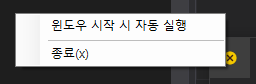
This program runs in the tray.