I use the following type:
export type Props = {
  /**
   * Style applied to the code block. [See `codeBlockStyle` type](https://github.com/rajinwonderland/react-code-blocks/blob/31e391b30a1f2835aaad4275f542329239761182/packages/react-code-blocks/src/components/CodeBlock.tsx#L19)
   */
  codeBlockStyle?: CSSStyles;

  /**
   * Style applied to the code block. [See `codeContainerStyle` type](https://github.com/rajinwonderland/react-code-blocks/blob/31e391b30a1f2835aaad4275f542329239761182/packages/react-code-blocks/src/components/CodeBlock.tsx#L19)
   */
  codeContainerStyle?: CSSStyles;

  /**
   * Text displayed as source code.
   */
  text: string;
} & Partial<CodeBlockProps>;
The extended type is
import React, { PureComponent } from 'react';
import { applyTheme } from '../utils/themeBuilder';
import { Theme } from '../types';
import Code from './Code';

export interface CodeBlockProps {
  /** The code to be formatted */
  text: string;
  /** The language in which the code is written. [See LANGUAGES.md](https://github.com/rajinwonderland/react-code-blocks/blob/master/LANGUAGES.md) */
  language: string;
  /** Indicates whether or not to show line numbers */
  showLineNumbers?: boolean;
  /** A custom theme to be applied, implements the `CodeBlockTheme` interface. You can also pass pass a precomposed theme into here. For available themes. [See THEMES.md](https://github.com/rajinwonderland/react-code-blocks/blob/master/THEMES.md) */
  theme?: Theme;
  /** The element or custom react component to use in place of the default `span` tag */
  lineNumberContainerStyle?: {};
  /** The style object to apply to the `CodeBlock` text directly i.e `fontSize` and such */

  codeBlockStyle?: {};
  /** The style object that accesses the style parameter on the `codeTagProps` property on the `Code` component */
  codeContainerStyle?: {};

  /** The style object that will be combined with the top level style on the pre tag, styles here will overwrite earlier styles. */
  customStyle?: {};

  /**
   * Lines to highlight comma delimited.
   * Example uses:

   * - To highlight one line `highlight="3"`
   * - To highlight a group of lines `highlight="1-5"`
   * - To highlight multiple groups `highlight="1-5,7,10,15-20"`
   */
  highlight?: string;
}

const LANGUAGE_FALLBACK = 'text';

export default class CodeBlock extends PureComponent<CodeBlockProps, {}> {
  _isMounted = false;

  static displayName = 'CodeBlock';

  static defaultProps = {
    showLineNumbers: true,
    language: LANGUAGE_FALLBACK,
    theme: {},
    highlight: '',
    lineNumberContainerStyle: {},
    customStyle: {},
    codeBlockStyle: {},
  };

  componentDidMount() {
    this._isMounted = true;
  }
  componentWillUnmount() {
    this._isMounted = false;
  }
  handleCopy = (event: any) => {
    /**
     * We don't want to copy the markup after highlighting, but rather the preformatted text in the selection
     */
    const data = event.nativeEvent.clipboardData;
    if (data) {
      event.preventDefault();
      const selection = window.getSelection();
      if (selection === null) {
        return;
      }
      const selectedText = selection.toString();
      const document = `<!doctype html><html><head></head><body><pre>${selectedText}</pre></body></html>`;
      data.clearData();
      data.setData('text/html', document);
      data.setData('text/plain', selectedText);
    }
  };

  render() {
    const {
      lineNumberContainerStyle,
      codeBlockStyle,
      codeContainerStyle,
    } = applyTheme(this.props.theme);

    const props = {
      language: this.props.language || LANGUAGE_FALLBACK,
      codeStyle: {
        ...codeBlockStyle,
        ...this.props?.codeBlockStyle,
      },
      customStyle: this.props?.customStyle,
      showLineNumbers: this.props.showLineNumbers,
      codeTagProps: {
        style: {
          ...codeContainerStyle,
          ...this.props?.codeContainerStyle,
        },
      },
      lineNumberContainerStyle: {
        ...lineNumberContainerStyle,
        ...this.props?.lineNumberContainerStyle,
      },
      text: this.props.text.toString(),
      highlight: this.props.highlight,
    };

    return <Code {...props} />;
  }
}
But Storybook renders only the props defined in Props, not those in CodeBlockProps.
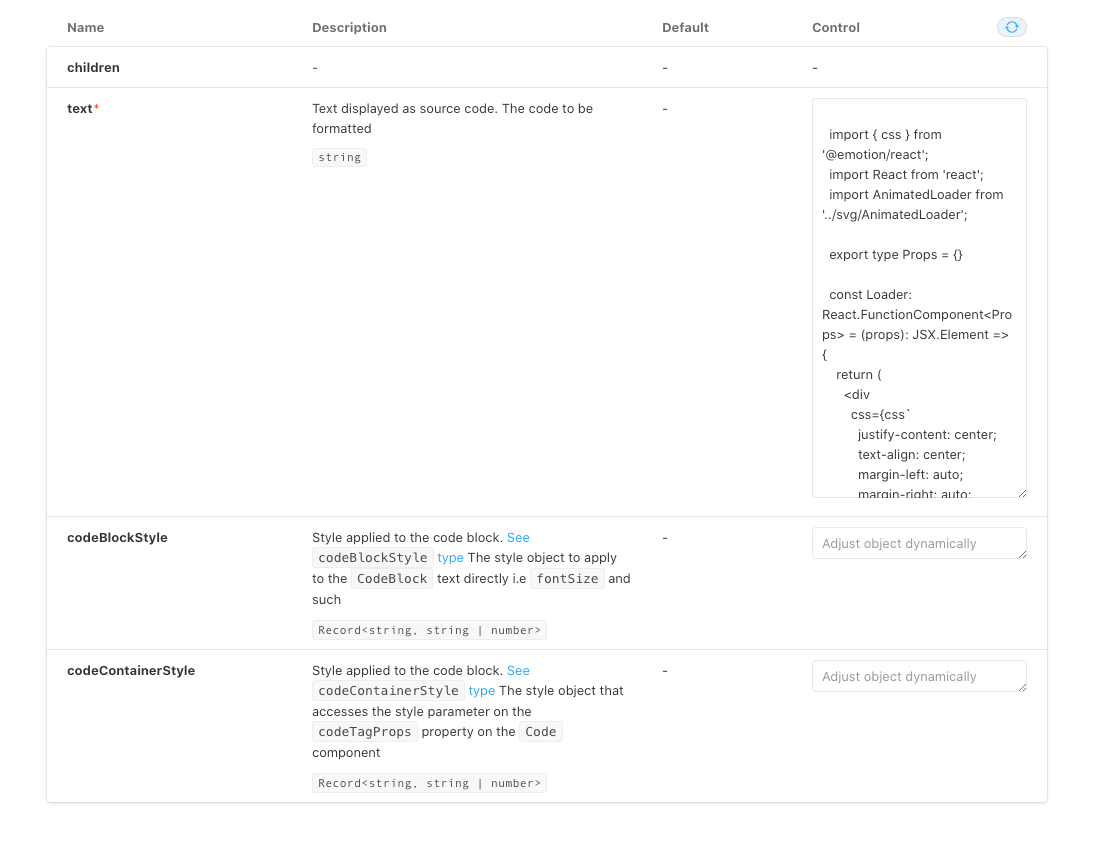
Is it the expected behaviour? I'm still new to storybook, I had seen something about TS types extending somewhere but can't find it again.

I use the following type:
The extended type is
But Storybook renders only the props defined in

Props, not those inCodeBlockProps.Is it the expected behaviour? I'm still new to storybook, I had seen something about TS types extending somewhere but can't find it again.