Note
The implementation is based on the explanation provided by the official sentry documentation.
A tunnel is an HTTP endpoint that acts as a proxy between Sentry and your application.
Because you control this server, there is no risk of any requests sent to it being blocked. When the endpoint lives under the same origin (although it does not have to in order for the tunnel to work), the browser will not treat any requests to the endpoint as a third-party request. As a result, these requests will have different security measures applied which, by default, don't trigger ad-blockers.
A quick summary of the flow can be found below.
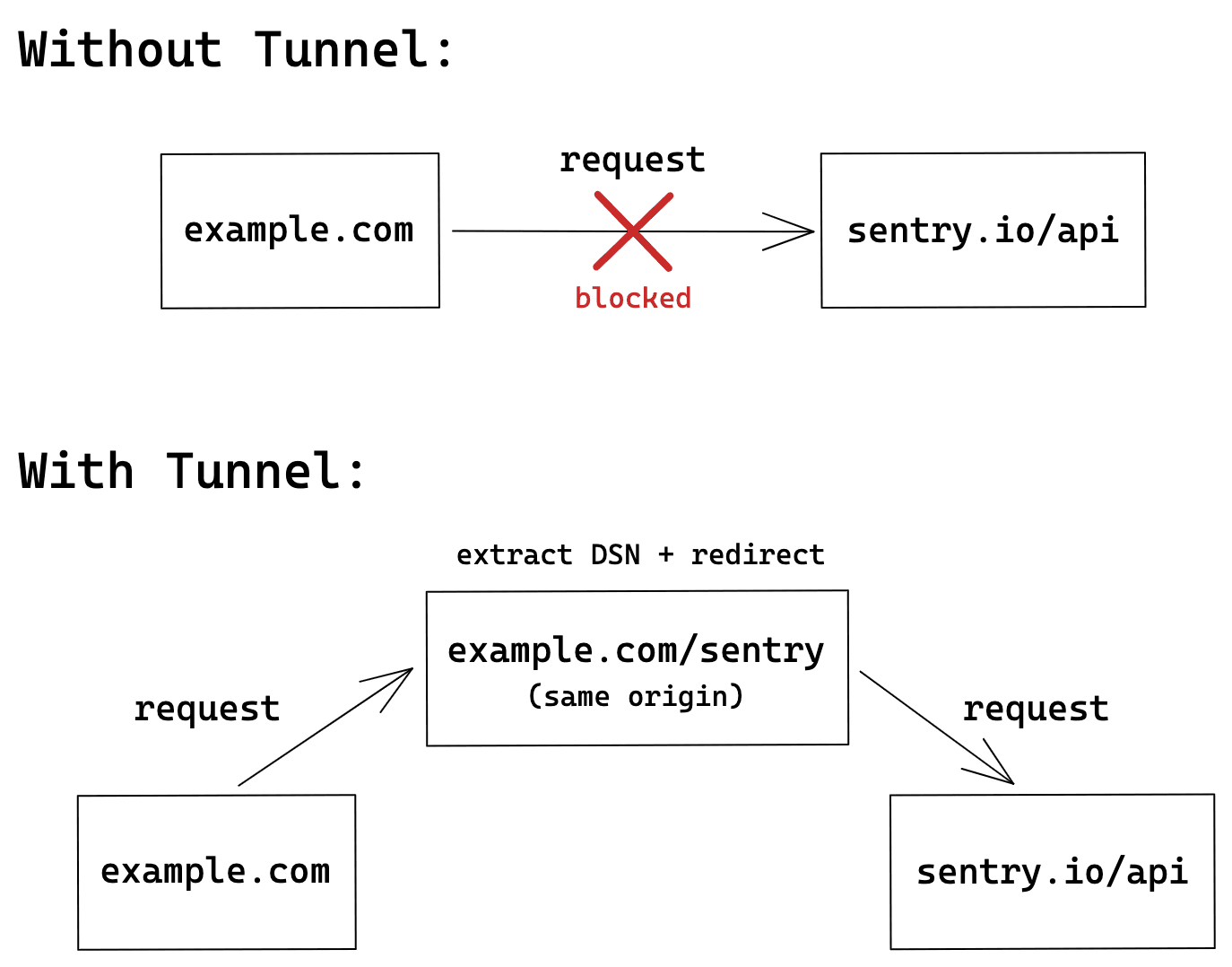
Starting with version 6.7.0 of the JavaScript SDK, you can use the tunnel option to tell the SDK to deliver events to the configured URL, instead of using the DSN. This allows the SDK to remove sentry_key from the query parameters, which is one of the main reasons ad-blockers prevent sending events in the first place. This option also stops the SDK from sending preflight requests, which was one of the requirements that necessitated sending the sentry_key in the query parameters.
To enable the tunnel option, provide either a relative or an absolute URL in your Sentry.init call. When you use a relative URL, it's relative to the current origin, and this is the form that we recommend. Using a relative URL will not trigger a preflight CORS request, so no events will be blocked, because the ad-blocker will not treat these events as third-party requests.
Sentry.init({
  dsn: "https://examplePublicKey@o0.ingest.sentry.io/0",
  tunnel: "/tunnel",
});
Once configured, all events will be sent to the /tunnel endpoint. This solution, however, requires an additional configuration on the server, as the events now need to be parsed and redirected to Sentry.
NAME:
   sentrytunnel - A tunneling service for Sentry

USAGE:
   sentrytunnel [global options]

VERSION:
   dev

GLOBAL OPTIONS:
   --help, -h          show help
   --log-level string  Set the log level (default: "info") [$SENTRYTUNNEL_LOG_LEVEL]
   --version, -v       print the version

   Tunnel metrics:

   --metrics-addr string  The address to listen on (default: ":9091") [$SENTRYTUNNEL_METRICS_ADDR]

   Tunnel server:

   --allowed-origin string [ --allowed-origin string ]  A list of origins that are allowed to access the tunnel. e.g. https://example.com [$SENTRYTUNNEL_ALLOWED_ORIGIN]
   --listen-addr string                                 The address to listen on (default: ":8080") [$SENTRYTUNNEL_LISTEN_ADDR]
   --trusted-proxy string [ --trusted-proxy string ]    A list of trusted proxy IPs or CIDRs to extract the client IP from X-Forwarded-For header. [$SENTRYTUNNEL_TRUSTED_PROXY]
   --tunnel-path string                                 The path to accept envelop tunneling requests (default: "/tunnel") [$SENTRYTUNNEL_TUNNEL_PATH]
   --tunnel-timeout duration                            The maximum duration for processing the tunneling requests (default: 3m0s) [$SENTRYTUNNEL_TUNNEL_TIMEOUT]
The tunnel server exposes the following metrics at /metrics endpoint on port 9091.
# HELP sentry_envelope_accepted The number of envelopes accepted by the tunnel
# TYPE sentry_envelope_accepted counter
sentry_envelope_accepted 0
# HELP sentry_envelope_rejected The number of envelopes rejected by the tunnel
# TYPE sentry_envelope_rejected counter
sentry_envelope_rejected 0
# HELP sentry_envelope_forward_success The number of envelopes successfully forwarded by the tunnel
# TYPE sentry_envelope_forward_success counter
sentry_envelope_forward_success 0
# HELP sentry_envelope_forward_error The number of envelopes that failed to be forwarded by the tunnel
# TYPE sentry_envelope_forward_error counter
sentry_envelope_forward_error 0
The tunnel server exposes the pprof debug endpoints at /debug/pprof on port 9091.
The benchmark was done using wrk running on a local machine. Simulating a more realistic scenario with a higher latency using Sentry stub instance with a fake session payload.
Running 30s test @ http://localhost:8080/tunnel
  12 threads and 400 connections
  Thread Stats   Avg      Stdev     Max   +/- Stdev
    Latency   166.29ms   82.42ms   1.33s    67.63%
    Req/Sec   126.74    108.95   565.00     77.81%
  42631 requests in 30.10s, 11.77MB read
  Socket errors: connect 159, read 0, write 0, timeout 0
  Non-2xx or 3xx responses: 15621
Requests/sec:   1416.30
Transfer/sec:    400.53KB