





smart-doc-gradle-plugin is a gradle plugin developed by the smart-doc official team.
This plugin is available from smart-doc 1.8.6.
Using smart-doc-gradle-plugin makes it easier to integrate smart-doc into your project, and integration is more lightweight.
You no longer need to write unit tests in your project to
Start smart-doc to scan source code analysis and generate API documents.
You can run the gradle command directly or click on the preset goal of the smart-doc-maven-plugin in the IDE to generate API documentation.
smart-doc-gradle-plugin will also make smart-doc's ability to generate API documentation more powerful.
About smart-doc
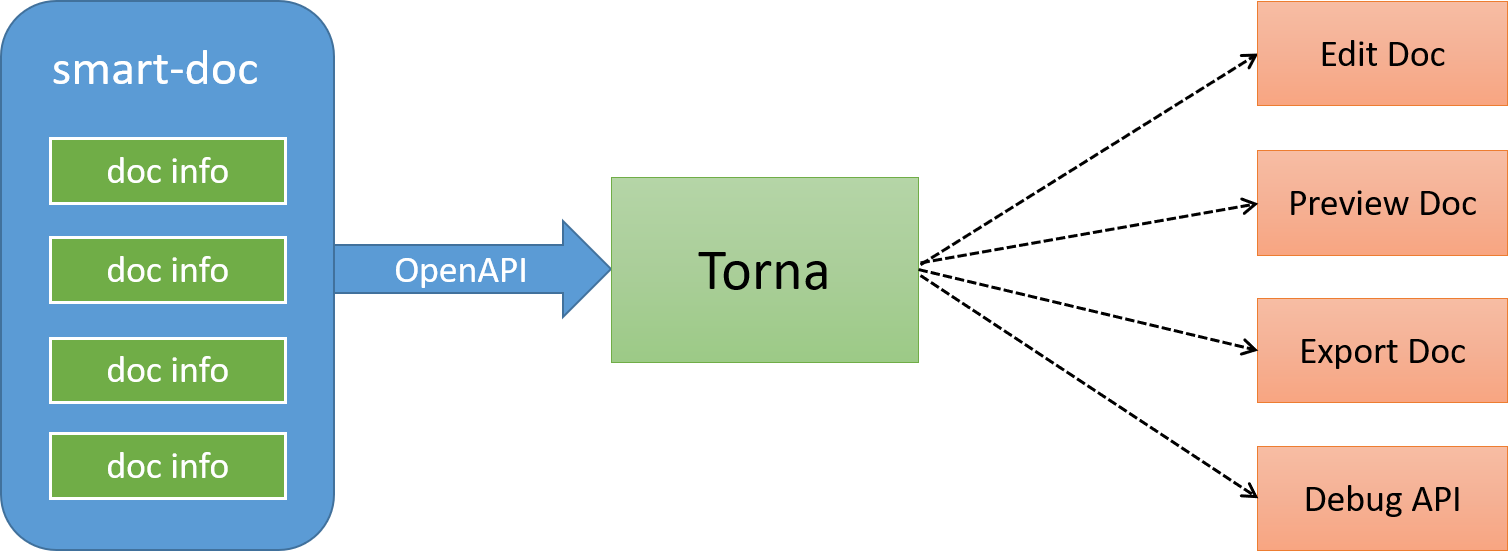
smart-doc + Torna form an industry-leading document generation and management solution, using smart-doc to complete Java source code analysis and extract annotations to generate API documents without intrusion,
and automatically push the documents to the Torna enterprise-level interface document management platform.
Using the plugins DSL:
plugins {
  id "com.ly.smart-doc" version "[latest]"
}
Using legacy plugin application:
buildscript {
  repositories {
    maven {
      url "https://plugins.gradle.org/m2/"
    }
  }
  dependencies {
    classpath "com.ly.smart-doc:smart-doc-gradle-plugin:[latest]"
  }
}

apply plugin: "com.ly.smart-doc"
| Option | Default value | Description |
|---|---|---|
| configFile | src/main/resources/default.json | |
| exclude | exclude artifact,usage:exclude 'org.springframework.boot:spring-boot-starter-tomcat' | |
| include | Let the plugin download the specified java lib source,usage:include 'org.springframework.boot:spring-boot-starter-tomcat' |
Example setting of options:
smartdoc {
    configFile = file("src/main/resources/default.json")

    // exclude example
    // exclude artifact
    exclude 'org.springframework.boot:spring-boot-starter-tomcat'
    // exclude artifact use pattern
    exclude 'org.springframework.boot.*'
    // You can use the include configuration to let the plugin automatically load the specified source.
    // include example
    include 'org.springframework.boot:spring-boot-starter-tomcat'
}
For the configuration of configFile, you can also dynamically override it through the gradle command line. Before version 3.0.3, you can add dynamic configuration to get the configFile in build.gradle, for example:
smartdoc {
    configFile = project.hasProperty('smartdoc.configFile') ? file(project.getProperty('smartdoc.configFile')) : file("src/main/resources/smart-doc.json")
}
After configuring, you can directly override it through the command line:
gradle smartdoc -Psmartdoc.configFile=src/main/resources/smart-doc.jsonFrom version 3.0.3 onwards, the configuration of dynamically configuring configFile in build.gradle is very simple, and the plugin has the ability to completely override it.
smartdoc {
    configFile =  file("src/main/resources/smart-doc.json")
}
After configuration, you can directly use -Psmartdoc.configFile to override it.
For multi-module gradle projects, if you do not want to configure in each module, you can put the smart-doc plugin related configuration into subprojects.
subprojects{
    apply plugin: 'com.github.shalousun.smart-doc'
    smartdoc {
        //
        configFile = file("src/main/resources/smart-doc.json")
        // exclude artifact
        exclude 'org.springframework.boot:xx'
        exclude 'org.springframework.boot:ddd'
        // You can use the include configuration to let the plugin automatically load the specified source.
        // include example
        include 'org.springframework.boot:spring-boot-starter-tomcat'
    }
}
Create a json configuration file in your project. If it is multiple modules, put them in the modules that need to generate documents.
The smart-doc-gradle-plugin plugin will use this configuration information.
For example, create /src/main/resources/smart-doc.json in the project.
The configuration contents are as follows.
Minimize configuration:
{
   "allInOne": true, // whether to merge documents into one file, generally recommended as true
   "isStrict": false,//If the strict mode is set to true, Smart-doc forces that the public method in each interface in the code has a comment.
   "outPath": "/src/main/resources" //Set the api document output path.
}
Only three configuration items are required to use the smart-doc-gradle-plugin to generate API documentation. In fact, only outPath must be configured.
Detailed configuration content:
smart-doc provides a lot of configuration options. For more configuration options,
please refer to the official documentation
// Generate documentation into HTML
gradle smartDocRestHtml
// Generate markdown
gradle smartDocRestMarkdown
// Generate adoc
gradle smartDocRestAdoc
// Generate Postman JSON data
gradle smartDocPostman
// Generate Open API 3.0 + specification JSON documentation, since smart-doc-gradle-plugin 1.1.4
gradle smartDocOpenApi
// Generate REST API documentation and push to Torna platform, @since 2.0.9
gradle tornaRest
// Generate JMeter performance test scripts, since 3.0.0
gradle smartDocJmeter
// Generate documentation output to Word, since 3.0.0
gradle word

// Apache Dubbo RPC generation
// Generate html
gradle smartDocRpcHtml
// Generate markdown
gradle smartDocRpcMarkdown
// Generate adoc
gradle smartDocRpcAdoc
// Push RPC interfaces to torna
gradle tornaRpc
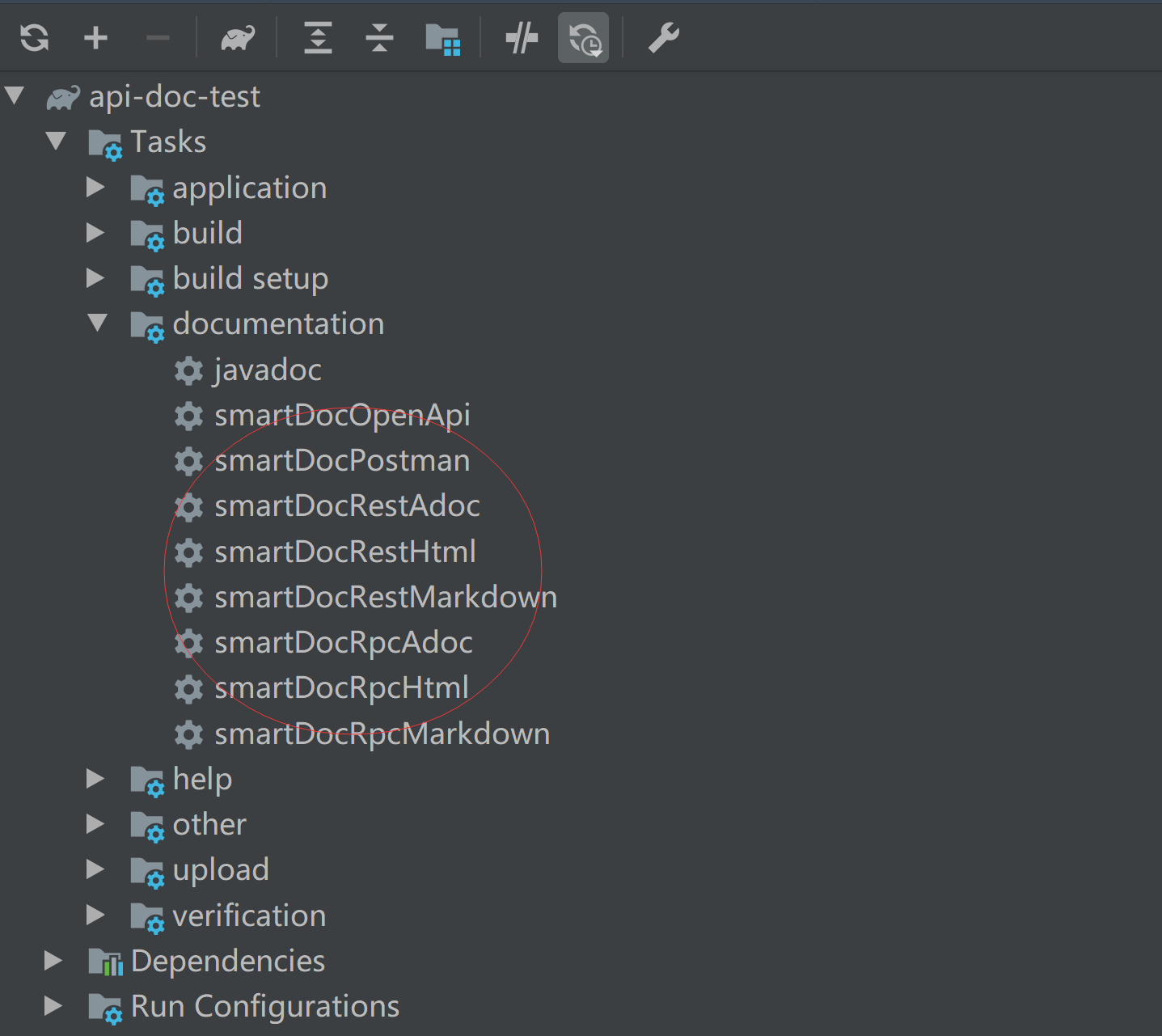
On Use IntelliJ IDE, if you have added smart-doc-gradle-plugin to the project,
you can directly find the plugin smart-doc plugin and click to generate API documentation.


you can build with the following commands. (JDK 1.8+, Gradle 7.6+is required to build the master branch)
Install the gradle plugin to the local Maven repository, which is located at ~/.m2/repository.
If your local Maven repository path is not ~/.m2/repository, it is recommended to set a global M2_HOME (Maven installation path) system variable first.
Gradle will then automatically search for it.
gradle publishToMavenLocalPublish the gradle plugin to your own Nexus repository by modifying the repository address configuration in build.gradle.
gradle publishpublish to https://plugins.gradle.org/
gradlew publishPlugins -PskipSigning
// or
make publishToPortalThese are only part of the companies using smart-doc, for reference only. If you are using smart-doc, please add your company here to tell us your scenario to make smart-doc better.
















smart-doc-gradle-plugin is under the Apache 2.0 license. See the LICENSE file for details.
Email: [email protected]