My web site was completely down for some period of time but Application Insights made us think that some requests were succeeding (leading us to wrong theory, and delaying mitigation):

After we opened web app view then it became clear that there were no successful requests during this time:

Looks like that Application Insights always creates a fake "Execute request handler". These requests are always marked as succeeded:
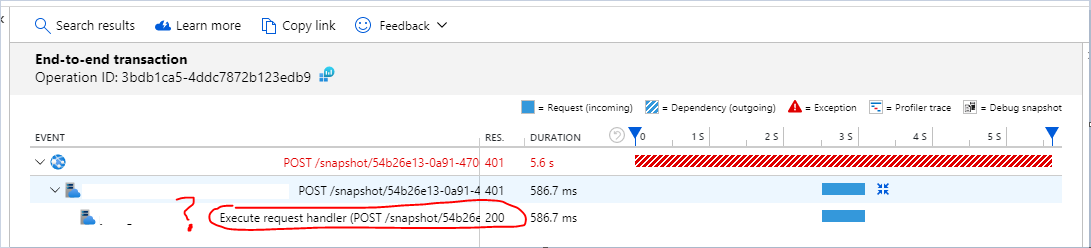
This also explained why Application Insights showed twice as much traffic than it really was.
We use the following version:
<package id="Microsoft.ApplicationInsights" version="2.10.0" targetFramework="net461" /> <package id="Microsoft.ApplicationInsights.Agent.Intercept" version="2.4.0" targetFramework="net461" /> <package id="Microsoft.ApplicationInsights.DependencyCollector" version="2.10.0" targetFramework="net461" /> <package id="Microsoft.ApplicationInsights.PerfCounterCollector" version="2.10.0" targetFramework="net461" /> <package id="Microsoft.ApplicationInsights.Web" version="2.10.0" targetFramework="net461" /> <package id="Microsoft.ApplicationInsights.WindowsServer" version="2.10.0" targetFramework="net461" /> <package id="Microsoft.ApplicationInsights.WindowsServer.TelemetryChannel" version="2.10.0" targetFramework="net461" />

My web site was completely down for some period of time but Application Insights made us think that some requests were succeeding (leading us to wrong theory, and delaying mitigation):
After we opened web app view then it became clear that there were no successful requests during this time:
Looks like that Application Insights always creates a fake "Execute request handler". These requests are always marked as succeeded:
This also explained why Application Insights showed twice as much traffic than it really was.
We use the following version:
<package id="Microsoft.ApplicationInsights" version="2.10.0" targetFramework="net461" /> <package id="Microsoft.ApplicationInsights.Agent.Intercept" version="2.4.0" targetFramework="net461" /> <package id="Microsoft.ApplicationInsights.DependencyCollector" version="2.10.0" targetFramework="net461" /> <package id="Microsoft.ApplicationInsights.PerfCounterCollector" version="2.10.0" targetFramework="net461" /> <package id="Microsoft.ApplicationInsights.Web" version="2.10.0" targetFramework="net461" /> <package id="Microsoft.ApplicationInsights.WindowsServer" version="2.10.0" targetFramework="net461" /> <package id="Microsoft.ApplicationInsights.WindowsServer.TelemetryChannel" version="2.10.0" targetFramework="net461" />