Can't create cluster with GPU instances - "waiting for at least 1 node(s) to become ready in <nodegroup>" #4532

Description

Hey gang, I've got a bit of weird one here. Any help is much appreciated:
What were you trying to accomplish?
I'm trying to spin up a cluster of GPU accelerated instances using eksctl. The expected behaviour is for the cluster to spin up and have one active node.
What happened?
I see the following in the console.

I can confirm that the EC2 instance has started correctly:
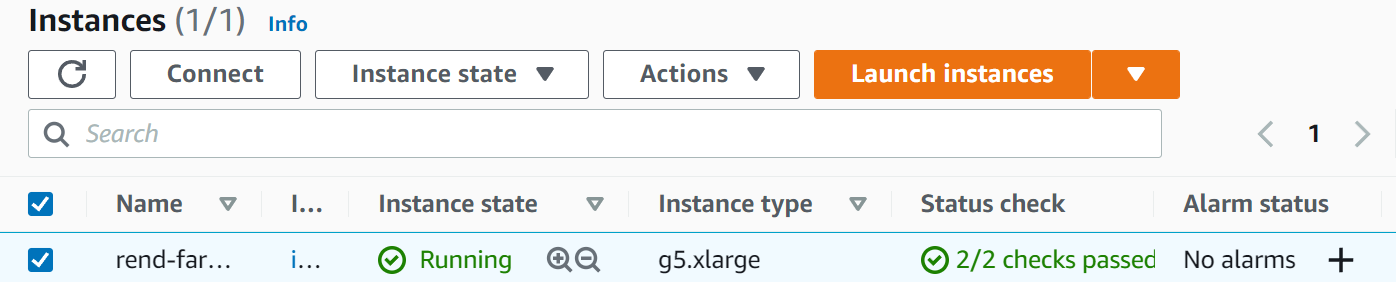
And that no node ever joins the cluster:

I can ssh onto this node and inspect the kubelet logs. The kubelet service fails with the following:
Dec 09 12:33:30 systemd[1]: kubelet.service: main process exited, code=exited, status=255/n/a
Dec 09 12:33:30 systemd[1]: Unit kubelet.service entered failed state.
Dec 09 12:33:30 systemd[1]: kubelet.service failed.
The kubelet service repeatedly does this (never succeeding).
systemctl status kubelet.service returns the following:

How to reproduce it?
Here's the simplest config file I can come up with that reproduces this behaviour:
apiVersion: eksctl.io/v1alpha5
kind: ClusterConfig

# Kubernetes is designed to accommodate configurations that meet ALL
# of the following criteria:
#   No more than 110 pods per node
#   No more than 5000 nodes
#   No more than 150000 total pods
#   No more than 300000 total containers

metadata:
  name: cluster-name
  region: us-west-2
  version: "1.20"

nodeGroups:
  - name: ng0
    # Using this: https://aws.amazon.com/marketplace/server/configuration?productId=6908c220-f1fd-46e3-bd88-bb5e0fe48061&ref_=psb_cfg_continue
    ami: ami-08b3a8f0da374288c
    instanceType: g5.xlarge
    minSize: 1
    maxSize: 10
    desiredCapacity: 1

    volumeSize: 64 # In gigabytes
    ssh:
      allow: true
      publicKeyName: <my-keypair-name>

    availabilityZones: [ "us-west-2a", "us-west-2b", "us-west-2c" ]

    # We want to allow autoscaling to meet varying demand, so the EC2 autoscaling
    # needs certain tags which this option applies
    iam:
      attachPolicyARNs:
        # These default node policies are required for operation
        - arn:aws:iam::aws:policy/AmazonEKSWorkerNodePolicy
        - arn:aws:iam::aws:policy/AmazonEKS_CNI_Policy
        - arn:aws:iam::aws:policy/AmazonEC2ContainerRegistryReadOnly
        - arn:aws:iam::aws:policy/ElasticLoadBalancingFullAccess

# Have this match the node group configuration, as this will determine (in the least)
# where subnets will be built
availabilityZones: [ "us-west-2a", "us-west-2b", "us-west-2c" ]
You'll note that I'm using a custom AMI here, and the G5 instances. The AMI is one that has just been released by the amazon-eks-ami people. More detail can be seen here: awslabs/amazon-eks-ami#806 . Matching ticket from the amazon-vpc-cni-k8s folks: aws/amazon-vpc-cni-k8s#1748 .
TLDR: vpc-cni doesn't block the usage of this instance, and the latest ami (found here: https://us-west-2.console.aws.amazon.com/systems-manager/parameters/%252Faws%252Fservice%252Feks%252Foptimized-ami%252F1.20%252Famazon-linux-2-gpu%252Frecommended%252Fimage_id/description?region=us-west-2# ) has fixed the issues that would prevent the G5 from working.
I've looked into the following issues but no luck (including the pre-bootstrap command issues).
#4503
#3391
#3005
Logs
See above^.
Anything else we need to know?
I'm using Ubuntu 18.04, I'm installing eksctl using Docker as follows:
# Install eksctl (Elastic Kubernetes Service Control)
RUN curl --silent --location "https://github.com/weaveworks/eksctl/releases/latest/download/eksctl_$(uname -s)_amd64.tar.gz" | tar xz -C /tmp
RUN mv /tmp/eksctl /usr/local/bin
Versions
$ eksctl info
eksctl info
eksctl version: 0.76.0
kubectl version: v1.22.4
OS: linux
I can't figure out what to try next - the kubelet service does not provide any useful error messages. Any help would be greatly appreciated - I've hit a bit of a wall here and I'm not sure how to proceed.