Bug report:
Manage console is broken in configuration/scheduler-cluster path. I can't see the details of scheduler cluster. See the screenshot for more details.
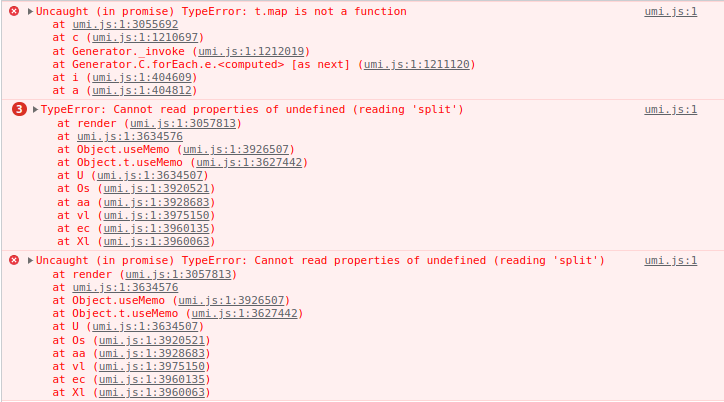
Expected behavior:
We should be able to see scheduler cluster dashboard in manage console.
How to reproduce it:
Deploy Dragonfly with helm charts using below configuration with dragonflyoss/helm-charts#74 patch
containerRuntime:
  containerd:
    enable: true
manager:
  ingress:
    enable: true
    className: private
    hosts:
      - "dragonfly.example.com"
    tls:
      - secretName: secure-tls
        hosts:
          - "dragonfly.example.com"
cdn:
  # -- Enable cdn
  enable: true
Enter dragonfly.example.com after ingress is up. Login to console. Go to http://dragonfly.example.com/configuration/scheduler-cluster. As the result we see the dashboard for a moment and then it turn into whitescreen.
Environment:
- Dragonfly version: v2.0.3-beta.3
- OS: Ubuntu 20.04.3 LTS
- Kernel (e.g.
uname -a): 5.11.0-1021-aws
- Others: containerRuntime: containerd://1.4.12


Bug report:
Manage console is broken in

configuration/scheduler-clusterpath. I can't see the details of scheduler cluster. See the screenshot for more details.Expected behavior:
We should be able to see scheduler cluster dashboard in manage console.
How to reproduce it:
Deploy Dragonfly with helm charts using below configuration with dragonflyoss/helm-charts#74 patch
Enter dragonfly.example.com after ingress is up. Login to console. Go to
http://dragonfly.example.com/configuration/scheduler-cluster. As the result we see the dashboard for a moment and then it turn into whitescreen.Environment:
uname -a): 5.11.0-1021-aws