Move Format property to TarEntry and allow multiple Global Extended Attributes entries #69933
Conversation


 ghost
added
the
ghost
added
the

|
Note regarding the This serves as a reminder for when your PR is modifying a ref *.cs file and adding/modifying public APIs, to please make sure the API implementation in the src *.cs file is documented with triple slash comments, so the PR reviewers can sign off that change. |
|
Tagging subscribers to this area: @dotnet/area-system-io Issue DetailsNot ready yet, do not review.
|
 carlossanlop
changed the title
carlossanlop
changed the title
carlossanlop
changed the title
carlossanlop
changed the title
 carlossanlop
changed the title
carlossanlop
changed the title

There was a problem hiding this comment.
This is the only thing left to address. Depending on the name attribute in the global extended attributes, I need to apply it to the file, if applicable.
There was a problem hiding this comment.
See my detailed answer here: #69933 (comment)

…e GEA dict from writer constructor.
… remove GEA dict from writer constructor.
…remove GEA dict from writer constructor.

|
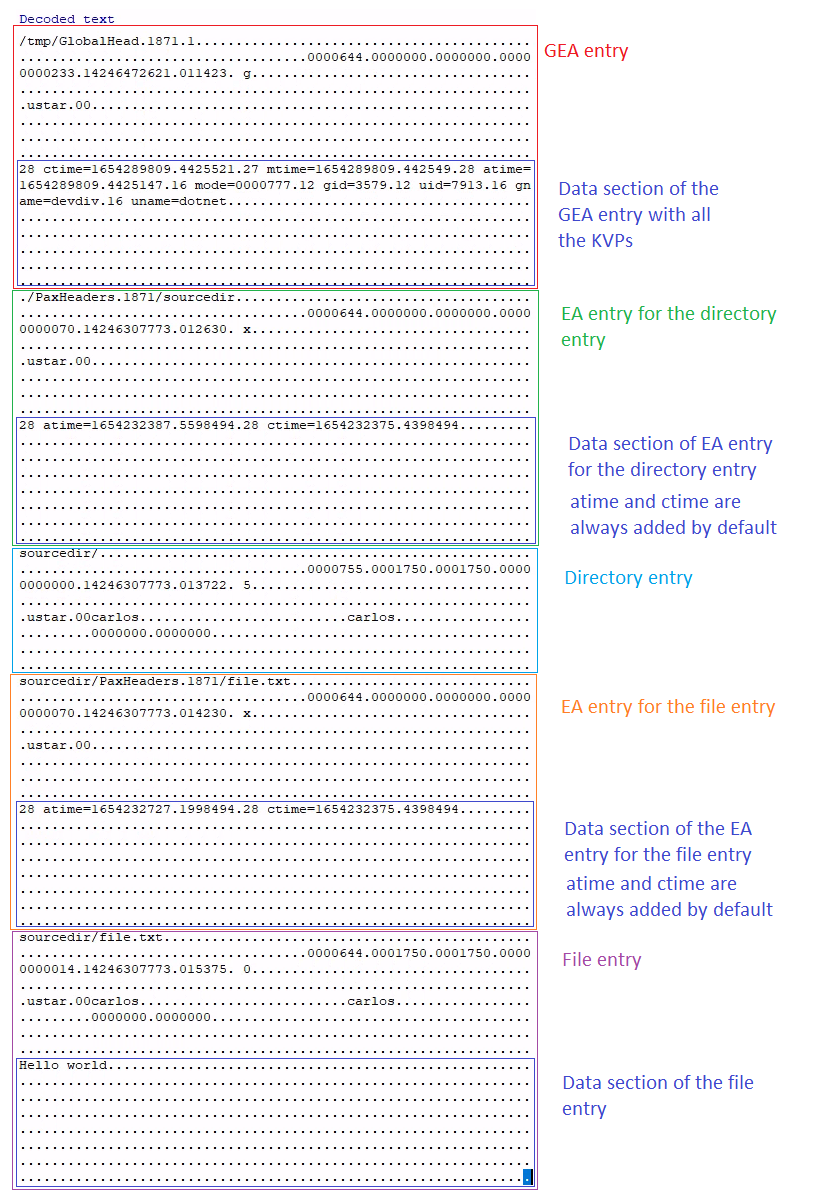
I read several sources that describe how the gnu I was able to generate a GEA that contains global values for the header fields *Note: Other header fields like What I have not been able to reproduce is extracting an archive that contains a GEA entry overriding such values: I can extract the files, but the extracted files do not acquire the overriden metadata information. Conclusion:
DetailsSo I think we should avoid overriding any header fields with values found in the extended attributes Here is how I tested it in Ubuntu: carlos@ubuntuwsl:~$ pwd
/home/carlos
carlos@ubuntuwsl:~$ mkdir testtar
carlos@ubuntuwsl:~$ cd testtar
carlos@ubuntuwsl:~/testtar$ mkdir sourcedir
carlos@ubuntuwsl:~/testtar$ echo "Hello world" > sourcedir/file.txt
# Need to see the uid of a user I created called 'dotnet'
carlos@ubuntuwsl:~/testtar$ cat /etc/passwd
...
root:x:0:0:root:/root:/bin/bash
carlos:x:1000:1000:,,,:/home/carlos:/bin/bash
dotnet:x:7913:3580::/home/dotnet:/bin/sh
...
# Need to see the gid of a group I created called 'devdiv'
carlos@ubuntuwsl:~/testtar$ cat /etc/group
...
root:x:0:
carlos:x:1000:
devdiv:x:3579:dotnet
...Here's how a PAX archive with a GEA entry at the beginning: carlos@ubuntuwsl:~/testtar$ tar cvf archive.tar sourcedir/ --format=posix --pax-option=uname=dotnet,gname=devdiv,uid=7913,gid=3579,mode=0000777,'atime={now}','mtime={now}','ctime={now}'
tar: Option --pax-option: Treating date 'now' as 2022-06-03 14:23:33.3516828
tar: Option --pax-option: Treating date 'now' as 2022-06-03 14:23:33.3516599
tar: Option --pax-option: Treating date 'now' as 2022-06-03 14:23:33.351568
sourcedir/
sourcedir/file.txtThis is how the archive looks in a hex editor:
carlos@ubuntuwsl:~/testtar$ tar xvf archive.tar --directory destinationdir/
sourcedir/
sourcedir/file.txt

# %x=atime (last access), %y=mtime (last modification), %z=ctime (last data change)
# Notice the only value that shows exactly like in the output above is mtime (2022-06-03 14:23:33.3516599) but that's because the same timestamp was saved in the header field value
carlos@ubuntuwsl:~/testtar$ stat -c %n,%x,%y,%z destinationdir/*
destinationdir/sourcedir,2022-06-03 14:24:39.449849400 -0700,2022-06-03 14:23:33.351659900 -0700,2022-06-03 14:24:21.169849400 -0700

carlos@ubuntuwsl:~/testtar$ stat -c %n,%x,%y,%z destinationdir/sourcedir/*
destinationdir/sourcedir/file.txt,2022-06-03 14:24:21.169849400 -0700,2022-06-03 14:23:33.351659900 -0700,2022-06-03 14:24:21.169849400 -0700
Extract using the Now here is an alternative way to generate a PAX archive without a GEA entry at the beginning, but with attributes that apply to all entries: By using carlos@ubuntuwsl:~/testtar$ tar cvf archive.tar sourcedir/ --format=posix --pax-option=uname:=dotnet,gname:=devdiv,uid:=7913,gid:=3579,mode:=0000777,'atime:={now}','mtime:={now}','ctime:={now}'
tar: Option --pax-option: Treating date 'now' as 2022-06-03 14:30:36.0733551
tar: Option --pax-option: Treating date 'now' as 2022-06-03 14:30:36.0733517
tar: Option --pax-option: Treating date 'now' as 2022-06-03 14:30:36.0732873
sourcedir/
sourcedir/file.txtThis is how the archive looks in a hex editor. Notice there is no GEA, but the two EA entries contain all the custom extended attributes:
Extract using the gnu carlos@ubuntuwsl:~/testtar$ rm archive.tar
carlos@ubuntuwsl:~/testtar$ rm -r destinationdir/*
carlos@ubuntuwsl:~/testtar$ tar xvf archive.tar --directory destinationdir/
tar: Ignoring unknown extended header keyword 'mode'
sourcedir/
tar: Ignoring unknown extended header keyword 'mode'
sourcedir/file.txt
# Once again, notice the only value that shows exactly like in the output above is mtime (2022-06-03 14:30:36.0733517) but that's because the same timestamp was saved in the header field value
carlos@ubuntuwsl:~/testtar$ stat -c %n,%x,%y,%z destinationdir/*
destinationdir/sourcedir,2022-06-03 14:31:17.229849400 -0700,2022-06-03 14:30:36.073351700 -0700,2022-06-03 14:31:17.229849400 -0700
carlos@ubuntuwsl:~/testtar$ stat -c %n,%x,%y,%z destinationdir/sourcedir/*
destinationdir/sourcedir/file.txt,2022-06-03 14:31:17.229849400 -0700,2022-06-03 14:30:36.073351700 -0700,2022-06-03 14:31:17.229849400 -0700Extract using the Sources
|

|
Will submit this change divided in two PRs for simplicity. |
1 participant

Fixes: #69544
Fixes: #69935
Here is a full description of my investigation on the behavior of extended attributes in the
tartool: #69933 (comment)