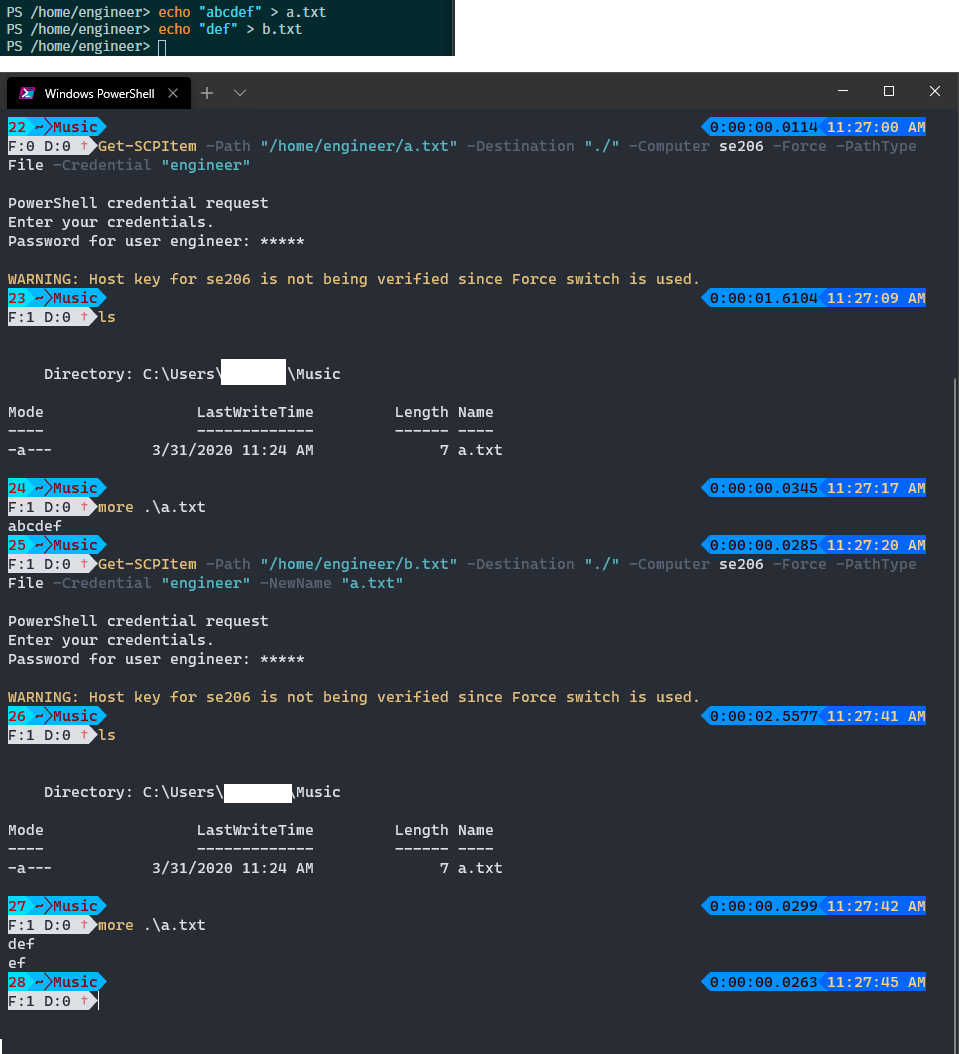
Get-SCPItem overwrites bytes in local file instead of replacing the entire file #320

Description

When I use Get-SCPItem and overwrite a local file I expect the local file to be completely overwritten. What I'm finding is that the bytes are written to the existing file starting at offset 0. This can be reproduce by running Get-SCPItem to retrieve a file which is smaller in size then the local file it will overwrite.
Ubuntu-18.04-x64 can be used for the remote and host machine to reproduce. I have seen this issue using different remote machines. Edit: I can confirm this happens using Windows 10 as the host machine too.
- On remote machine make a file
echo "abcdef" > a.txt - On remote machine make another file
echo "def" > b.txt - On local machine run
Get-SCPItem -Path "/root/a.txt" -Destination "./" -Computer localhost -Port 10022 -Force -PathType File - On local machine run
more a.txt, note output should beabcdef - On local machine run
Get-SCPItem -Path "/root/b.txt" -Destination "./" -Computer localhost -Port 10022 -Force -PathType File -NewName a.txt - On local machine run
more a.txt
At this point I would expect the local file named a.txt to contain def but instead it contains def\nef.
The use of -NewName parameter has no bearing on the issue. The remote file named a.txt can be modified in between the calls to Get-SCPItem to reproduce the issue.