The macOS File Summoner is a little tool which is able to create new files directly from finder. Simply drag this .app file onto the finder toolbar in edit mode (more detailed description later) and click the icon! :)
TODO: Update -github actions workflow to use the scripts for building, notarizing etc!
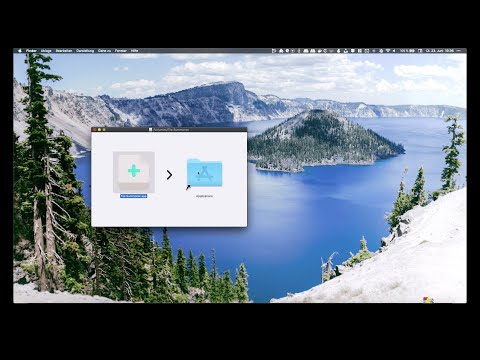
Here is a link to the installation guide video:
MacOS MAY ask you for the following permissions:
- Controlling Finder: needed to find the active folder path in the finder window where 'File Summoner' was activated
- Access to locations on your disk (to create new files)
You need to grant both for the app to work.
-
Download the file 'File.Summoner.x.x.x.dmg' from the latest release of this software at Github Latest Releases. The part x.x.x means the version number of the latest release.
-
Open the dmg file
-
Drag and drop the App to your macOS 'Applications' folder link inside the dmg
-
Add the app to your finder toolbar
- Open a new finder window
- Right click on a space section of the finder toolbar and click 'Adjust toolbar'
- Open a second finder Window and navigate to /Applications
- Drag the icon of
File Summoner.appfrom the second finder window to the toolbar of the first, to the location where you want to have the icon for creating a new file.
-
Enjoy the ability to create arbitrary files from the toolbar of your finder! 🎉
- Communicating with osascript from golang: mack
- Bundling go applications for mac (Medium Article)
- Create file with touch: https://golang.org/pkg/os/exec/
- "Icon made by Pixel perfect from www.flaticon.com"
- Iconset generated with http://www.img2icnsapp.com/
- DMG created with create-dmg by Sindre Sorhus
- up to 1.2.0: App and DMG notarizations done with mitchellh/gon
- Update ./mac-app-template/Info.plist with the new version number
- Run
./scripts/01-build.sh - Publish / use the dist "./File Summoner.app" in Finder Toolbar
- Migrated release pipeline to GoReleaser
- Universal binary support (arm64 + amd64) - works on all Macs
- Automated signing, notarization, and DMG creation
- Stable CI/CD pipeline (tested locally on M3 MBP and GitHub Actions)
- same as v1.2.1, but with correct version number in Info.plist
- Fixes issue on MacOS Sequoia (15.0) where the App would output garbage text before the filename in the new file dialog. => split filename at "Legacy" to fix garbage output from osa script
- Completely signed and notarized app, which will run without security issues on your mac! *️
- Distribution via beautiful, signed and notarized dmg file!
* ️ As long as my apple developer certificate is valid.
Ways to support me will be available in the future, so that I can continue to pay the anual fee for the apple developer certificate.
- initial Release
- Script runner: bx: https://crates.io/crates/bx
Install via:
cargo install --locked codemonument_bx
Uses GoReleaser for automated builds, signing, notarization, and DMG creation.
- Update version in
./versionANDmac-app-template/Contents/Info.plist - Update changelog in README.md
- Commit:
git commit -am "Release vX.X.X" - Tag:
git tag vX.X.X - Push:
git push && git push origin vX.X.X - GoReleaser automatically builds, signs, notarizes, and creates GitHub release
Local testing: bx release-snapshot (builds without publishing)
- improve icon to better fit macOS Finder style
- Add i18n to the app based on the language of the host macos
- copy the string in ./version' into the 'Info.plist' file for the app to avoid manual version updating in Info.plist
- Publish App in Mac App Store (https://developer.apple.com/macos/submit/)
- Implement a better designed 'new File' Dialog based on Gio
- Add more 'File Creators' besides simple 'touch'
- essential for Microsoft Office files
- for example, creating my-document.docx with "File Summoner.app" currently results in a broken file