This repository has been archived and is now read-only.
Current status:
- This open-source version is no longer actively maintained
- The repository remains publicly accessible in read-only mode
- You can continue to fork, clone, and use the code under the MIT License terms
If you wish to continue receiving updates and support, the commercial version is available on the Unreal Engine Marketplace:
The commercial version includes:
- Ongoing development and updates
- Official support
- Additional features
If you plan to continue using this open-source version:
- Please fork or clone this repository for your own use
- All existing code remains available under the MIT License
- You are free to maintain your own fork
Thank you for your support and contributions to this project.
WindowCapture2D is an Unreal Engine plugin that enables low-latency, high-performance window-based capture on Windows.
It supports capturing background windows, and the captured images can be attached to meshes or UMG in 3D space.
If you want to confirm whether this plugin works in your environment, you can download the Tester application from the Releases of this repository and check if the capture works correctly.

Note: This plugin is updated and maintained only for the latest 3 versions of Unreal Engine.
| UE Version | Support Status | Branch Name |
|---|---|---|
| UE 5.6 | ✅ Supported | UE5.6 |
| UE 5.5 | ✅ Supported | UE5.5 |
| UE 5.4 | ✅ Supported | UE5.4 |
| UE 5.3 | ❌ End of Support (v2.0.4+) | UE5.3 |
| Others | 🔄 Check docs | master |
With support for UE5.x, the capture method has changed compared to the previous WindowCapture2D plugin.
The UE5.x compatible plugin is designed to deliver even higher performance than the previous UE4.x version.
For UE4 support, please use the UE4.x branch.
If you don't have a C++ build environment, download the pre-built package from the Marketplace.
- Purchase and download the plugin from the Marketplace.
- Add it to your project from the "Library" section in the UE Launcher.
- Enable WindowCapture2D from "Edit" → "Plugins" in the UE editor.
- Clone this repository:
git clone https://github.com/ayumax/WindowCapture2D - Copy the
Pluginsdirectory into your project folder. - Build the plugin (requires a C++ build environment).
- Enable WindowCapture2D from "Edit" → "Plugins" in the UE editor.
Select the appropriate branch for your Unreal Engine version.
- Enable "show engine content" and "show plugin content".

- Place "WindowCapturePlane" in your level.

- Place "WindowCaptureUMG" in your UMG.

- Set various properties.
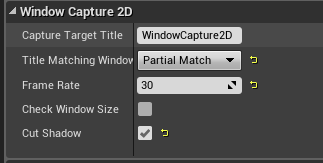
| Property | Description |
|---|---|
| Capture Target Title | Title string of the window you want to capture |
| Title Matching Window Search | Window title matching method |
| Frame Rate | Capture frame rate (fps) |
- Low-latency, high-performance window capture for Windows
- Supports capturing background windows
- Captured images can be attached to 3D meshes or UMG
- Title matching (Perfect, Forward, Partial, Backward, Regular Expression)
- Supports both Unreal Engine C++ and Blueprint
| Type | Description |
|---|---|
| PerfectMatch | Exact match with the input string |
| ForwardMatch | Forward match with the input string |
| PartialMatch | Partial match with the input string |
| BackwardMatch | Backward match with the input string |
| RegularExpression | Match using regular expressions |
- See "Quick Start" above.
- Easy to use with Blueprint.
// Create a CaptureMachine and start capturing
UCaptureMachine* Capture = NewObject<UCaptureMachine>();
Capture->Start();
// ... Release with Dispose() when done
Capture->Dispose();- Does not work on environments other than Windows.
- Capturing windows displayed on large screens such as 4K monitors requires a high-performance CPU and GPU.
- If the frame rate is low, please lower the screen resolution.
- Some types of windows may not be capturable.
This plugin uses WinRT to capture windows.
WinRT is used under the MIT license.
C++ for the Windows Runtime (cppwinrt)

Copyright (c) Microsoft Corporation
All rights reserved.

MIT License

Permission is hereby granted, free of charge, to any person obtaining a copy
of this software and associated documentation files (the "Software"), to deal
in the Software without restriction, including without limitation the rights
to use, copy, modify, merge, publish, distribute, sublicense, and/or sell
copies of the Software, and to permit persons to whom the Software is
furnished to do so, subject to the following conditions:

The above copyright notice and this permission notice shall be included in all
copies or substantial portions of the Software.

THE SOFTWARE IS PROVIDED "AS IS", WITHOUT WARRANTY OF ANY KIND, EXPRESS OR
IMPLIED, INCLUDING BUT NOT LIMITED TO THE WARRANTIES OF MERCHANTABILITY,
FITNESS FOR A PARTICULAR PURPOSE AND NONINFRINGEMENT. IN NO EVENT SHALL THE
AUTHORS OR COPYRIGHT HOLDERS BE LIABLE FOR ANY CLAIM, DAMAGES OR OTHER
LIABILITY, WHETHER IN AN ACTION OF CONTRACT, TORT OR OTHERWISE, ARISING FROM,
OUT OF OR IN CONNECTION WITH THE SOFTWARE OR THE USE OR OTHER DEALINGS IN THE
SOFTWARE.
Therefore, to build this plugin in your environment, Windows SDK v10.0.22000.0 or later is required.
Additionally, this plugin includes the WinRT headers within the Plugin directory and uses them via include.
This is because, in rare cases where an older version of WinRT is present in the environment, building the plugin may fail.
If you want to build using the WinRT installed in your environment, please modify the following line in WindowCapture2D.Build.cs to add the directory on your system to the include path.
var winrtDirectory = Path.Combine(ModuleDirectory, "Private", "cppwinrt");
if (Directory.Exists(winrtDirectory))
{
    PrivateIncludePaths.Add(winrtDirectory);
}This plugin is provided under the MIT License.
However, if you download and use it from the Epic Games Marketplace, the Epic Games license terms will apply.
Bug reports, feature requests, and pull requests are welcome.
Please select the appropriate branch for your Unreal Engine version.