
Getatrex is a Gettext automatic translator written in Elixir. It translates *.po files generated by Gettext in your Elixir/Phoenix project (compatible with modern Phoenix/Gettext releases).
- Automatically translates Gettext
*.pofiles (singular + plural) - Preserves PO metadata (comments, flags, references, context)
- Protects placeholders like
%{name}and{{name}} - Auto-detects HTML strings and uses HTML-aware translation
- Simple integration with Elixir/Phoenix projects
- Utilizes Google Cloud Translation API for translations
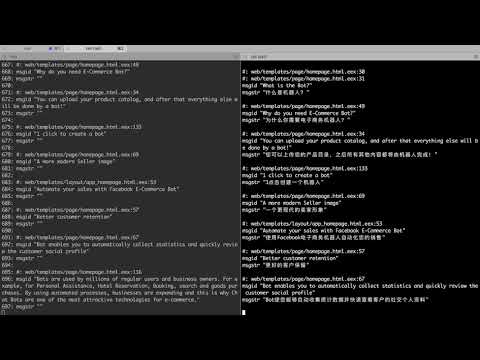
Watch a demonstration of Getatrex in action:
To install Getatrex, add it to your list of dependencies in mix.exs:
def deps do
  [{:getatrex, "~> 0.2", only: :dev, runtime: false}]
end
This will also install goth, which is required for Google Cloud Translation.
To use the Google Cloud Translation API you need Google credentials (service account JSON or Application Default Credentials). If you don't have one, create it in the Google Cloud Console.
Download the JSON file with your credentials and store it somewhere safe (avoid including it in your source control).
Then choose one of the options below:
Option A: configure Goth in config/config.exs:
# Google credentials
config :goth, json: "path/to/goth_credentials.json" |> File.read!
Replace path/to/goth_credentials.json with the actual path to your credentials file.
Option B: set an env var pointing to the JSON file:
export GOOGLE_APPLICATION_CREDENTIALS=/path/to/goth_credentials.json
Getatrex uses Goth's default credential discovery, so either option works.
- Follow the Gettext workflow in your app (extract + merge). For example:
$ mix gettext.extract
$ mix gettext.merge priv/gettext
- Generate a new locale, e.g. Spanish:
$ mix gettext.merge priv/gettext --locale es
- IMPORTANT: commit the new locale so you can easily review/revert:
$ git commit -a -m 'adding new Spanish locale'
- Run Getatrex:
$ mix getatrex es
Getatrex will generate translated_default.po next to your original:
priv/gettext/es/LC_MESSAGES/default.po
priv/gettext/es/LC_MESSAGES/translated_default.po
Open the translated file, review it, and replace the original default.po when you're happy.
By default, Getatrex translates default.po. To translate other domains:
$ mix getatrex es --domain errors
$ mix getatrex es --domain default --domain errors
You can also pass a comma-separated list:
$ mix getatrex es --domain default,errors
If you already have a locale and new strings were added:
- Merge updated POT files:
$ mix gettext.extract
$ mix gettext.merge priv/gettext --locale es
- Run Getatrex again for that locale:
$ mix getatrex es
Only empty msgstr entries are translated. Existing translations are preserved.
You can tune the translation request options in config/config.exs:
config :getatrex, google_translate: [
  format: :auto, # :auto | :text | :html
  model: "nmt"   # optional, if your Google project supports it
]
- Placeholders like
%{name}and{{name}}are protected from translation. - HTML tags in strings trigger HTML-aware translation automatically.
- If a locale file is missing, Getatrex prints instructions to generate it.
Missing required configuration for Goth/ auth errors:- Ensure your credentials are set via
config :goth, json: ...orGOOGLE_APPLICATION_CREDENTIALS=/path/to/creds.json. - Verify the Translation API is enabled in your Google Cloud project.
- Ensure your credentials are set via
Permission deniedfrom the API:- Make sure the service account has
Cloud Translation API Userpermissions.
- Make sure the service account has
unknown localeerrors:- Ensure the locale folder exists under
priv/gettext/<locale>/LC_MESSAGES.
- Ensure the locale folder exists under
Before (default.po):
msgid "Hello %{name}"
msgstr ""
Run:
$ mix getatrex es
After (translated_default.po):
msgid "Hello %{name}"
msgstr "Hola %{name}"
- Automatically write translations to the original
default.pofile, eliminating the need for a copy-paste step.