add Oculus Go controller support #3548
Conversation


This is mostly a copy and rename of the GearVR controls. This is to get everything boot strapped for now and then diverge them later while consolidating common functionality into a set of helpers.

The same for the tests, I've done a bit more consolidation in them, but also this is a copy.

For the controller we rely on the existing Gear VR controllers as well until we are able to upload Oculus Go specific controllers.

src/components/oculus-go-controls.js
Outdated
| buttonMeshes.trigger = controllerObject3D.children[0].children[1].children[4]; | ||
| buttonMeshes.trackpad = controllerObject3D.children[0].children[1].children[1]; | ||
|
|
||
| // we need to set trigger and trackpad material separately so that we can edit them independently |
There was a problem hiding this comment.
I'm not too happy with how I fiddle with the materials here, but without these changes, changing the color doesn't seem to actually create any visual difference. Is this a concern, or is it something I shouldn't be worried about?

There was a problem hiding this comment.
Is this because the material is shared across different parts and you need to clone them so each button has its own?
There was a problem hiding this comment.
Can this be handled at the glTF level?
There was a problem hiding this comment.
There's two problems: one is that it's a shared material, the other is that the material itself doesn't seem to obviously change colors (though that might be because of how shiny / dark my scenes made the material look - I'm not too familiar with how the material properties should behave).
It probably can be handled at the GLTF level, but I'm not sure how to go about doing that.

| @@ -0,0 +1,263 @@ | |||
| /* global assert, process, setup, sinon, suite, test */ | |||
| var entityFactory = require('../helpers').entityFactory; | |||
There was a problem hiding this comment.
the path for this file should be tests/components/oculus-go-controls.test.js with lowercase tests instead of Tests
src/components/oculus-go-controls.js
Outdated
| buttonMeshes = this.buttonMeshes = {}; | ||
| buttonMeshes.trigger = controllerObject3D.children[0].children[1].children[4]; | ||
| buttonMeshes.trackpad = controllerObject3D.children[0].children[1].children[1]; | ||
|
|
There was a problem hiding this comment.
Are not the objects in the glTF named? It will be more robust if we use names like in the Oculus Touch Controls: https://github.com/aframevr/aframe/blob/master/src/components/oculus-touch-controls.js#L184
src/components/oculus-go-controls.js
Outdated
| buttonMeshes.trackpad = controllerObject3D.children[0].children[1].children[1]; | ||
|
|
||
| // we need to set trigger and trackpad material separately so that we can edit them independently | ||
| for (const buttonName in buttonMeshes) { |
There was a problem hiding this comment.
Declare var buttonName at the top of the function and reference here

|
Congrats for your first PR. Almost ready to go! I made a few comments / questions. |


1. This assumes a new version of the GLTF model that has separate materials for the trackpad and trigger, so the code to clone the material has been removed.
2. Tests folder fixed to tests
3. Separate buttons now referenced by name instead of array index.
|
Looking good. Thanks! |


|
@dmliao Is there somewhere I can test this easily? Would love to test it out! |
|
@dmliao @dmarcos I tried it and it works! Really great! However it works different from the normal in-game Oculus Go controller in that it follows the heads rotation where the Oculus Go controller normally follows a certain circle on the radius on that, eg. does not follow your heads rotation. I think I like the default behavior as when I move my head, I don't my move hands at the same time, but with Aframe it looks like I move my hand which I don't. Can the Oculus Go controller be made fixed as an option? |

|
I think the basic arm model A-Frame uses is different than what other native apps use... @dmliao @DigiTec is more information on the standard Go arm model available? Not using any arm model at all could be somewhat problematic as the controller would be rooted at the wrong spot it you turn 180 degrees and start interacting |
There are several things that makes it works without arm:
But doing the arm model, it will be more confusing as with WebVR you just came from the default and then into a weird Aframe arm model. It feels really weird. |
|
I am not sure what you are suggesting would be providing the positional update for the Go controller with no arm model, as it is not a 6DOF controller and the Go doesn't know where it is. If you are saying that the browser is providing a full 6DOF pose using the native arm model, that would be great, but I would like to get some level of confirmation from the committers, as I expect they would have disabled the arm model if it was not required. |
|
That being said, it looks as though there is a simple flag to disable arm model if you like, see |
|
@machenmusik The oculus controller turns in the black radius where the red circle is the head
|
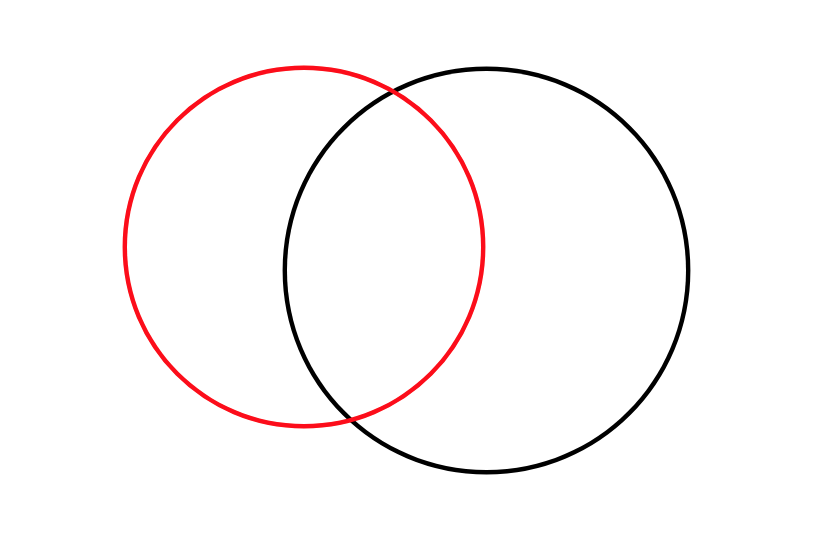
|
@kevinsimper right, but if you turn around (turn your head 180 degrees), without any arm model, your right hand would then become your left hand... the arm model is what keeps your right hand on the right. Also you can turn it off if you don't like it, as described above. |
|
@machenmusik We can't change how it works inside the Oculus Go, so shouldn't it work the same inside Aframe so that people don't get confused? It also works that way inside games: https://www.facebook.com/kevinsimper/videos/10157280187933539/ Edit: Also thought, you arm and hand does not move when your head do. That is why it feels weird when I tried it. |
|
@kevinsimper Did you get a chance to disable armModel? Does if work as you expect? |
|
@kevinsimper actually there is a native arm model for Oculus Go, and here is how to prove it... find a swivel chair and sit in it; put on your Oculus Go, go to the Home screen, center the controller and hold it out in front of you with your right hand; spin in the swivel chair slowly clockwise. You'll notice at first the controller doesn't move in space, as you mention in your diagram above. But as you keep spinning, you will notice that the controller starts to move in space to follow your rotation as well; it's the native arm model that is doing that. Without any arm model, the controller would stay in the same position and would no longer be visible once you had trotted far enough. The Oculus Go native arm model is almost certainly more sophisticated than the current basic arm model in A-Frame; pull requests with better arm model are certainly welcome, as are suggestions on how it could be improved even without implementation, as you have been doing (thank you BTW!)... and if the behavior with |
|
Is not the native arm model already applied and passed to the gamepad pose? |
|
https://judicious-random.glitch.me seems fine on Oculus Go If all the other 3DOF combinations apply native arm model, maybe we can default to
|
|
oh, I am wrong, armModel doesn't pass through |
|
So the current state of https://judicious-random.glitch.me is coded for the Go only, and there is apparently no position provided when the arm model is disabled; the controller stays put in the floor. :-/ |

6 participants


Description: Adds support for using / displaying the Oculus Go controller. Addresses #3390.
Changes proposed:
oculus-go-controls, which is pretty close in functionality to the GearVR controller. A lot of this is duplicated code right now, which can likely be consolidated.tracked-controlsto have multiple gamepad id prefixes in one string (since we now have a separate component for Oculus Go controllers)