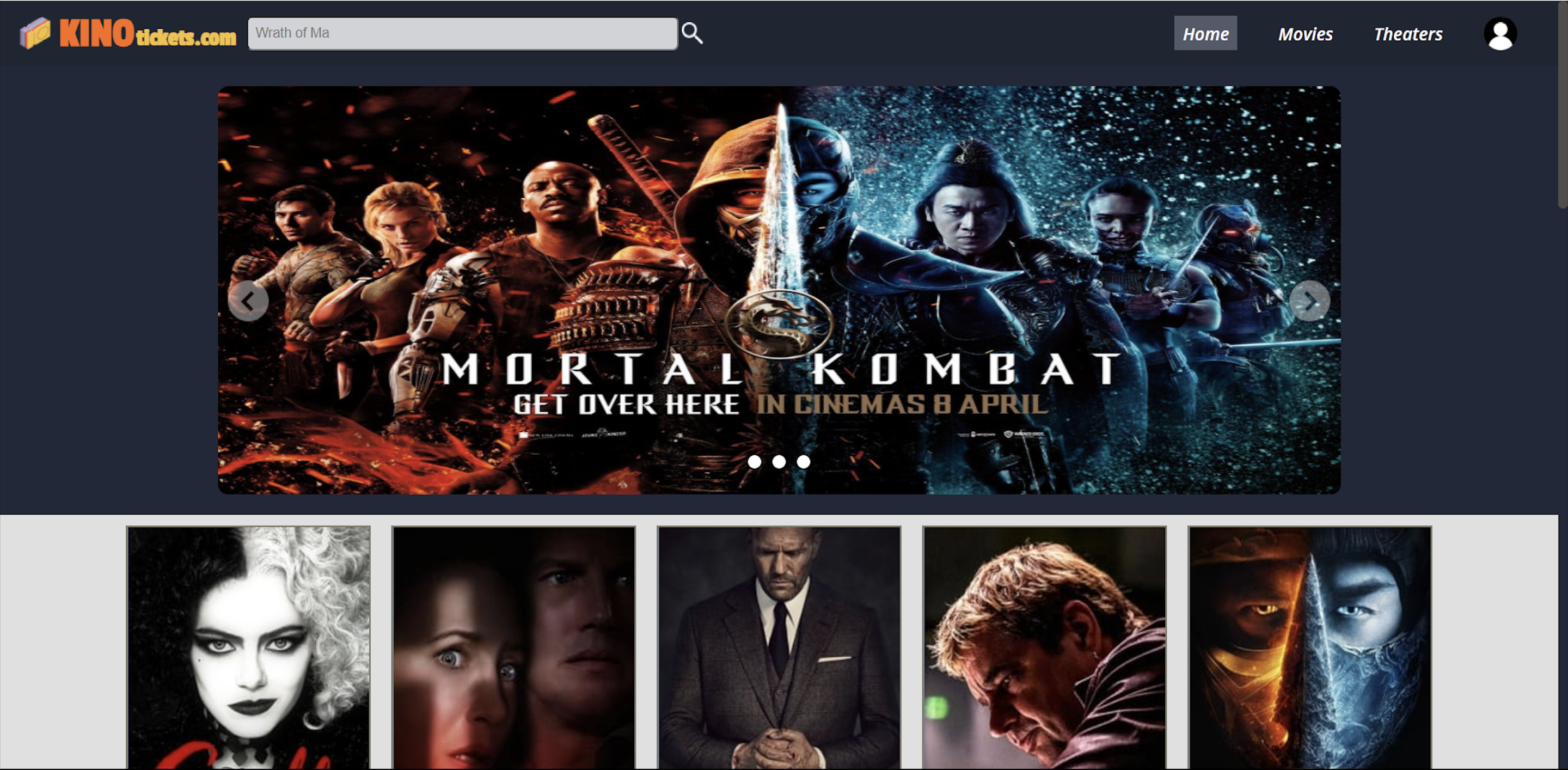
Our project is a movie ticket booking website. It has sections of Home, Signin/Signup, My Profile, My bookings, etc. We have used Tmdb API for movie database and Razorpay Gateway for payment, which is in test mode. Further these sections will be described in the later part of this README file.
Starting off with the HOME page, it begins with:
- Navigation Bar
- Website name and Logo
- Search bar
- Navigation Sections
- Home: Active page
- Movies: The page under construction
- Theater: The page under construction
- SignIn: Allows the user to SignIn, with a submenu to register himself if not.
- Container with cards containing:
- Movie Title
- Ratings
- Overview
- Footer which as the name suggests is the end of this page has:
- Website logo
- Social media handles which is also under construction.
- About us: This page gives a brief description about the creaters of this website
- Contact us: This page lets the user leave his/her queries to us which goes to our database on submission. Also we have given the address where people can reach out to us.
- Feedback: This has a link to a google form for the user to leave us a feedback on our website.
Then comes the other pages which can be reached using the navigation bar.
- SignIn: In this page the user enters his/her email and password in the fields to signIn, on clicking the proceed button one has access to his profile, bookings and also can now book any movies.
- Register: This page can be reached through the navigation bar as well as with the link in the sigin page. It has fields of name, email, contact, password and confirm password by filling which a person registers himself on our page and can now signin.
- My Profile: This can also be reached through the navigation bar and has option to reset all the credentials of the user including resetting the password.
- Bookings: This page also is reached using the navbar and displays all the successful and failed bookings made by the user.
Other than these we have pages to select:
- Slot date and timings
- Choice of seats
- A page consisting of the button to book the movies, its overview, trailer video and cast can be reached by clicking on the cards in the container of home page.
- After selection of seats displays a page with the summary of your booking as well as the amount to be paid. It also has a pay now button which directs you to the payment gateway through razorpay API.
- On payment a page with the booking summary is displayed which also gives you an option to print the ticket.
(1) Authentication Routes
These routes are for user registration and verification. New user's data is fetched from frontend after checking that all entries are in proper format and then user's data and hashed password is stored in the database.
For existing users the email and password is comapred with priorly entered values and on successfull match A token is given to the user for session.
It also has a route which resets the password on user request by taking token,old password and new password as requset parameters.
(2) Slot Routes
These routes handle all the requests regarding : (1) Availability of a movie on a particular date. (2) Slots that are vacant. (3) Information of booked and vacant seats.
(3) Booking Routes
These routes contain the following functions : (1) Blocking the selected seats for 5mins. (2) Creating order Id for payment. (3) Displaying all the order details by taking order_Id and user token as request parameters.
(4) User Routes
These routes are specially for handling user data. These are used for my profile and my bookings section mentioned in the frontend.








- Fork the repository.
- Clone the repository (
git clone URL) - Install the packages using the code given below
npm i nodemon bcrypt cors express jsonwebtoken pg dotenv razorpay
- Create account on razorpay then go into web integration and generate API test key and secret key.
- Create your own database on ElephantSQL.
- If you want to use Razorpay payments gateway as well generate your KEY_ID and KEY_SECRET using this link and then substitute it in the .env file.
- Now you can run
npm startand start working localy.
- Harsh Mishra (2020IMT-036)
- Samarjeet Mohite (2020IMT-084)
- Khushi Soni (2020IMT-045)
To access backend repository click on Movie-Backend.