
- 🎯 Description
- ✨ Features
- 📦 Example
- 🖼️ Visual Overview
- ⚙️ Usage
- 🧪 Smoke Tests
- ▶ Next Steps: Using Compiled Documents
- 💾 Working with BSON and Binary Data
- 📜 Syntax
- 📥 Installation
- 📂 Recommended File Structure
JSON-LOOM is a lightweight preprocessor that lets you author normalized JSON (similar to relational tables) and compile it into flat, document-friendly JSON optimized for document databases (e.g., MongoDB, CouchDB, Firestore). Think of it as Sass for JSON:
- Write once
- Keep it DRY
- Compile to ready-to-use output
$importsfor relational JSON or BSON sources$refsyntax with flexible spacing (product:1,product : 1)- Field-qualified
$ref(alias.field: value) returns an array of all matches - Array
$ref(alias.field: [v1, v2, ...]) expands into multiple records $aliasto project/rename fields- Detects circular references and missing IDs
- Validates aliases, IDs, and prevents duplicates
- Works with arrays (
[{...}]) or object-maps ({ "id": {...} }) - Optional
--strict-projectionfor safe$alias - Compile output to either
.jsonor.bson
data/products.json
[
  { "product_id": 1, "name": "t-shirt" },
  { "product_id": 2, "name": "pants" }
]
data/categories.json
[
  { "category_id": 10, "category_name": "apparel" }
]
data/logos.json
[
  {
    "logo_id": 1,
    "brand": "Acorn Systems",
    "mime_type": "image/png",
    "data_base64": "iVBORw0KGgoAAAANSUhEUgAAAAEAAAABCAQAAAC1HAwCAAAAC0lEQVR4nGMAAQAABQABDQottQAAAABJRU5ErkJggg=="
  },
  {
    "logo_id": 2,
    "brand": "Blue Meadow",
    "mime_type": "image/png",
    "data_base64": "iVBORw0KGgoAAAANSUhEUgAAAAIAAAACCAYAAABytg0kAAAAFElEQVR4nGP8z8AARAwMDIxBAAAgPgD13e9QYQAAAABJRU5ErkJggg=="
  }
]
data/suppliers.json
[
  { "supplier_id": 100, "supplier_name": "Acme Corp", "contact_email": "info@acme.com" }
]
preprocessor.json
{
  "$imports": {
    "product": "data/products.json",
    "category": "data/categories.json",
    "supplier": "data/suppliers.json",
    "logo": "data/logos.json"
  },
  "product": { "$ref": "product:1" },
  "category": { "$ref": "category: 10" },
  "supplier": {
    "$ref": "supplier : 100",
    "$alias": { "supplier_name": "name", "contact_email": "email" }
  },
  "app_branding": {
    "primary_logo": {
      "$ref": "logo :    1",
      "$alias": { "brand": "brand", "data_base64": "image" }
    }
  }
}
(Note: whitespace around the alias or id is ignored)
Run:
python jsonloom.py preprocessor.jsonOutput (preprocessor.compiled.json):
{
  "product": {
    "product_id": 1,
    "name": "t-shirt"
  },
  "category": {
    "category_id": 10,
    "category_name": "apparel"
  },
  "supplier": {
    "name": "Acme Corp",
    "email": "info@acme.com"
  },
  "app_branding": {
    "primary_logo": {
      "brand": "Acorn Systems",
      "image": "iVBORw0KGgoAAAANSUhEUgAAAAEAAAABCAQAAAC1HAwCAAAAC0lEQVR4nGMAAQAABQABDQottQAAAABJRU5ErkJggg=="
    }
  }
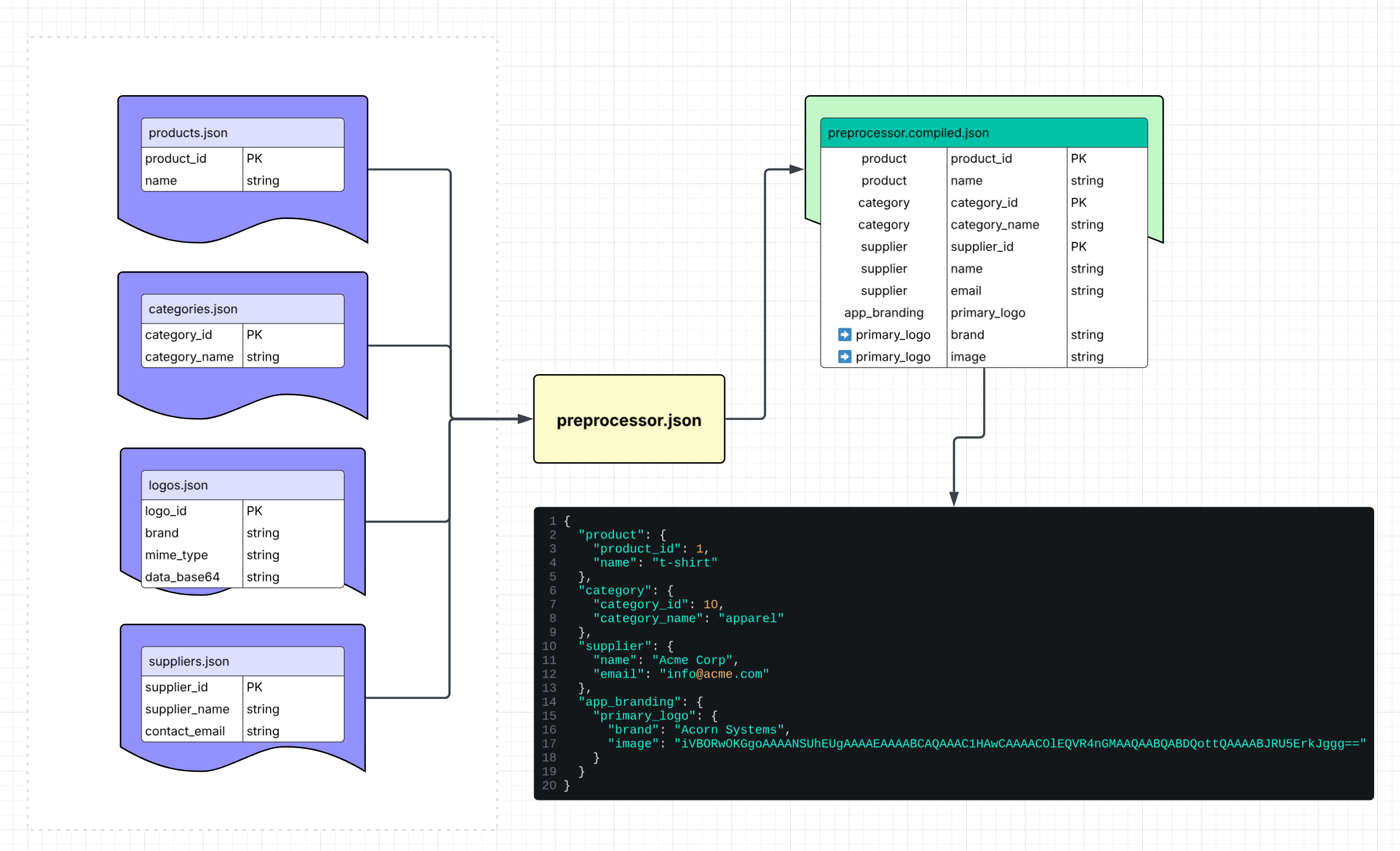
}The diagram below shows how JSON-LOOM stitches relational JSON sources into a single compiled document:
python jsonloom.py <input.json|.bson> [output.json|.bson] [options]

# If output is omitted, writes <input>.compiled.json (or .bson if input was .bson)
Options (can be combined in any order):
--strict-projection→ error if$aliasreferences fields that don’t exist (default: warn only)--indent N→ set JSON output indentation (default: 2; use 0 for minified output; ignored for BSON)--base64-binary→ when writing JSON, BSON Binary values are automatically converted to base64 strings
The smoke tests are provided to help contributors quickly verify that jsonloom.py is working as
expected after making code changes. They also serve as usage examples for common $ref and
$alias scenarios.
Think of these as unit tests for the compiler: when you add a new major feature, you should also add a new smoke test to ensure your new functionality doesn’t accidentally break the existing code.
A batch runner and sample preprocessor files are included under smoke_tests/ to validate the
compiler end-to-end.
run_smoke_tests.batThis will:
- Compile each
preprocessor_*.jsonfile - Move compiled outputs into
smoke_tests/results/ - Write a full log to
smoke_tests/results/smoke_tests.log - Print a summary of passed/failed cases
The suite covers both success and failure scenarios:
Expected to pass
- ✅
preprocessor_default_alias_id.json– default alias resolution - ✅
preprocessor_field_qualified.json– field-qualified$ref - ✅
preprocessor_whitespace_tolerance.json– spacing tolerance - ✅
preprocessor_object_map_imports.json– object map imports - ✅
preprocessor_order_items_array.json– multiple matches via$ref - ✅
preprocessor_inventory_array.json– array$refsyntax - ✅
preprocessor_binary_copy.json– creating a binary BSON copy
Expected to fail
- ❌
preprocessor_strict_projection.json --strict-projection– alias projection failure - ❌
preprocessor_missing_record.json– missing records - ❌
preprocessor_unknown_alias.json– unknown alias - ❌
preprocessor_circular_reference.json– circular reference detection
For quick iteration, you can run a single file:
python ..\jsonloom.py preprocessor_datalarge.jsonThis produces preprocessor_datalarge.compiled.json in the same folder.
JSON-LOOM produces fully denormalized JSON/BSON documents.
You can:
- Use them directly in your app (as static data or configs), or
- Submit them to a document database (e.g., MongoDB).
Example (MongoDB, Python):
collection.replace_one({ "_id": doc["_id"] }, doc, upsert=True)This pattern lets you re-compile normalized data and update the document store in one step.
JSON-LOOM supports both JSON and BSON as input and output formats:
.json→ standard JSON, portable and human-readable.bson→ MongoDB’s binary JSON, efficient and compact
Because JSON does not support raw binary, binary fields must be stored as base64 strings when working with .json files:
{
  "logo_id": 1,
  "brand": "Acorn Systems",
  "mime_type": "image/png",
  "data_base64": "iVBORw0KGgoAAAANSUhEUgAAAAEAAAABCAQ..."
}
If you import from .bson files that contain true Binary values:
- Compiling to
.bsonpreserves the raw binary. - Compiling to
.jsonwill, by default, raise an error unless you enable--base64-binary, which converts raw binary to base64 strings.
JSON-LOOM defaults to base64-in-JSON for binary data in examples. Why?
- Base64 is valid JSON and works everywhere (APIs, configs, GitHub).
- Easier for newcomers to understand and copy-paste.
- Keeps JSON-LOOM’s examples portable outside MongoDB.
Native BSON binary is still supported for advanced users who need efficiency in MongoDB-heavy environments.
Preprocessor files are strict JSON documents with a few special keywords.
Defines which relational JSON sources to load. Keys are aliases (used in $ref), and
values are file paths relative to the preprocessor file.
"$imports": {
  "product": "data/products.json",
  "logo": "data/logos.json",
  "category": "data/categories.json",
  "supplier": "data/suppliers.json"
}
Is like (SQL table aliases):
FROM products   AS product,
     logos      AS logo,
     categories AS category,
     suppliers  AS supplier
Is like (JavaScript / ES Modules):
import { product } from "data/products.json";
import { logo } from "data/suppliers.json";
import { category } from "data/categories.json";
import { supplier } from "data/suppliers.json";Each imported JSON/BSON source must have a clear identifier field so $ref can work.
- If the file is an array of objects, JSON-LOOM looks for
idfirst, then falls back to the first field ending in_id(e.g.,product_id,category_id,supplier_id). - If the file is an object keyed by IDs, those keys are used directly as IDs.
The import alias name ("product", "category", etc.) does not have to match the ID field name. For example:
"$imports": {
  "lighting_product": "data/products.json"
}

"product": { "$ref": "lighting_product:1" }
This approach works fine, even if the records inside products.json use product_id as the identifier. The important part is that each record has an ID field and $ref uses the right alias.
References one or more records from an imported file.
Supports three forms:
Format: "alias:id" — whitespace around the alias or id is ignored.
"product":  { "$ref": "product:1" },
"category": { "$ref": "category: 10" },
"supplier": { "$ref": "supplier  :   100" }
Is like (SQL primary key lookup):
SELECT * FROM products  WHERE id = 1;
SELECT * FROM categories WHERE id = 10;
SELECT * FROM suppliers WHERE id = 100;Format: "alias.field:value"
Fetches all records where the given field matches. Always returns an array.
"order_items": { "$ref": "order_items.order_id: 1" }Is like:
SELECT * FROM order_items WHERE order_id = 1;Compiled output:
"order_items": [
  { "id": 1, "order_id": 1, "product_id": 119, "qty": 2, "unit_price": 288.29 },
  { "id": 2, "order_id": 1, "product_id": 213, "qty": 3, "unit_price": 161.37 },
  { "id": 3, "order_id": 1, "product_id": 123, "qty": 2, "unit_price": 581.08 },
  { "id": 4, "order_id": 1, "product_id": 222, "qty": 1, "unit_price": 238.15 }
]Format: "alias.field:[v1, v2, ...]"
Fetches all records where the field is in the provided list of values. Returns an array of combined results.
"inventory": { "$ref": "inventory.product_id: [119, 213, 123, 222]" }Is like (SQL IN clause):
SELECT * FROM inventory WHERE product_id IN (119, 213, 123, 222);Compiled output:
"inventory": [
  { "product_id": 119, "warehouse": "W3-SAC", "on_hand": 255, "reserved": 20 },
  { "product_id": 213, "warehouse": "W2-SF", "on_hand": 323, "reserved": 9 },
  { "product_id": 123, "warehouse": "W1-LA", "on_hand": 413, "reserved": 19 },
  { "product_id": 222, "warehouse": "W2-SF", "on_hand": 171, "reserved": 38 }
]Optional projection/renaming. Maps fields in the source record to new keys in the compiled output.
"supplier": {
  "$ref": "supplier:100",
  "$alias": { "supplier_name": "name", "contact_email": "email" }
}
Output:
"supplier": {
  "name": "Acme Corp",
  "email": "info@acme.com"
}
Is like (SQL SELECT aliasing):
SELECT supplier_name AS name, contact_email AS email
FROM suppliers WHERE supplier_id = 100;No dependencies required — just Python 3.9+.
If you only plan to work with .json files, you’re ready to go.
git clone https://github.com/Hydra9268/json-loom.git
cd json-loomIf you want to import/export .bson files or handle binary data, you need an extra package:
# Recommended
pip install pymongo

# Alternative (not recommended, may conflict with pymongo)
pip install bson
⚠️ BSON support comes from thepymongopackage. A standalonebsonpackage also exists, but it’s not official and may conflict — prefer installingpymongo.
To keep projects organized, we suggest separating your relational JSON sources (products, categories, suppliers, etc.) from your preprocessor JSON files (the documents that reference them).
Example layout:
json-loom/
├── jsonloom.py
├── preprocessor.json
└── data/
    ├── products.json
    ├── logos.json
    ├── categories.json
    └── suppliers.json
- Place normalized/relational JSON files inside a
data/folder (or any folder you prefer). - Keep your preprocessor files (like
preprocessor.json) at the project root for clarity. - References in
$importsare always relative to the preprocessor file’s location.