-
Notifications
You must be signed in to change notification settings - Fork 234
Document the supported 35 standard Postscript fonts in the Technical Reference section #3378
New issue
Have a question about this project? Sign up for a free GitHub account to open an issue and contact its maintainers and the community.
By clicking “Sign up for GitHub”, you agree to our terms of service and privacy statement. We’ll occasionally send you account related emails.
Already on GitHub? Sign in to your account
Merged
Merged
Changes from all commits
Commits
Show all changes
16 commits
Select commit
Hold shift + click to select a range
a020857
Add the list of 35 standard Postscript fonts to Technical Reference
seisman 811f6e9
Add the table
seisman 23ace6d
Fix image link
seisman bba62b7
Convert the table into two columns to save vertical spaces
seisman 143ecfe
Add to toctree
seisman 323cf48
Use markdown syntax
seisman f8face5
Updates
seisman 26bdcd5
Update doc/techref/fonts.md
seisman a6ace91
Apply suggestions from code review
seisman 1dca229
Update the font table
seisman ca052d6
Remove the sentence about octal codes and fonts from the text symbol …
seisman 000c42b
Merge branch 'main' into docs/fonts
seisman 9132a3f
Add supported fonts back
seisman cf591a5
Rewrap to 88 characters
seisman 96d7cbb
Merge branch 'main' into docs/fonts
seisman 8ed3552
Set the figure width to 67.5% to have the same widths for image and t…
seisman File filter
Filter by extension
Conversations
Failed to load comments.
Loading
Jump to
Jump to file
Failed to load files.
Loading
Diff view
Diff view
There are no files selected for viewing
This file contains hidden or bidirectional Unicode text that may be interpreted or compiled differently than what appears below. To review, open the file in an editor that reveals hidden Unicode characters.
Learn more about bidirectional Unicode characters
| Original file line number | Diff line number | Diff line change |
|---|---|---|
| @@ -0,0 +1,31 @@ | ||
| # Supported Fonts | ||
|
|
||
| PyGMT supports the 35 standard PostScript fonts. The table below lists them with their | ||
| font numbers and font names. When specifying fonts in PyGMT, you can either give the | ||
| font name or just the font number. For example, to use the font "Helvetica", you can use | ||
| either `"Helvetica"` or `"0"`. For the special fonts "Symbol" (**12**) and | ||
| "ZapfDingbats" (**34**), see the {doc}`/techref/encodings` for the character set. | ||
| The image below the table shows a visual sample for each font. | ||
|
|
||
| | Font No. | Font Name | Font No. | Font Name | | ||
| |----------|------------------------|----------|------------------------------| | ||
| | 0 | Helvetica | 17 | Bookman-Demi | | ||
| | 1 | Helvetica-Bold | 18 | Bookman-DemiItalic | | ||
| | 2 | Helvetica-Oblique | 19 | Bookman-Light | | ||
| | 3 | Helvetica-BoldOblique | 20 | Bookman-LightItalic | | ||
| | 4 | Times-Roman | 21 | Helvetica-Narrow | | ||
| | 5 | Times-Bold | 22 | Helvetica-Narrow-Bold | | ||
| | 6 | Times-Italic | 23 | Helvetica-Narrow-Oblique | | ||
| | 7 | Times-BoldItalic | 24 | Helvetica-Narrow-BoldOblique | | ||
| | 8 | Courier | 25 | NewCenturySchlbk-Roman | | ||
| | 9 | Courier-Bold | 26 | NewCenturySchlbk-Italic | | ||
| | 10 | Courier-Oblique | 27 | NewCenturySchlbk-Bold | | ||
| | 11 | Courier-BoldOblique | 28 | NewCenturySchlbk-BoldItalic | | ||
| | 12 | Symbol | 29 | Palatino-Roman | | ||
| | 13 | AvantGarde-Book | 30 | Palatino-Italic | | ||
| | 14 | AvantGarde-BookOblique | 31 | Palatino-Bold | | ||
| | 15 | AvantGarde-Demi | 32 | Palatino-BoldItalic | | ||
| | 16 | AvantGarde-DemiOblique | 33 | ZapfChancery-MediumItalic | | ||
| | | | 34 | ZapfDingbats | | ||
|
|
||
| 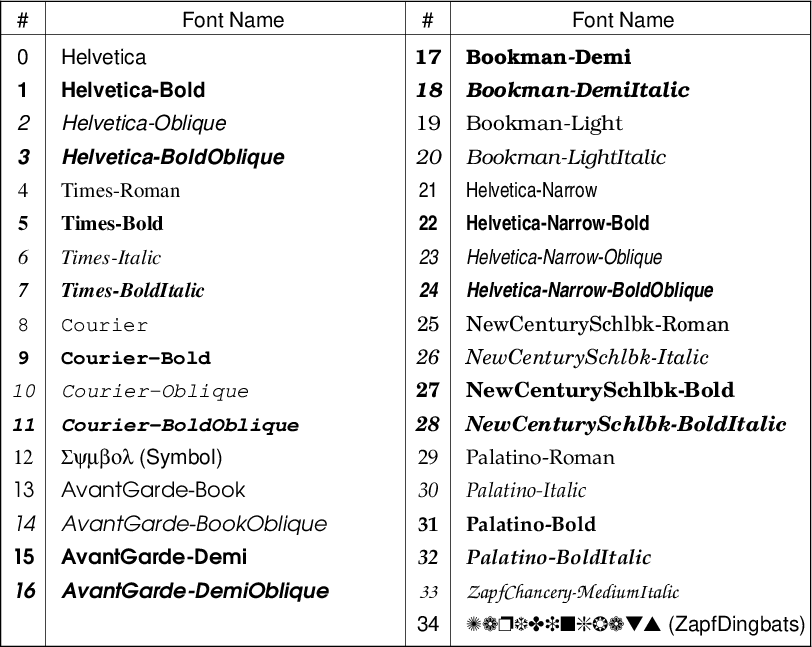{width="67.5%"} |
This file contains hidden or bidirectional Unicode text that may be interpreted or compiled differently than what appears below. To review, open the file in an editor that reveals hidden Unicode characters.
Learn more about bidirectional Unicode characters
This file contains hidden or bidirectional Unicode text that may be interpreted or compiled differently than what appears below. To review, open the file in an editor that reveals hidden Unicode characters.
Learn more about bidirectional Unicode characters
This file contains hidden or bidirectional Unicode text that may be interpreted or compiled differently than what appears below. To review, open the file in an editor that reveals hidden Unicode characters.
Learn more about bidirectional Unicode characters
Add this suggestion to a batch that can be applied as a single commit.
This suggestion is invalid because no changes were made to the code.
Suggestions cannot be applied while the pull request is closed.
Suggestions cannot be applied while viewing a subset of changes.
Only one suggestion per line can be applied in a batch.
Add this suggestion to a batch that can be applied as a single commit.
Applying suggestions on deleted lines is not supported.
You must change the existing code in this line in order to create a valid suggestion.
Outdated suggestions cannot be applied.
This suggestion has been applied or marked resolved.
Suggestions cannot be applied from pending reviews.
Suggestions cannot be applied on multi-line comments.
Suggestions cannot be applied while the pull request is queued to merge.
Suggestion cannot be applied right now. Please check back later.
There was a problem hiding this comment.
Choose a reason for hiding this comment
The reason will be displayed to describe this comment to others. Learn more.
I prefer to remove this sentence because this gallery example should focus on "Typesetting text like symbols".
There was a problem hiding this comment.
Choose a reason for hiding this comment
The reason will be displayed to describe this comment to others. Learn more.
Maybe we can reduce the sentence to:
and move it up:
There was a problem hiding this comment.
Choose a reason for hiding this comment
The reason will be displayed to describe this comment to others. Learn more.
Done in 9132a3f.