[JDBC 라이브러리 구현하기 - 1, 2단계] 에어(김준서) 미션 제출합니다. #7
Conversation


 choijy1705
left a comment
choijy1705
left a comment
choijy1705
left a comment
There was a problem hiding this comment.
안녕하세요 에어.
연휴인데도 빠르게 구현해주셨네요
JdbcTemplate 을 엄청 잘 구현해주셨네요 저도 많은 부분을 얻어갈 수 있었습니다.
근데 아직까지 InMemoryUserRepository를 사용하고 있는 것 같습니다.
userDao를 활용하여 구현하신 jdbcTemplate이 실제로 동작하도록 하면 더 좋을 것 같아요.
그리고 저도 jdbcTemplateTest 가 비어있는데 이부분도 한번 고민해보시면 좋을 것 같습니다.
추석 잘보내세여
| try (Connection conn = dataSource.getConnection(); | ||
| Statement statement = conn.createStatement()) { | ||
| final String sql = getInitSchema(); | ||
| statement.execute(sql); | ||
| } catch (NullPointerException | IOException | SQLException e) { | ||
| } catch (SQLException e) { | ||
| throw new DataAccessException(e.getMessage()); | ||
| } catch (URISyntaxException | IOException e) { |
| datasource.url=jdbc:h2:mem:test;DB_CLOSE_DELAY=-1; | ||
| datasource.username= | ||
| datasource.password= |
There was a problem hiding this comment.
오 application.properties로 설정할 수 있도록 구현하셨네요. 좋은 아이디어인것 같습니다
| @Test | ||
| void findAllByAccount() { | ||
| final User user = new User("gugu", "password1", "[email protected]"); | ||
| userDao.insert(user); | ||
|
|
||
| List<User> users = userDao.findAllByAccount("gugu"); | ||
|
|
||
| assertThat(users).hasSize(2); | ||
| } |
There was a problem hiding this comment.
account가 아이디인데 findAll할 경우가 있을까요? 같은 account로 등록을 하면 오히려 예외를 발생하도록 하면 좋을 것 같습니다.
There was a problem hiding this comment.
아 이 부분은 where 절이 있는 쿼리여도 여러 데이터가 반환될 수 있는 경우를 제대로 처리할 수 있는지 확인하기 위해 만들어 둔 부분인데, account로 테스트 하다보니 적절하지 않은 것 같네요! 삭제하겠습니다!
| execute(sql, pstmt -> { | ||
| setter.setValues(pstmt); | ||
| pstmt.executeUpdate(); | ||
| return null; |
There was a problem hiding this comment.
execute를 실행하기 위해서 반환값이 필요했는데 찾아보니 pstmt.executeUpdate();에 반환값이 존재하네요! pstmt.executeUpdate();값을 리턴하도록 변경하였습니다!
| public static class Builder { | ||
| private String url; | ||
| private String username; | ||
| private String password; | ||
|
|
||
| public Builder url(String url) { | ||
| this.url = url; | ||
| return this; | ||
| } | ||
|
|
||
| public Builder username(String username) { | ||
| this.username = username; | ||
| return this; | ||
| } | ||
|
|
||
| public Builder password(String password) { | ||
| this.password = password; | ||
| return this; | ||
| } | ||
|
|
||
| public DataSourceProperty build() { | ||
| return new DataSourceProperty(this); | ||
| } | ||
| } |
There was a problem hiding this comment.
builder를 사용한 이유가 궁금합니다.
저는 개인적으로 파라미터가 많은 경우에 의미가 있다고 생각하는데 3개정도는 생성자를 통해서 하는게 좀 더 명확할거 같다는 생각입니다.
There was a problem hiding this comment.
제가 이 경우에 빌더를 사용한 이유는 url, username, password 의 타입이 모두 String이어서 값이 바꿔서 들어가더라도 제대로 인지하지 못할 것 같다는 생각이 들어서였습니다.
처음에는 아래와 같이 사용하였으나, url 자리에 username이 들어가는 등, 생성자 파라미터에 들어가는 값이 달라도 모두 String이기 때문에 헷갈릴 수 있다는 생각이 들었습니다.
new DataSourceProperty(
    properties.getProperty("datasource.url"),
    properties.getProperty("datasource.username"),
    properties.getProperty("datasource.password")
);
빌더의 필드 이름값을 통해 값을 넣어주면 명확하게 어떤 필드에 어떤 값이 들어가는 지 확인할 수 있어서 빌더를 적용해봤습니다!
| public <T> List<T> query(String sql, RowMapper<T> mapper, Object... args) { | ||
| return query(sql, args, new RowMapperResultSetExtractor<>(mapper)); | ||
| } |
There was a problem hiding this comment.
이부분이 꼭 필요한가요? 별다른 기능없이 밑의 query만 호출 하는 느낌입니다. 혹시 의도한 기능이 있다면 있어야겠지만. 아니라면 이부분을 없애고 밑에 query 메서드를 활용하도록 하는게 좋을 것 같아요
There was a problem hiding this comment.
이 부분은 사용자가 사용하기 편하게 하기 위해서 만들어 두었습니다!
밑의 query만 사용하려면 사용자가 직접 RowMapperResultSetExtractor를 생성해서 넣어줘야하지만, 위의 query를 이용하면, jdbcTemplate.query(sql, USER_ROW_MAPPER, account); 와 같은 형식으로 편하게 사용할 수 있다는 생각에 분리해 놓았습니다!
다시 살펴보니 밑의 query를 없애고, 위의 query만 사용하는 식으로는 줄일 수 있을 것 같아 위의 query를 활용하는 식으로 리팩토링 해보겠습니다!

|
영이~ 좋은 피드백 감사합니다! 피드백 반영
JdbcTemplateTest를 어떻게 할까 고민하다가 spring은 어떤식으로 테스트 코드를 짰는지 참고해서 코드를 작성해봤어요. 실제 데이터를 다루는 부분은 dao 테스트가 담당한다고 생각하여 JdbcTemplateTest는 실제로 쿼리에 따라 어떤 메서드들이 호출되는지를 중점적으로 테스트했습니다! 확인 후 리뷰 부탁드립니다~~ 감사해요! 🙏 |
choijy1705
left a comment
choijy1705
left a comment
There was a problem hiding this comment.
안녕하세요 에어
피드백 반영확인했습니다. jdbcTemplate으로도 userDao가 잘 동작하는 것도 확인했습니다.
몇가지 같이 고민해보면 좋을 것 같아서 리뷰 남겼습니다.
| final User user = new User(2, | ||
| request.getParameter("account"), | ||
| request.getParameter("password"), | ||
| request.getParameter("email")); |
There was a problem hiding this comment.
schema.sql 에서 auto_increment라서 id 값이 중요하지 않을 수는 있지만. 코드를 처음 보는 사람들은 userId가 계속 2로 들어 갈 거 라고 오해할 수 있을 것 같아요
| @Test | ||
| @DisplayName("select where 쿼리 실행. 반환값이 1개인 경우") | ||
| void selectOne() throws SQLException { | ||
| // given | ||
| String sql = "select * from users where email = ?"; | ||
| String email = "[email protected]"; | ||
| given(resultSet.next()).willReturn(true, false); | ||
| given(resultSet.getString("email")).willReturn(email); | ||
|
|
||
| // when | ||
| User user = jdbcTemplate.queryForObject(sql, TEST_USER_ROW_MAPPER, email); | ||
|
|
||
| // then | ||
| assertThat(user.getEmail()).isEqualTo(email); | ||
| verify(preparedStatement).setObject(1, email); | ||
| verify(preparedStatement).executeQuery(); | ||
| verify(preparedStatement).close(); | ||
| verify(resultSet).close(); | ||
| verify(connection).close(); |
There was a problem hiding this comment.
jdbcTemplateTest를 mockito를 활용하여 진행하셨네요. 저는 실제 datasource와 schema.sql등을 옮겨서 실제와 완전히 똑같이 진행하였습니다. mockito를 사용하는 것도 좋은 방법 중 하나라고 생각하는데. 사실 datasource를 생성하는 것 부터 객체를 불러오는 모든 부분들이 mock으로 진행되는것 같습니다. 이렇게 진행하면 과연 실제 jdbcTemplate이 제대로 동작한다고 판단할 수 있을까요? 제 생각은 verify를 하는 정도 까지만 의미있는 테스트이고 assertThat 부분은 실제와 다를 수 도 있다는 생각이 들었습니다.
에어의 생각이 궁금합니다.
There was a problem hiding this comment.
좋은 의견 감사합니다! 🙏
제 의견도 말씀드리고 다시 의견을 나눠보고 싶네요! ㅎㅎ
저는 실제 datasource를 생성하는 것 부터 전부 동작하게 하는 테스트는 통합테스트나 인수테스트라고 생각을 했어요! JdbcTemplateTest같은 경우는 단위 테스트를 목적으로 작성해봤습니다!
실제 모든 과정이 제대로 동작하는지를 테스트하기 보다는 직접 구현한 JdbcTemplate 단위 자체만 잘 동작하는지를 테스트해보고 싶었어요. 서비스단의 단위테스트를 작성할 때 repository를 mocking하는 느낌으로요! 그래서 미리 만들어져있는 Connection, PreparedStatement 등을 mocking 해서 진행했습니다! 실제 모든 과정이 잘 진행되는지를 확인하기 위해서는 별도의 통합테스트나 인수테스트로 진행하는 것이 좋다고 생각해요.
Connection, PreparedStatement 등이 제공하는 메서드가 호출되는 부분은 JdbcTemplate에서 구현한 메서드에 따라 어떤 메서드가 호출되는지 여부만 판단하면 된다고 생각했어요! 마찬가지로 select 쿼리 테스트 부분은 DB에 조건에 해당하는 몇 개의 데이터가 있음을 가정하고 JdbcTemplate의 메서드가 올바른 흐름으로 동작하는지 확인하는 부분이라고 생각하여 assertThat 부분도 추가하였습니다!
There was a problem hiding this comment.
에어의 의견과 다른 크루 의견을 들어보니 jdbcTemplateTest에서는 메서드가 호출되는지 여부만 판단하면 될 것 같군요. 저도 mock으로 테스트를 변경하려구여 ㅋㅋ 좋은 의견 감사합니다 👍
| public <T> List<T> query(String sql, RowMapper<T> mapper, Object... args) { | ||
| RowMapperResultSetExtractor<T> extractor = new RowMapperResultSetExtractor<>(mapper); | ||
| PreparedStatementSetter setter = argumentPreparedStatementSetter(args); | ||
| return execute(sql, pstmt -> { | ||
| ResultSet resultSet = null; | ||
| try { | ||
| setter.setValues(pstmt); | ||
| resultSet = pstmt.executeQuery(); | ||
| return extractor.extractData(resultSet); | ||
| } finally { | ||
| if (resultSet != null) { | ||
| resultSet.close(); | ||
| } | ||
| } | ||
| }); | ||
| } |
There was a problem hiding this comment.
이 부분에서 catch를 통하여 예외를 처리할 상황은 아예 없는걸까요?
There was a problem hiding this comment.
저 부분은 결국 execute()메서드 내부에서 실행되어 execute()메서드의 catch에서 SQLException을 잡아줄 것 같습니다!
| private <T> T execute(String sql, PreparedStatementCallback<T> callback) { | ||
| try (Connection conn = dataSource.getConnection(); | ||
| PreparedStatement pstmt = conn.prepareStatement(sql)) { | ||
| log.debug("query : {}", sql); | ||
| return callback.execute(pstmt); | ||
| } catch (SQLException e) { | ||
| throw new DataAccessException(e.getMessage()); | ||
| } | ||
| } |
There was a problem hiding this comment.
조회에는 필요하지 않겠지만 execute 에서는 트랜잭션을 처리해줘야 할 필요가 있을것 같습니다. 저도 확실치는 않는 부분이라 같이 한번 고민해보면 좋을 거 같습니다.
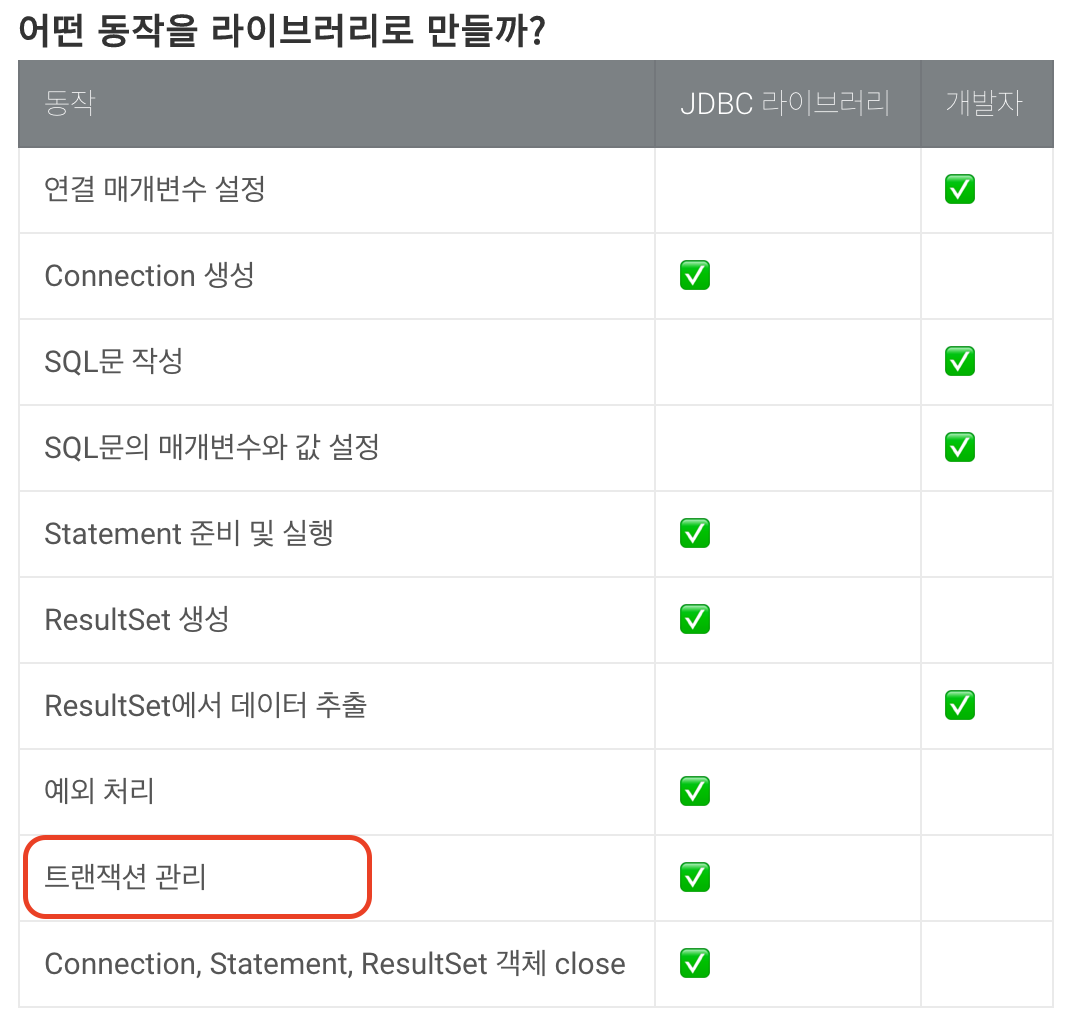
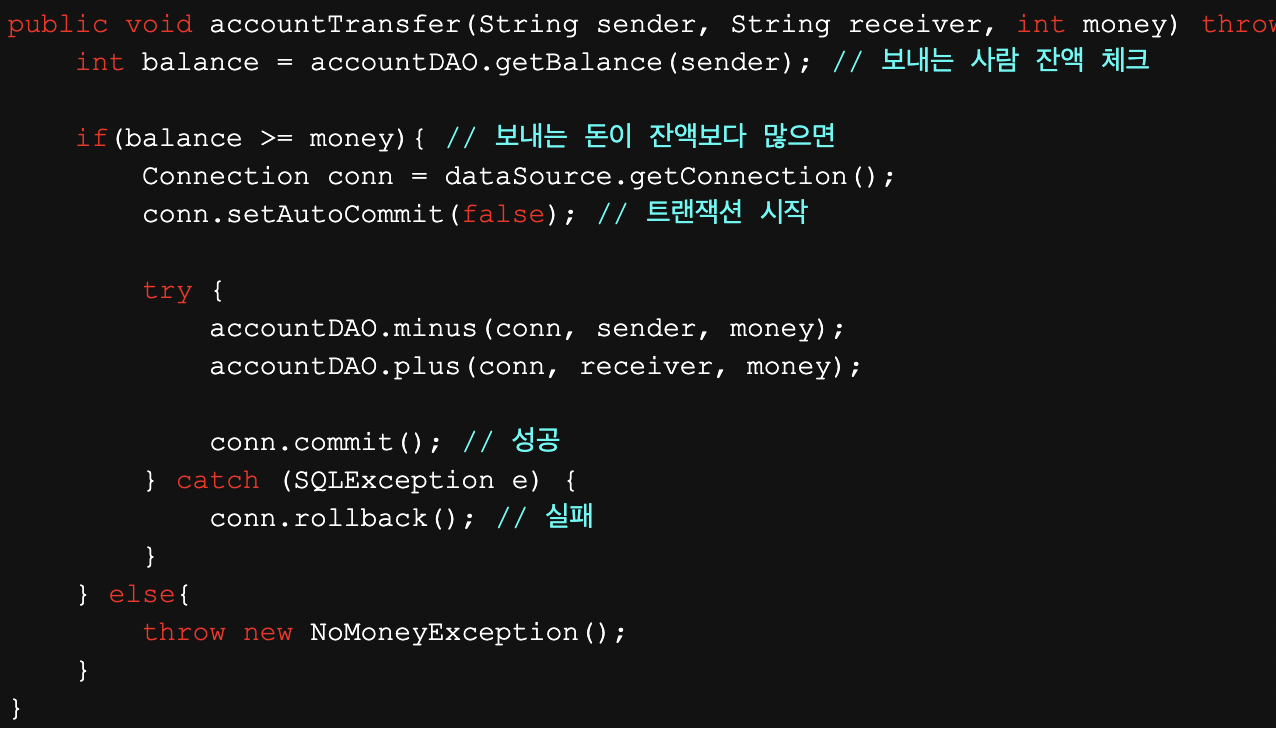
There was a problem hiding this comment.
이 부분을 한 번 찾아보니 기본적으로 setAutoCommit의 값이 true라고 하네요. setAutoCommit(true)인 경우는 코드상에서 commit이나 rollback을 명시 하지 않아도 정상동작하면 commit, 에러 발생시, rollback을 해준다고 하네요!
https://docs.oracle.com/javase/7/docs/api/java/sql/Connection.html#setAutoCommit(boolean)
다만 이때는 개별 트랜잭션으로 관리되어서 예를 들어 10개의 쿼리 중 3번째 쿼리에 문제가 있으면 3번째 쿼리만 rollback 된다고 하네요. 그래서 만약 10개의 쿼리 중 하나라도 문제가 있을 때 모두 반영되지 않길 바랄 때는 setAutoCommit(false)로 두고 직접 commit 지점과 rollback 지점을 설정해줘서 처리하는 것 같습니다!(아마 스프링의 @Transactional을 처리할 때 이렇게 하지 않을까 추측이 되네요.. 아닐수도..)
execute 메서드의 경우는 개별 트랜잭션으로(setAutoCommit(true)) 관리하여도 괜찮다고 생각하는데 영이는 어떻게 생각하시나요?
There was a problem hiding this comment.
앗 따로 설정을 안해줘도 commit과 rollback을 알아서 처리해주는군요... 제가 너무 안알아보고 리뷰를 남겼네요ㅋㅋ
이부분 리뷰를 남긴 이유는 원래 rollback 처리를 따로 해줘야 할 것 같아서 남겼는데 알아서 처리를 해준다면 꼭 처리할 필요는 없을 것 같습니다.
다만 JDBC 라이브러리르 쓰는 사용자가 여러개의 업데이트 쿼리를 날릴 경우를 대비하여 이부분은 setAutoCommit(false) 로 하여 rollback 상황을 처리하는게 좋을 것 같네요. 저도 조금 더 자세히 알아봐야겠어요 ㅠㅠ
There was a problem hiding this comment.
말씀해주신 사용자가 여러개의 쿼리를 날리는 경우 결국 이런 형식이 될 것 같아요!
public void method() {
    jdbcTemplate.update(); // 1
    jdbcTemplate.update(); // 2
    jdbcTemplate.update(); // 3
    // ...
}
이런 경우면 execute()에서 setAutoCommit(false)를 해줘도 각 jdbcTemplate.update() 메서드 별로 하나씩 execute()가 실행될 것 같기 때문에 결국 method() 전체가 트랜잭션으로 묶이지 않고, 각 update()별(1, 2, 3)로 각각 트랜잭션이 묶일 것 같아요! 그래서 setAutoCommit(true)해준 것과 같은 효과를 볼 것 같다는 생각이 들어요!
말씀해주신 여러개의 쿼리가 발생하는 경우를 하나의 트랜잭션으로 묶으려면, 결국
1)@Transactional을 직접 구현하거나
// 1
@Transactional
public void method() {
    jdbcTemplate.update(); // 1
    jdbcTemplate.update(); // 2
    jdbcTemplate.update(); // 3
    // ...
}
2)올려주신 사진의 형태처럼 메서드 자체를 아래와 같은 형식으로 처리해야할 것 같아요.
// 2
public void method() {
    Connection conn = dataSource.getConnection();
    conn.setAutoCommit(false);
    try {
        // ...
        pstmt1.executeUpdate() // 1

        // ...
        pstmt2.executeUpdate() // 2

        // ...
        pstmt3.executeUpdate() // 3

        // ...
        conn.commit();
    } catch (SQLException e) {
        conn.rollback();
    }
    // ...
}
2번의 경우는 프로덕션 단에서 Connection을 직접 다뤄야하는 문제점이 있을 것 같아서 만약 여러개의 쿼리를 날리는 경우를 처리해야한다면 쉽지는 않겠지만 @Transactional을 구현하여 프록시 객체를 이용하는 방법이 더 좋을 것 같다는 생각이 드네요!
There was a problem hiding this comment.
메서드 하나에서 jdbcTemplate.update() 를 여러번 날리는건 JDBC 라이브러리에서 처리할 트랜잭션 문제는 아닌거 같네요. 첫번째나 두번째 예시모두 이러한 트랜잭션처리는 JDBC 라이브러리를 사용하는 개발자가 구현해야할 부분 같습니다. @Transactional 을 만들어서 개발자가 사용할 수 있도록 할 수 도 있겠지만 그 부분은 jdbcTemplate과는 별개의 영역 같습니다.
제 생각에는 그냥 이대로 놔두시면 될 것 같습니다ㅋㅋ
|
영이! 의견을 나누는 과정이 재밌네요ㅎㅎ |
choijy1705
left a comment
choijy1705
left a comment
There was a problem hiding this comment.
안녕하세여 에어
매번 좋은 의견들을 주셔서 많이 배울 수 있었습니다.
머지할려구 했는데 저도 리뷰를 받으면서 보니 제가 몇 가지 빼먹은 부분이 있더군요 그 부분도 한번 고민해보시면 좋을 것 같아서 리뷰 남겼습니다.
| public class ArgumentPreparedStatementSetter implements PreparedStatementSetter { | ||
|
|
||
| private final Object[] args; | ||
|
|
||
| public ArgumentPreparedStatementSetter(Object[] args) { | ||
| this.args = args; | ||
| } | ||
|
|
||
| @Override | ||
| public void setValues(PreparedStatement pstmt) throws SQLException { | ||
| for (int i = 0; i < args.length; i++) { | ||
| Object value = args[i]; | ||
| pstmt.setObject(i + 1, value); | ||
| } | ||
| } | ||
| } |
There was a problem hiding this comment.

에어 제가 요구사항 몇가지를 빼먹고 리뷰를 했네여. 마지막 부분에 PreparedStatementSetter를 구현하지말고 가변인자를 통하여 좀더 편하게 만들 방법을 고민해보라네여. 에어도 이부분 고민해보면 좋을 것 같습니다.
| public class RowMapperResultSetExtractor<T> { | ||
|
|
||
| private final RowMapper<T> rowMapper; | ||
|
|
||
| public RowMapperResultSetExtractor(RowMapper<T> rowMapper) { | ||
| this.rowMapper = rowMapper; | ||
| } | ||
|
|
||
| public List<T> extractData(ResultSet resultSet) throws SQLException { | ||
| List<T> results = new ArrayList<>(); | ||
| while (resultSet.next()) { | ||
| results.add(rowMapper.mapRow(resultSet)); | ||
| } | ||
| return results; | ||
| } | ||
| } |
There was a problem hiding this comment.
이 부분도 굳이 안만들고 처리할 수 있을것 같아요. 아직 미션 마감까지 여유가 있으니 한번 고민해보면 좋을 것 같습니다.
|
|
||
| private static final Logger log = LoggerFactory.getLogger(LoginController.class); | ||
|
|
||
| private final UserDao userDao = new UserDao(DataSourceConfig.getInstance()); |
There was a problem hiding this comment.
필드 주입도 문제가 없겠지만. @Inject 를 통한 생성자 주입도 고민해보면 좋을 것 같습니다.
저도 이부분은 명확하지는 않지만 저는 ControllerScanner에서 @Inject 와 @Repository 를 활용하여 주입하도록 하였습니다. 한 번 고민해보시고 이부분도 의견 나누면 좋을 것 같아여

|
SonarCloud Quality Gate failed. |


|
영이 주신 피드백 반영했습니다! 이전 MVC 미션에서 ApplicationContext를 만들어 빈 등록, 생성자 주입을 한 번 구현해봤었는데요. 이때 빈 등록을 하면서 @Autowired가 붙은 생성자를 찾고 그 생성자의 필드를 찾아서 만약 해당 필드타입의 인스턴스가 이미 빈으로 등록되어 있으면 빈 저장소에서 꺼내썼고, 등록되어 있지 않다면 재귀적으로 해당 필드를 먼저 빈 등록 하는 식으로 구현했었어요. 이번에 피드백 주신 것 처럼 UserDao를 생성자 주입하려다 보니, MVC 미션 때 구현한 부분을 모두 가져오려다가 너무 주객이 전도되는 느낌이어서 일부만 가져와서 ApplicationContext가 아닌 ControllerScanner에서 약식으로 구현해 봤어요! 빈으로 관리하지 않고 ControllerScanner에서 구현하려다보니 몇 가지 문제점이 있긴해서 조금 아쉽긴 하네요 |
choijy1705
left a comment
choijy1705
left a comment
There was a problem hiding this comment.
에어 피드백 반영하시느라 고생많으셨습니다.
생성자 주입까지 완벽하게 동작 확인했습니다.
한가지 궁금한게 있어서 남겼는데 확인해주세요.
미션하시느라 고생많으셨습니다 👍
| Object[] fields = new Object[parameterTypes.length]; | ||
| int index = 0; | ||
| for (Class<?> parameter : parameterTypes) { | ||
| fields[index++] = create(parameter); |
There was a problem hiding this comment.
오 create를 재활용 하면 더 간단하겠군요. 하나 배웠습니다👍
| .findAny() | ||
| .orElseGet(() -> { | ||
| try { | ||
| return clazz.getConstructor(); |
There was a problem hiding this comment.
clazz.getDeclaredConstructor() 가 아니여도 이부분은 문제가 없을까요? 궁금하네요
There was a problem hiding this comment.
저는 @Autowired가 붙어 있는 생성자가 있을 때만 해당 생성자에 의존성 주입을 해주길 원했는데요!
만약 @Autowired가 붙어 있는 생성자가 없고 기본 생성자가 있다면 다른 클래스에 주입해주기 위해 인스턴스화 해야한다고 생각했어요.(빈일 경우에!)
하지만 만약 @Autowired가 붙어 있는 생성자가 없고, 기본 생성자가 없다면 에러를 발생하는 게 맞다고 생각했어요. private 기본 생성자를 사용자가 임의로 만들어 놓은 경우도 에러가 발생하게 하고 싶어서 저렇게 했는데, 실제 스프링에서는 어떻게 하는지는 잘 모르겠네요 ㅠㅠ
결론적으로 아래와 같이 생각했어요.
- 생성자에 @Autowired가 붙어 있으면 의존성 주입을 해주길 원하는 것
- @Autowired 생성자가 없으면 기본 생성자로 인스턴스 생성(해당 타입의 인스턴스를 주입받아야 할 클래스를 위해)
- @Autowired가 붙어 있지않고 기본 생성자도 없다면 의존성 주입을 할 수 없음.

2 participants


안녕하세요 영이!
리뷰어로 만나게 되어 반갑네요ㅎㅎ 리뷰 잘 부탁드립니다! 🙏
이번 미션을 진행하면서 톰캣 연결 부분과 같은 부분들도 다른 모듈로 분리하여 app 모듈에는 실제 스프링 쓰듯이 필요한 부분만 남기고 싶었고 빈 등록, 의존성 주입도 해보고 싶었으나, 이 부분들은 이전 MVC 미션을 하면서 적용해봤던 부분이라 이번에는 Jdbc 쪽만 집중해서 구현해봤습니다!
app모듈에 application.properties 파일을 만들어 url, username, password 를 관리하게 하였고 단계적으로 리팩터링 과정을 경험해봤어요. 특히 불필요한 구현을 제거하기 위해 인터페이스로 분리해보는 과정이 굉장히 인상 깊었습니다. 😄 1, 2 단계를 완료한 후 실제 JdbcTemplate 코드를 살펴보면서 조금 더 리팩토링 해봤어요. 잘 구현했는지는 모르겠어서 리뷰가 기대되네요 ㅎㅎ(JdbcTemplate에 대한 테스트는 UserDaoTest로 테스트를 하고 있다고 생각해서 따로 JdbcTemplateTest에 테스트 코드를 추가하지는 않았습니다.)
추석 잘 보내시고 리뷰는 천천히 해주셔도 됩니다!! DM도 언제든지 주셔도 됩니다!
이번 리뷰 잘 부탁드려요~~ 🙏🙏🙏