2 incorrect paths in the IFCLoader #21673

Description

Describe the bug
I have been trying to test the IFC Loader in a new project and I have detected 2 problems:
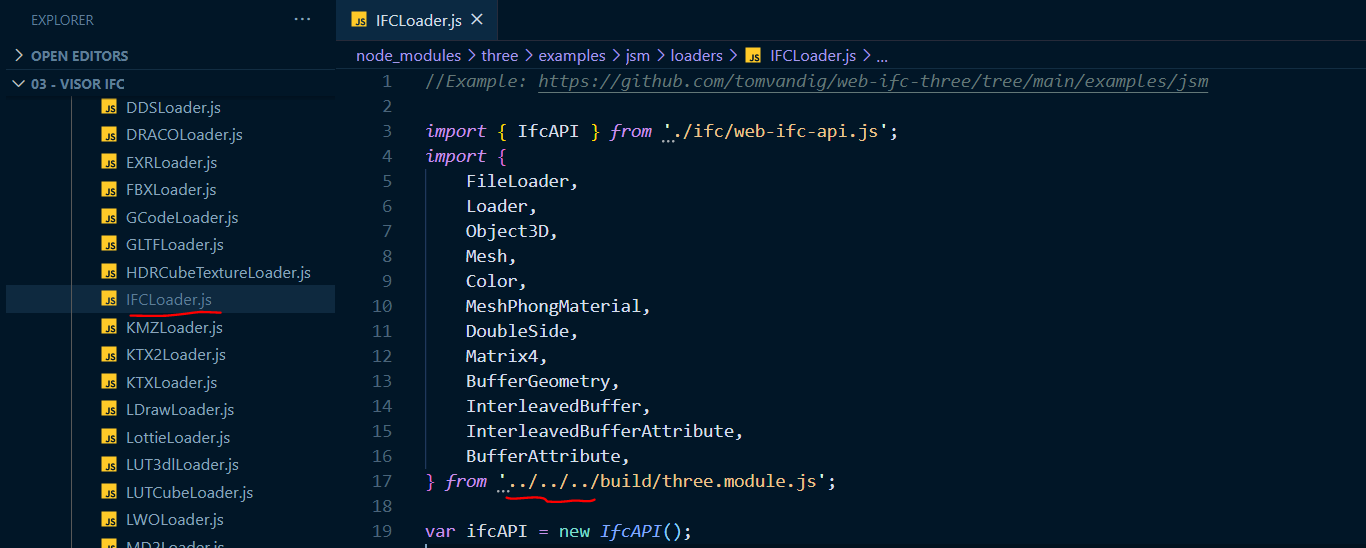
- The path to three.module.js in IFCLoader.js is incorrect (there is an additional "../").
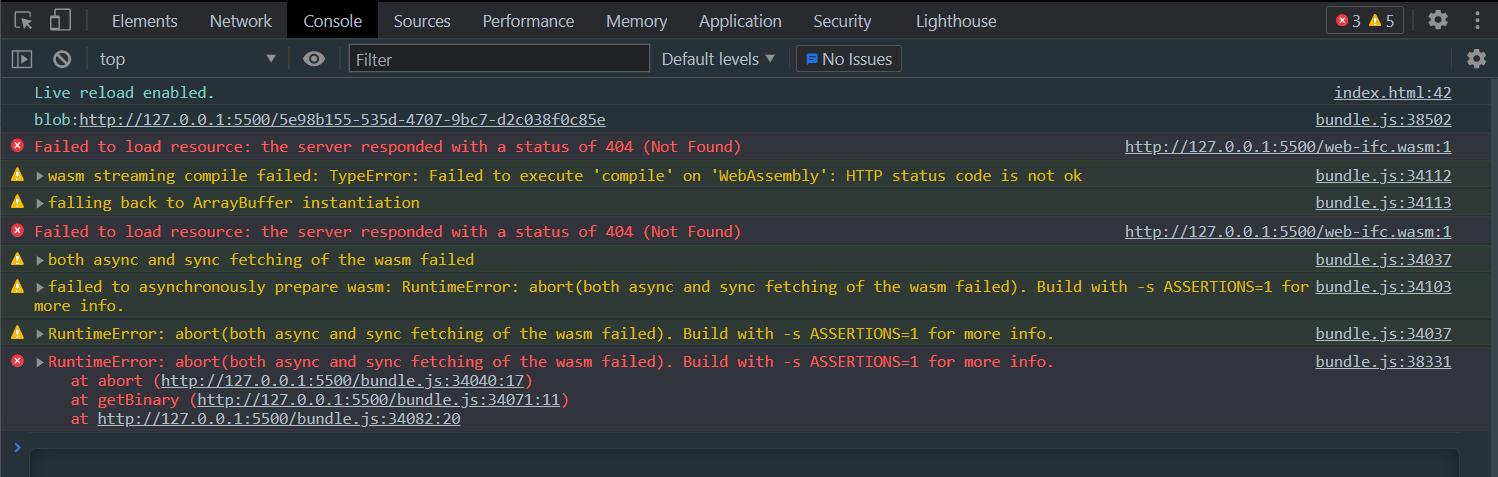
- The path to the WASM file is incorrect, so it is not able to load it when starting the application.
I've suggested a solution to both errors below.
To Reproduce
Steps to reproduce the behavior:
- Start a new empty project.
- Install three with
npm i three. - Create a minimal scene to load an IFC as shown below.
Code
import {
  AmbientLight,
  AxesHelper,
  Color,
  DirectionalLight,
  GridHelper,
  PerspectiveCamera,
  Scene,
  WebGLRenderer,
} from "three";
import { OrbitControls } from "three/examples/jsm/controls/OrbitControls";
import { IFCLoader } from "three/examples/jsm/loaders/IFCLoader";

const scene = new Scene();
scene.background = new Color(0xaaaaaa);

const size = {
  width: window.innerWidth,
  height: window.innerHeight,
};

const camera = new PerspectiveCamera(75, size.width / size.height);
camera.position.z = 3;
camera.position.y = 3;
camera.position.x = 3;

const lightColor = 0xffffff;

const ambientLight = new AmbientLight(lightColor, 0.5);
scene.add(ambientLight);

const directionalLight = new DirectionalLight(lightColor, 1);
directionalLight.position.set(0, 10, 0);
directionalLight.target.position.set(-5, 0, 0);
scene.add(directionalLight);
scene.add(directionalLight.target);

const threeCanvas = document.getElementById("three-canvas");
const renderer = new WebGLRenderer({ canvas: threeCanvas });
renderer.setSize(size.width, size.height);
renderer.setPixelRatio(Math.min(window.devicePixelRatio, 2));

const grid = new GridHelper(50, 30);
scene.add(grid);

const axes = new AxesHelper();
axes.material.depthTest = false;
axes.renderOrder = 1;
scene.add(axes);


const controls = new OrbitControls(camera, threeCanvas);
controls.enableDamping = true;

const animate = () => {
  controls.update();
  renderer.render(scene, camera);
  requestAnimationFrame(animate);
};

animate();

window.addEventListener("resize", () => {
  (size.width = window.innerWidth), (size.height = window.innerHeight);
  camera.aspect = size.width / size.height;
  camera.updateProjectionMatrix();
  renderer.setSize(size.width, size.height);
});

const ifcLoader = new IFCLoader();

const input = document.getElementById("file-input");
input.addEventListener(
  "change",
  (changed) => {
    var ifcURL = URL.createObjectURL(changed.target.files[0]);
    console.log(ifcURL);
    ifcLoader.load(ifcURL, (geometry) => scene.add(geometry));
  },
  false
);
Live example
Expected behavior
The Loader should load the IFC and add it to the scene.
Screenshots
The first error avoids bundling the project:

Once I change the route directly in IFCLoader.js removing the additional ../, this first error is solved:

But now the console says that the WASM file can't be found:
I managed to solve this changing the route to the WASM in web-ifc-api.js:

This way, both errors get solved.
I have just checked and it looks like in the dev branch the route to three.module.js is correct. I don't understand why it's incorrect in the deployed version.
As for the second error, we can open a PR to correct it.
Platform:
- Browser: [Chrome]