Releases: junegunn/fzf
Releases · junegunn/fzf
0.61.3


0.61.2
- Fixed panic when using header border without pointer/marker (@phanen)
- Fixed
--tmuxoption when already inside a tmux popup (@peikk0) - Bug fixes and improvements in CTRL-T binding of fish (#4334) (@bitraid)
- Added
--no-tty-defaultoption to make fzf search for the current TTY device instead of defaulting to/dev/tty(#4242)
Contributors


peikk0, bitraid, and phanen
Assets 20
0.61.1
- Disable bracketed-paste mode on exit. This fixes issue where pasting breaks after running fzf on old bash versions that don't support the mode.
0.61.0
- Added
--ghost=TEXTto display a ghost text when the input is empty# Display "Type to search" when the input is empty fzf --ghost "Type to search"
- Added
change-ghostandtransform-ghostactions for dynamically changing the ghost text - Added
change-pointerandtransform-pointeractions for dynamically changing the pointer sign - Added
rflag for placeholder expression (raw mode) for unquoted output - Bug fixes and improvements
0.60.3
- Bug fixes and improvements
- [fish] Enable multiple history commands insertion (#4280) (@bitraid)
- [walker] Append '/' to directory entries on MSYS2 (#4281)
- Trim trailing whitespaces after processing ANSI sequences (#4282)
- Remove temp files before
becomewhen using--tmuxoption (#4283) - Fix condition for using item numlines cache (#4285) (@alex-huff)
- Make
--accept-nthcompatible with--select-1(#4287) - Increase the query length limit from 300 to 1000 (#4292)
- [windows] Prevent fzf from consuming user input while paused (#4260)
Contributors

bitraid and alex-huff
Assets 20
0.60.2
- Template for
--with-nthand--accept-nthnow supports{n}which evaluates to the zero-based ordinal index of the item - Fixed a regression that caused the last field in the "nth" expression to be trimmed when a regular expression delimiter is used
- Thanks to @phanen for the fix
- Fixed 'jump' action when the pointer is an empty string
Contributors
phanen
Assets 20
0.60.1
- Bug fixes and minor improvements
- Built-in walker now prints directory entries with a trailing slash
- Fixed a bug causing unexpected behavior with fzf-tab. Please upgrade if you use it.
- Thanks to @alexeisersun, @bitraid, @Lompik, and @fsc0 for the contributions
Contributors


Lompik, bitraid, and 2 other contributors
Assets 20
0.60.0
Release highlights: https://junegunn.github.io/fzf/releases/0.60.0/
- Added
--accept-nthfor choosing output fieldsps -ef | fzf --multi --header-lines 1 | awk '{print $2}' # Becomes ps -ef | fzf --multi --header-lines 1 --accept-nth 2 git branch | fzf | cut -c3- # Can be rewritten as git branch | fzf --accept-nth -1
--accept-nthand--with-nthnow support a template that includes multiple field index expressions in curly bracesecho foo,bar,baz | fzf --delimiter , --accept-nth '{1}, {3}, {2}' # foo, baz, bar echo foo,bar,baz | fzf --delimiter , --with-nth '{1},{3},{2},{1..2}' # foo,baz,bar,foo,bar
- Added
excludeandexclude-multiactions for dynamically excluding itemsseq 100 | fzf --bind 'ctrl-x:exclude' # 'exclude-multi' will exclude the selected items or the current item seq 100 | fzf --multi --bind 'ctrl-x:exclude-multi'
- Preview window now prints wrap indicator when wrapping is enabled
seq 100 | xargs | fzf --wrap --preview 'echo {}' --preview-window wrap
- Bug fixes and improvements
0.59.0
Release highlights: https://junegunn.github.io/fzf/releases/0.59.0/
- Prioritizing file name matches (#4192)
- Added a new tiebreak option
pathnamefor prioritizing file name matches --scheme=pathnow sets--tiebreak=pathname,length- fzf will automatically choose
pathscheme- when the input is a TTY device, where fzf would start its built-in walker or run
$FZF_DEFAULT_COMMANDwhich is usually a command for listing files, - but not when
reloadortransformaction is bound tostartevent, because in that case, fzf can't be sure of the input type.
- when the input is a TTY device, where fzf would start its built-in walker or run
- Added a new tiebreak option
- Added
--header-lines-borderto display header from--header-lineswith a separate border# Use --header-lines-border to separate two headers ps -ef | fzf --style full --layout reverse --header-lines 1 \ --bind 'ctrl-r:reload(ps -ef)' --header 'Press CTRL-R to reload' \ --header-lines-border bottom --no-list-border
click-headerevent now sets$FZF_CLICK_HEADER_WORDand$FZF_CLICK_HEADER_NTH. You can use them to implement a clickable header for changing the search scope using the newtransform-nthaction.# Click on the header line to limit search scope ps -ef | fzf --style full --layout reverse --header-lines 1 \ --header-lines-border bottom --no-list-border \ --color fg:dim,nth:regular \ --bind 'click-header:transform-nth( echo $FZF_CLICK_HEADER_NTH )+transform-prompt( echo "$FZF_CLICK_HEADER_WORD> " )'
$FZF_KEYwas updated to expose the type of the click. e.g.click,ctrl-click, etc. You can use it to implement a more sophisticated behavior.killcompletion for bash and zsh were updated to use this feature
- Added
--no-inputoption to completely disable and hide the input section# Click header to trigger search fzf --header '[src] [test]' --no-input --layout reverse \ --header-border bottom --input-border \ --bind 'click-header:transform-search:echo ${FZF_CLICK_HEADER_WORD:1:-1}' # Vim-like mode switch fzf --layout reverse-list --no-input \ --bind 'j:down,k:up,/:show-input+unbind(j,k,/)' \ --bind 'enter,esc,ctrl-c:transform: if [[ $FZF_INPUT_STATE = enabled ]]; then echo "rebind(j,k,/)+hide-input" elif [[ $FZF_KEY = enter ]]; then echo accept else echo abort fi '
- You can later show the input section using
show-inputortoggle-inputaction, and hide it again usinghide-input, ortoggle-input.
- You can later show the input section using
- Extended
{q}placeholder to support ranges. e.g.{q:1},{q:2..}, etc. - Added
search(...)andtransform-search(...)action to trigger an fzf search with an arbitrary query string. This can be used to extend the search syntax of fzf. In the following example, fzf will use the first word of the query to trigger ripgrep search, and use the rest of the query to perform fzf search within the result.export TEMP=$(mktemp -u) trap 'rm -f "$TEMP"' EXIT TRANSFORMER=' rg_pat={q:1} # The first word is passed to ripgrep fzf_pat={q:2..} # The rest are passed to fzf if ! [[ -r "$TEMP" ]] || [[ $rg_pat != $(cat "$TEMP") ]]; then echo "$rg_pat" > "$TEMP" printf "reload:sleep 0.1; rg --column --line-number --no-heading --color=always --smart-case %q || true" "$rg_pat" fi echo "+search:$fzf_pat" ' fzf --ansi --disabled \ --with-shell 'bash -c' \ --bind "start,change:transform:$TRANSFORMER"
- You can now bind actions to multiple keys and events at once by writing a comma-separated list of keys and events before the colon
# Load 'ps -ef' output on start and reload it on CTRL-R
fzf --bind 'start,ctrl-r:reload:ps -ef'
--min-heightoption now takes a number followed by+, which tells fzf to show at least that many items in the list section. The default value is now changed to10+.# You will only see the input section which takes 3 lines fzf --style=full --height 1% --min-height 3 # You will see 3 items in the list section fzf --style full --height 1% --min-height 3+
- Shell integration scripts were updated to use
--min-height 20+by default
- Shell integration scripts were updated to use
--header-lineswill be displayed at the top inreverse-listlayout- Added
bellaction to ring the terminal bell# Press CTRL-Y to copy the current line to the clipboard and ring the bell fzf --bind 'ctrl-y:execute-silent(echo -n {} | pbcopy)+bell'
- Added
toggle-bindaction - Bug fixes and improvements
- Fixed fish script to support fish 3.1.2 or later (@bitraid)
Contributors
bitraid
Assets 20
0.58.0
Release highlights: https://junegunn.github.io/fzf/releases/0.58.0/
This version introduces three new border types, --list-border, --input-border, and --header-border, offering much greater flexibility for customizing the user interface.
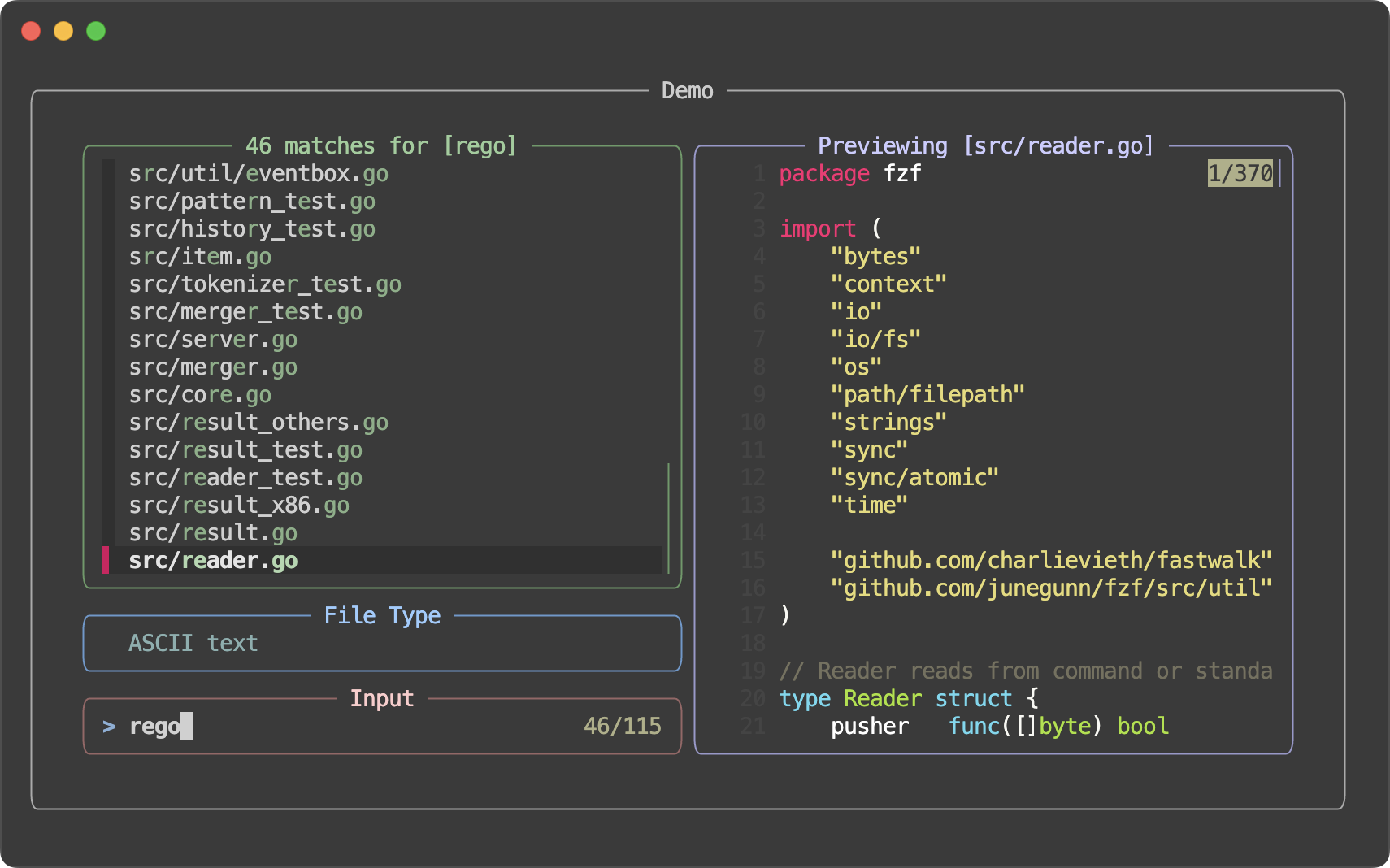
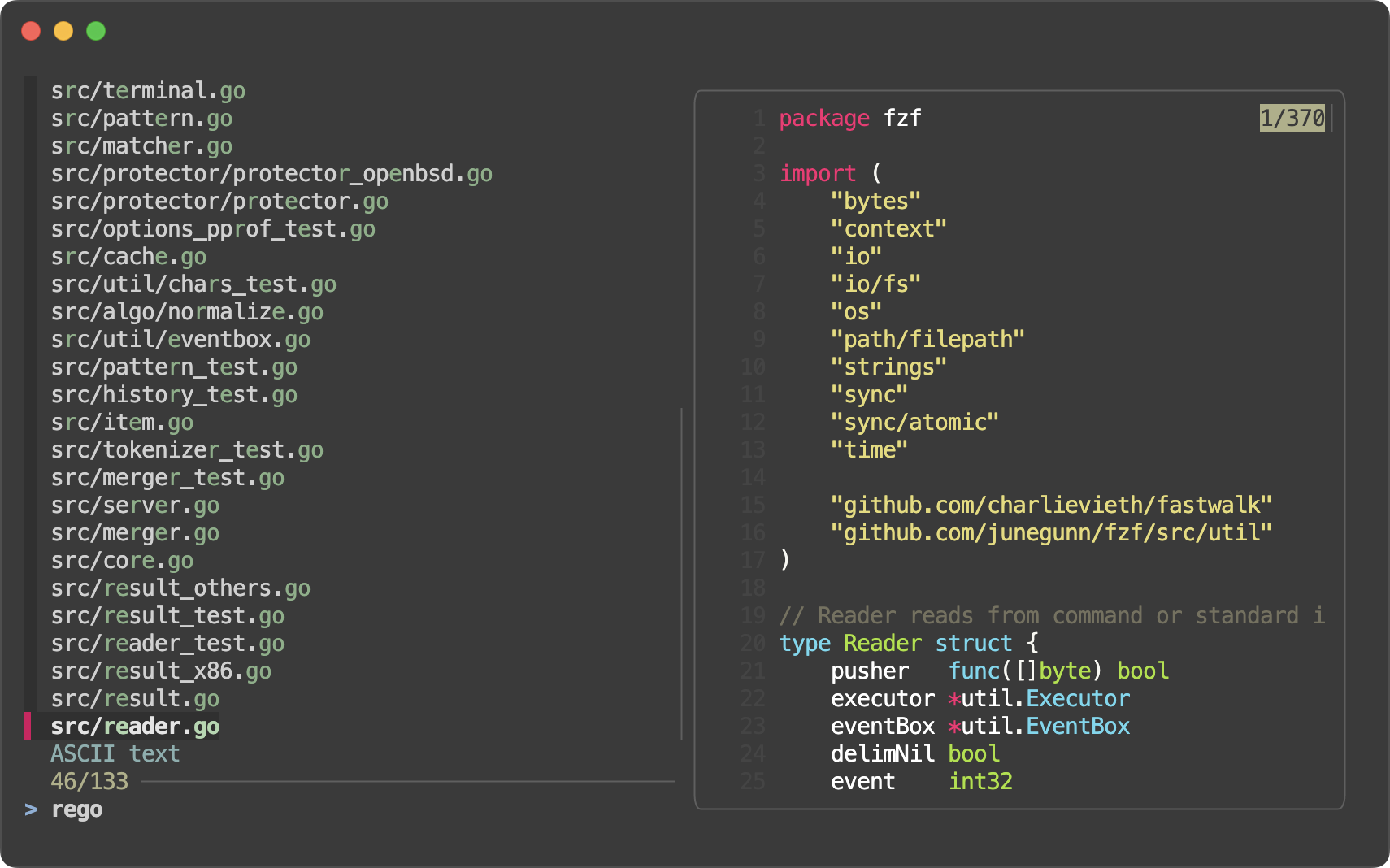
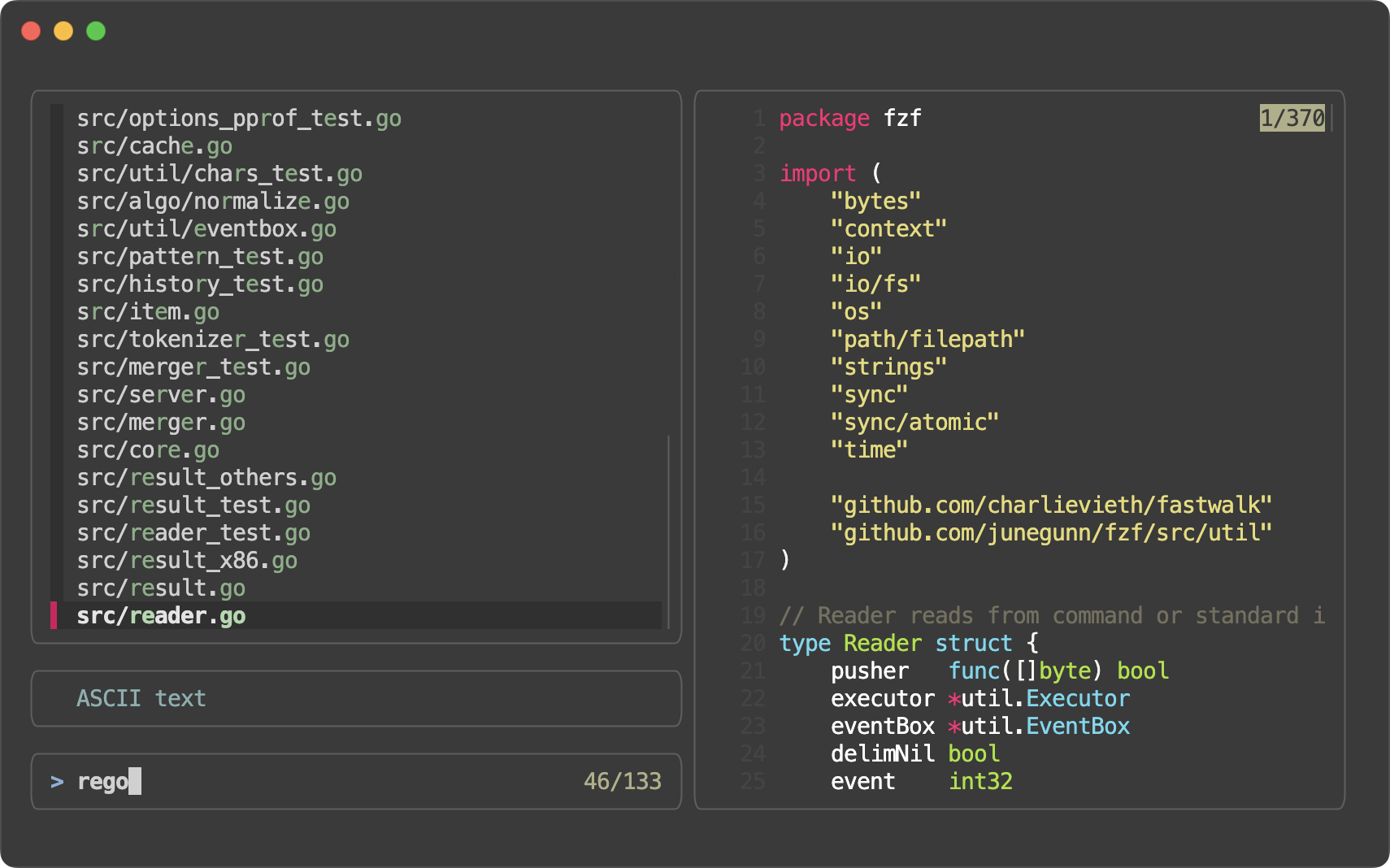
Also, fzf now offers "style presets" for quick customization, which can be activated using the --style option.
| Preset | Screenshot |
|---|---|
default |
 |
full |
 |
minimal |
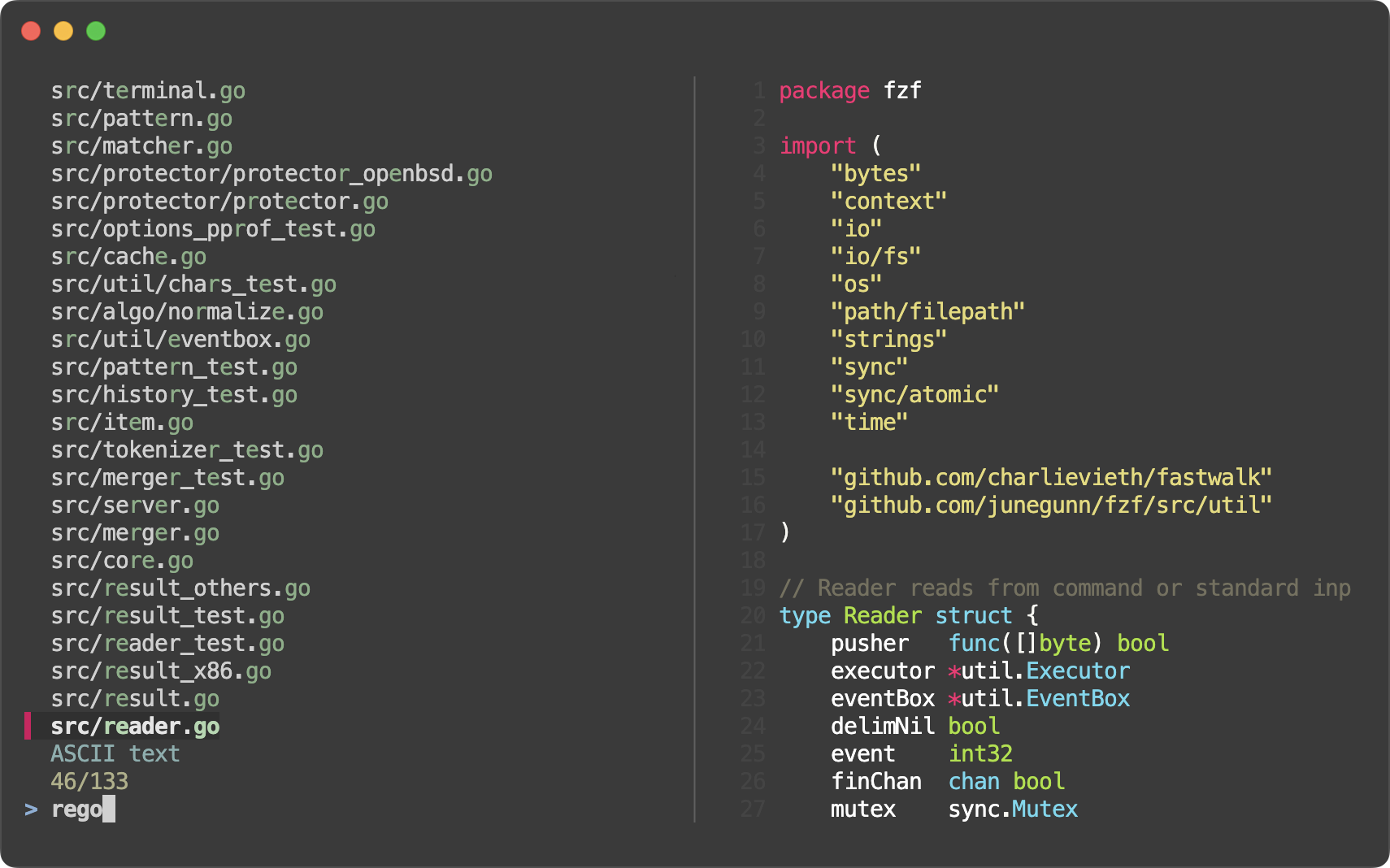 |
- Style presets (#4160)
--style=full[:BORDER_STYLE]--style=default--style=minimal
- Border and label for the list section (#4148)
- Options
--list-border[=STYLE]--list-label=LABEL--list-label-pos=COL[:bottom]
- Colors
list-fglist-bglist-borderlist-label
- Actions
change-list-labeltransform-list-label
- Options
- Border and label for the input section (prompt line and info line) (#4154)
- Options
--input-border[=STYLE]--input-label=LABEL--input-label-pos=COL[:bottom]
- Colors
input-fg(query)input-bginput-borderinput-label
- Actions
change-input-labeltransform-input-label
- Options
- Border and label for the header section (#4159)
- Options
--header-border[=STYLE]--header-label=LABEL--header-label-pos=COL[:bottom]
- Colors
header-fg(header)header-bgheader-borderheader-label
- Actions
change-header-labeltransform-header-label
- Options
- Added
--preview-border[=STYLE]as short for--preview-window=border[-STYLE] - Added new preview border style
linewhich draws a single separator line between the preview window and the rest of the interface - fzf will now render a dashed line (
┈┈) in each--gapfor better visual separation.# All bash/zsh functions, highlighted declare -f | perl -0 -pe 's/^}\n/}\0/gm' | bat --plain --language bash --color always | fzf --read0 --ansi --layout reverse --multi --highlight-line --gap

- You can customize the line using
--gap-line[=STR].
- You can customize the line using
- You can specify
border-nativeto--tmuxso that native tmux border is used instead of--border. This can be useful if you start a different program from inside the popup.fzf --tmux border-native --bind 'enter:execute:less {}' - Added
toggle-multi-lineaction - Added
toggle-hscrollaction - Added
change-nthaction for dynamically changing the value of the--nthoption# Start with --nth 1, then 2, then 3, then back to the default, 1 echo 'foo foobar foobarbaz' | fzf --bind 'space:change-nth(2|3|)' --nth 1 -q foo
--nthparts of each line can now be rendered in a different text style# nth in a different style ls -al | fzf --nth -1 --color nth:italic ls -al | fzf --nth -1 --color nth:reverse ls -al | fzf --nth -1 --color nth:reverse:bold # Dim the other parts ls -al | fzf --nth -1 --color nth:regular,fg:dim # With 'change-nth'. The current nth option is exported as $FZF_NTH. ps -ef | fzf --reverse --header-lines 1 --header-border bottom --input-border \ --color nth:regular,fg:dim \ --bind 'ctrl-n:change-nth(8..|1|2|3|4|5|6|7|)' \ --bind 'result:transform-prompt:echo "${FZF_NTH}> "'
- A single-character delimiter is now treated as a plain string delimiter rather than a regular expression delimiter, even if it's a regular expression meta-character.
- This means you can just write
--delimiter '|'instead of escaping it as--delimiter '\|'
- This means you can just write
- Bug fixes
- Bug fixes and improvements in fish scripts (thanks to @bitraid)

Contributors
bitraid