Sentinel
随着微服务的流行,服务和服务之间的稳定性变得越来越重要。 Sentinel 以流量为切入点,从流量控制、熔断降级、系统负载保护等多个维度保护服务的稳定性。
Sentinel 具有以下特征:
-
丰富的应用场景: Sentinel 承接了阿里巴巴近 10 年的双十一大促流量的核心场景,例如秒杀(即突发流量控制在系统容量可以承受的范围)、消息削峰填谷、实时熔断下游不可用应用等。
-
完备的实时监控: Sentinel 同时提供实时的监控功能。您可以在控制台中看到接入应用的单台机器秒级数据,甚至 500 台以下规模的集群的汇总运行情况。
-
广泛的开源生态: Sentinel 提供开箱即用的与其它开源框架/库的整合模块,例如与 Spring Cloud、Dubbo、gRPC 的整合。您只需要引入相应的依赖并进行简单的配置即可快速地接入 Sentinel。
-
完善的 SPI 扩展点: Sentinel 提供简单易用、完善的 SPI 扩展点。您可以通过实现扩展点,快速的定制逻辑。例如定制规则管理、适配数据源等。
如果要在您的项目中引入 Sentinel,使用 group ID 为 org.springframework.cloud 和 artifact ID 为 spring-cloud-starter-alibaba-sentinel 的 starter。
<dependency>
    <groupId>org.springframework.cloud</groupId>
    <artifactId>spring-cloud-starter-alibaba-sentinel</artifactId>
</dependency>
下面这个例子就是一个最简单的使用 Sentinel 的例子:
@SpringBootApplication
public class Application {

    public static void main(String[] args) {
        SpringApplication.run(ServiceApplication.class, args);
    }

}

@RestController
public class TestController {

    @GetMapping(value = "/hello")
    @SentinelResource("hello")
    public String hello() {
        return "Hello Sentinel";
    }

}
@SentinelResource 注解用来标识资源是否被限流、降级。上述例子上该注解的属性 'hello' 表示资源名。
@SentinelResource 还提供了其它额外的属性如 blockHandler,blockHandlerClass,fallback 用于表示限流或降级的操作,更多内容可以参考 Sentinel注解支持。
Sentinel 控制台提供一个轻量级的控制台,它提供机器发现、单机资源实时监控、集群资源汇总,以及规则管理的功能。您只需要对应用进行简单的配置,就可以使用这些功能。
注意: 集群资源汇总仅支持 500 台以下的应用集群,有大概 1 - 2 秒的延时。
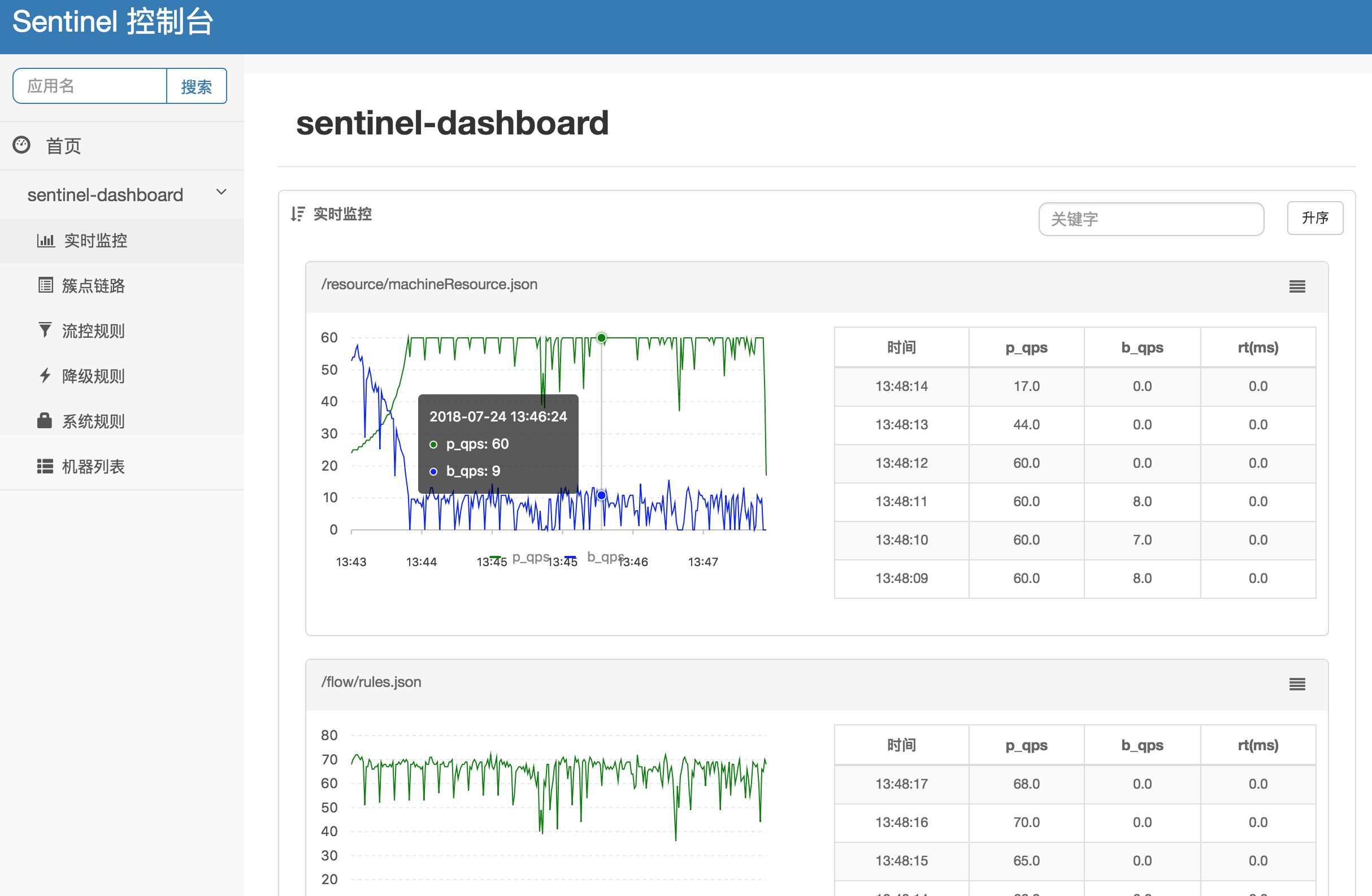
开启该功能需要3个步骤:
您可以从 release 页面 下载最新版本的控制台 jar 包。
您也可以从最新版本的源码自行构建 Sentinel 控制台:
-
下载 控制台 工程
-
使用以下命令将代码打包成一个 fat jar:
mvn clean package
spring:
  cloud:
    sentinel:
      transport:
        port: 8719
        dashboard: localhost:8080
这里的 spring.cloud.sentinel.transport.port 端口配置会在应用对应的机器上启动一个 Http Server,该 Server 会与 Sentinel 控制台做交互。比如 Sentinel 控制台添加了1个限流规则,会把规则数据 push 给这个 Http Server 接收,Http Server 再将规则注册到 Sentinel 中。
更多 Sentinel 控制台的使用及问题参考: Sentinel控制台
Sentinel 适配了 Feign 组件。如果想使用,除了引入 sentinel-starter 的依赖外还需要 2 个步骤:
-
配置文件打开 sentinel 对 feign 的支持:
feign.sentinel.enabled=true -
加入
feign starter依赖触发sentinel starter的配置类生效:<dependency> <groupId>org.springframework.cloud</groupId> <artifactId>spring-cloud-starter-openfeign</artifactId> </dependency>
这是一个 FeignClient 对应的接口:
@FeignClient(name = "service-provider", fallback = EchoServiceFallback.class, configuration = FeignConfiguration.class)
public interface EchoService {
    @RequestMapping(value = "/echo/{str}", method = RequestMethod.GET)
    String echo(@PathVariable("str") String str);
}

class FeignConfiguration {
    @Bean
    public EchoServiceFallback echoServiceFallback() {
        return new EchoServiceFallback();
    }
}

class EchoServiceFallback implements EchoService {
    @Override
    public String echo(@PathVariable("str") String str) {
        return "echo fallback";
    }
}|
Note
|
Feign 对应的接口中的资源名策略定义:httpmethod:protocol://requesturl |
EchoService 接口中方法 echo 对应的资源名为 GET:http://service-provider/echo/{str}。
请注意:@FeignClient 注解中的所有属性,Sentinel 都做了兼容。
Spring Cloud Alibaba Sentinel 支持对 RestTemplate 的服务调用使用 Sentinel 进行保护,在构造 RestTemplate bean的时候需要加上 @SentinelRestTemplate 注解。
@Bean
@SentinelRestTemplate(blockHandler = "handleException", blockHandlerClass = ExceptionUtil.class)
public RestTemplate restTemplate() {
    return new RestTemplate();
}
@SentinelRestTemplate 注解的参数支持限流(blockHandler, blockHandlerClass)和降级(fallback, fallbackClass)的处理。
其中 blockHandler 或 fallback 对应的方法必须是对应 blockHandlerClass 或 fallbackClass 中的静态方法。
该对应的方法参数跟 ClientHttpRequestInterceptor 接口中的参数一致,并多出了一个 BlockException 参数,且返回值是 ClientHttpResponse。
比如上述 ExceptionUtil 的 handleException 方法对应的声明如下:
public class ExceptionUtil {
    public static ClientHttpResponse handleException(HttpRequest request, byte[] body, ClientHttpRequestExecution execution, BlockException exception) {
        ...
    }
}
@SentinelRestTemplate 注解的限流(blockHandler, blockHandlerClass)和降级(fallback, fallbackClass)不强制填写,当被 Sentinel 熔断后,会返回 RestTemplate request block by sentinel 信息,或者也可以填写对应的方法自行处理。
Sentinel RestTemplate 限流的资源规则提供两种粒度:
-
schema://host:port/path:协议、主机、端口和路径 -
schema://host:port:协议、主机和端口
|
Note
|
以 https://www.taobao.com/test 这个 url 为例。对应的资源名有两种粒度,分别是 https://www.taobao.com:80 以及 https://www.taobao.com:80/test
|
需要3个步骤才可完成数据源的配置:
-
配置文件中定义数据源信息。比如使用文件:
spring.cloud.sentinel.datasource.type=file
spring.cloud.sentinel.datasource.recommendRefreshMs=3000
spring.cloud.sentinel.datasource.bufSize=4056196
spring.cloud.sentinel.datasource.charset=utf-8
spring.cloud.sentinel.datasource.converter=flowConverter
spring.cloud.sentinel.datasource.file=/Users/you/yourrule.json
-
创建一个 Converter 类实现
com.alibaba.csp.sentinel.datasource.Converter接口,并且需要在ApplicationContext中有该类的一个 Bean
@Component("flowConverter")
public class JsonFlowRuleListParser implements Converter<String, List<FlowRule>> {
	@Override
	public List<FlowRule> convert(String source) {
		return JSON.parseObject(source, new TypeReference<List<FlowRule>>() {
		});
	}
}
这个 Converter 的 bean name 需要跟 application.properties 配置文件中的 converter 配置一致
-
在任意一个 Spring Bean 中定义一个被
@SentinelDataSource注解修饰的ReadableDataSource属性
@SentinelDataSource("spring.cloud.sentinel.datasource")
private ReadableDataSource dataSource;
@SentinelDataSource 注解的 value 属性表示数据源在 application.properties 配置文件中前缀。 该在例子中,前缀为 spring.cloud.sentinel.datasource 。
如果 ApplicationContext 中存在超过1个 ReadableDataSource bean,那么不会加载这些 ReadableDataSource 中的任意一个。 只有在 ApplicationContext 存在一个 ReadableDataSource 的情况下才会生效。
如果数据源生效并且规则成功加载,控制台会打印类似如下信息:
[Sentinel Starter] load 3 flow rules只需要1个步骤就可完成数据源的配置:
-
直接在
application.properties配置文件中配置数据源信息即可
比如配置了4个数据源:
spring.cloud.sentinel.datasource.ds1.file.file=classpath: degraderule.json

spring.cloud.sentinel.datasource.ds2.nacos.server-addr=localhost:8848
spring.cloud.sentinel.datasource.ds2.nacos.dataId=sentinel
spring.cloud.sentinel.datasource.ds2.nacos.groupId=DEFAULT_GROUP
spring.cloud.sentinel.datasource.ds2.nacos.data-type=json

spring.cloud.sentinel.datasource.ds3.zk.path = /Sentinel-Demo/SYSTEM-CODE-DEMO-FLOW
spring.cloud.sentinel.datasource.ds3.zk.server-addr = localhost:2181

spring.cloud.sentinel.datasource.ds4.apollo.namespace-name = application
spring.cloud.sentinel.datasource.ds4.apollo.flow-rules-key = sentinel
spring.cloud.sentinel.datasource.ds4.apollo.default-flow-rule-value = test
这样配置方式参考了 Spring Cloud Stream Binder 的配置,内部使用了 TreeMap 进行存储,comparator 为 String.CASE_INSENSITIVE_ORDER 。
|
Note
|
d1, ds2, ds3, ds4 是 ReadableDataSource 的名字,可随意编写。后面的 file ,zk ,nacos , apollo 就是对应具体的数据源。 它们后面的配置就是这些数据源各自的配置。
|
每种数据源都有两个共同的配置项: data-type 和 converter-class 。
data-type 配置项表示 Converter,Spring Cloud Alibaba Sentinel 默认提供两种内置的值,分别是 json 和 xml (不填默认是json)。 如果不想使用内置的 json 或 xml 这两种 Converter,可以填写 custom 表示自定义 Converter,然后再配置 converter-class 配置项,该配置项需要写类的全路径名。
这两种内置的 Converter 只支持解析 json 数组 或 xml 数组。内部解析的时候会自动判断每个 json 对象或xml对象属于哪4种 Sentinel 规则(FlowRule,DegradeRule,SystemRule,AuthorityRule)。
比如10个规则数组里解析出5个限流规则和5个降级规则。 这种情况下该数据源不会注册,日志里页会进行警告。
如果10个规则里有9个限流规则,1个解析报错了。这种情况下日志会警告有个规则格式错误,另外9个限流规则会注册上去。
这里 json 或 xml 解析用的是 jackson。ObjectMapper 或 XmlMapper 使用默认的配置,遇到不认识的字段会解析报错。 因为不这样做的话限流 json 也会解析成 系统规则(系统规则所有的配置都有默认值),所以需要这样严格解析。
当然还有一种情况是 json 对象或 xml 对象可能会匹配上所有4种规则(比如json对象里只配了 resource 字段,那么会匹配上4种规则),这种情况下日志里会警告,并且过滤掉这个对象。
用户使用这种配置的时候只需要填写正确的json或xml就行,有任何不合理的信息都会在日志里打印出来。
如果数据源生效并且规则成功加载,控制台会打印类似如下信息:
[Sentinel Starter] DataSource ds1-sentinel-file-datasource load 3 DegradeRule
[Sentinel Starter] DataSource ds2-sentinel-nacos-datasource load 2 FlowRule|
Note
|
默认情况下,xml 格式是不支持的。需要添加 jackson-dataformat-xml 依赖后才会自动生效。
|
关于 Sentinel 动态数据源的实现原理,参考: 动态规则扩展
在使用 Endpoint 特性之前需要在 Maven 中添加 spring-boot-starter-actuator 依赖,并在配置中允许 Endpoints 的访问。
-
Spring Boot 1.x 中添加配置
management.security.enabled=false。暴露的 endpoint 路径为/sentinel -
Spring Boot 2.x 中添加配置
management.endpoints.web.exposure.include=*。暴露的 endpoint 路径为/actuator/sentinel
下表显示当应用的 ApplicationContext 中存在对应的Bean的类型时,会进行的一些操作:
| 存在Bean的类型 | 操作 | 作用 |
|---|---|---|
|
|
资源清理(资源(比如将满足 /foo/:id 的 URL 都归到 /foo/* 资源下)) |
|
|
自定义限流处理逻辑 |
下表显示 Spring Cloud Alibaba Sentinel 的所有配置信息:
| 配置项 | 含义 | 默认值 |
|---|---|---|
|
Sentinel自动化配置是否生效 |
true |
|
取消Sentinel控制台懒加载 |
false |
|
应用与Sentinel控制台交互的端口,应用本地会起一个该端口占用的HttpServer |
8721 |
|
Sentinel 控制台地址 |
|
|
应用与Sentinel控制台的心跳间隔时间 |
|
|
Servlet Filter的加载顺序。Starter内部会构造这个filter |
Integer.MIN_VALUE |
|
数据类型是数组。表示Servlet Filter的url pattern集合 |
/* |
|
metric文件字符集 |
UTF-8 |
|
Sentinel metric 单个文件的大小 |
|
|
Sentinel metric 总文件数量 |
|
|
Sentinel 日志文件所在的目录 |
|
|
Sentinel 日志文件名是否需要带上pid |
false |
|
自定义的跳转 URL,当请求被限流时会自动跳转至设定好的 URL |
|
|
3 |